
The FormView control is the control (.NET 2), that displays the values of s single record and allows us to edit, delete and insert data. We can customize the FormView control by adding templates, that allow to modify the displayed data. Of course, we can use all kind of validators (RequiredFieldValidator, RangeValidator, etc) to validate edited (and/or inserted) data. In this case we use validation not to validate our business object “as a whole”, but just use separate validator (for example, RequiredFieldValidator) for separate control (for example, TextBox). Now, let’s suppose that we are very “obedient” programmers and try to use OOP and three-layer data access model as far as we can. This is: there are at least four projects in our solution: BO (Business Object) project, DAL (Data Access Layer) project, BL (Business Logic) project, and project with all our forms and additional classes . If our solution named FH (for example, “First Hand”), we will get something like this:
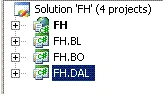
Figure 1.
Now, let’s suppose, that we execute all our data access by means of typed DataSets, which, of course are in the FH.DAL project. All our business processes we have to “execute” in the FH.BL project. In the FH project we only modify and display our business object. Of course, using validators in FH project, we “leave” our model. In fact, we “bypass past” our FH.BL and just validate only (as we have said before) separate property of some control (for example, Text property of some TextBox), without any connection with our business object (may be only holding in memory, that, for example, the FirstName of our object must be between 1 and 50 characters). Using the Enterprise Library 3 Validation Block we are not be “beyond” our business model. We can create a validator with some rules, run it to validate our BO, for example, directly in the BL project and then, depending on result, return some message to the FH or transfer data to the DAL. And so on. In this article I will show how you can use the Enterprise Library 3 Validation Application Block (VAB) to validate data, edited with the help of the FormView control. The examples are written using C#.
Let’s name “FormView with the Validation Application Block” as FVVAB. We can implement FVVAB by two ways. The first one is using the PropertyProxyValidator in the FH project and the second way is just addition of some code into the FH.BL project.
The first way. Using the PropertyProxyValidator for FVVAB.
Let’s suppose, that we have some BO Person to validate. The Person object has the following properties : PersonID (type of the string), FirstName (string), LastName (string), DateBirth (DateTime), DateUpdate (DateTime), Comments (string). Our class will look like this (don’t pay attention to the comments: this is ”green code”; we will discuss that later):
using System;
using System.Collections.Generic;
using System.Text;
//using Microsoft.Practices.EnterpriseLibrary.Validation;
//using Microsoft.Practices.EnterpriseLibrary.Validation.Validators;
namespace FH.BO
{
//[HasSelfValidation]
public class Person
{
#region "ForClass"
private string personID;
private string firstName;
private string lastName;
private DateTime? dateBirth;
private string comments;
private DateTime? dateUpdate;
#endregion
public string PersonID
{
get { return personID; }
set { personID = value; }
}
public string FirstName
{
get { return firstName; }
set { firstName = value; }
}
public string LastName
{
get { return lastName; }
set { lastName = value; }
}
public DateTime? DateBirth
{
get { return dateBirth; }
set { dateBirth = value; }
}
public DateTime? DateUpdate
{
get { return dateUpdate; }
set { dateUpdate = value; }
}
public string Comments
{
get { return comments; }
set { comments = value; }
}
//[SelfValidation(Ruleset = "rsPerson")]
//private void DoValidate(ValidationResults results)
//{
// if (dateBirth.Equals(DateTime.Parse("12/12/2000")))
// {
// if (!firstName.Equals("Michael"))
// {
// ValidationResult resultMic = new ValidationResult
// ("Must be only Michael", this,
// "FirstName", null, null);
// results.AddResult(resultMic);
// }
// }
//}
}
}
Certainly, you should add some additional references:
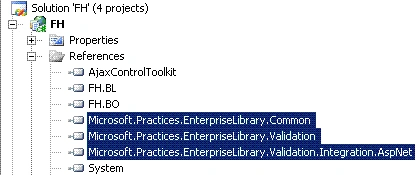
Figure 2.
Now, add the Validation Application Block to your Web.config and add new Type “Person” (see fig. 3, fig. 4).
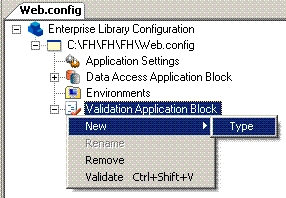
Figure 3.
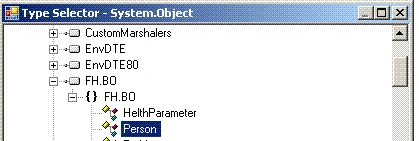
Figure 4.
To the type Person add new rule set (named, for example, “rsPerson”) and choose members that you want to validate, for example, FirstName, LastName, etc (fig 5., fig. 6).
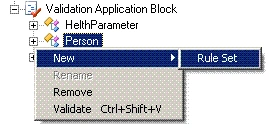
Figure 5.
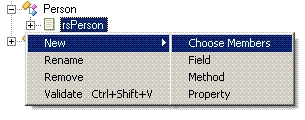
Figure 6.
Now, just add a validator, that you need, and set properties of this validator (fig. 7). For example, to set the validator’s message I use such property as MessageTemplateResourceName and MessageTemplateResourceTypeName (for this I use the Resources File “ErrorMessages”, which is in the FH.BO project), but not simplely the MessageTemplate property:
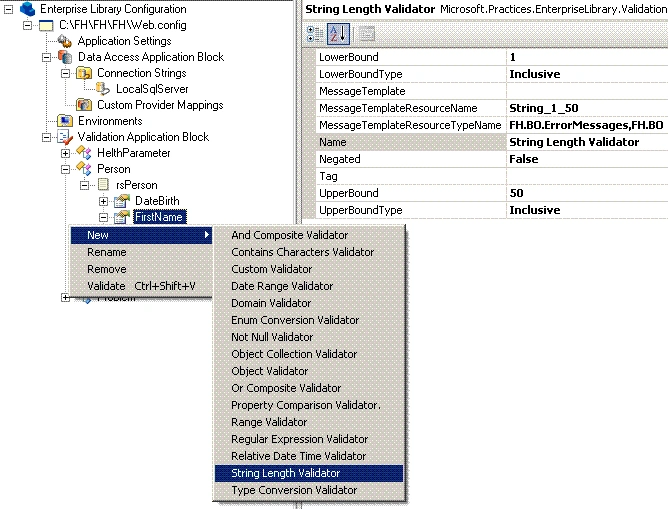
Figure 7.
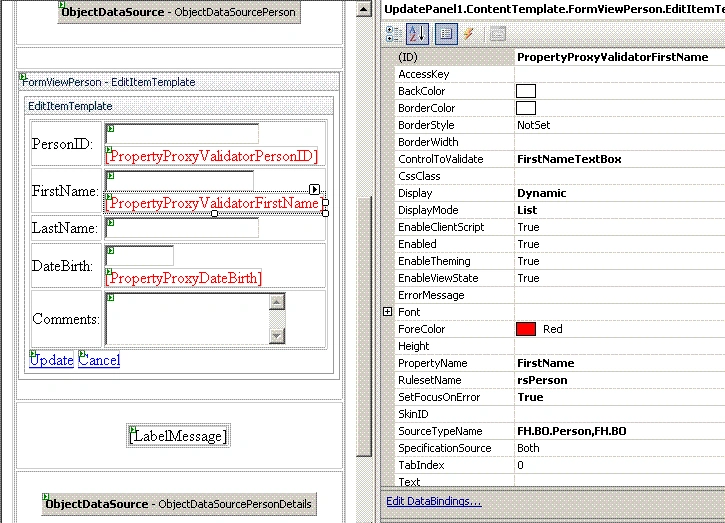
OK, in fact we have finished to build “basis” to validate our business object Person. Now we are ready to use the Proxy Validator with a FormView.
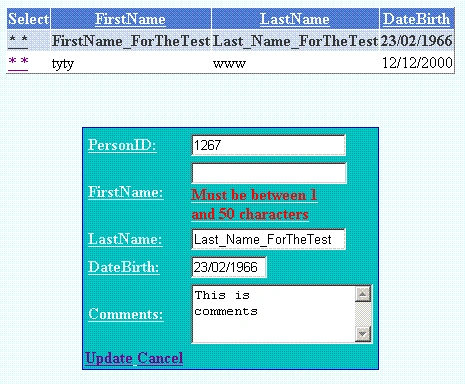
Suppose, you have on some web form (or user control) such controls as : GridViewPerson (to display all our persons), ObjectDataSourcePerson, FormViewPerson (to display, edit, insert and delete the object Person ) and, of course, ObjectDataSourcePersonDetails. All works perfectly and you just need to add validation of the data (this is “update” case; “insert” case we will discuss later). Our update method in the PersonBL class is very simple and doesn't need any addition code for validation:
namespace FH.BL
{
[DataObject]
public static class PersonBL
{
[DataObjectMethod(DataObjectMethodType.Update, true)]
public static void UpdatePerson
(Person person, Person Original_Person)
{
string original_PersonID = Original_Person.PersonID;
PersonTableAdapter personAdapter =
new PersonTableAdapter();
personAdapter.Update(
person.PersonID, person.FirstName,
person.LastName, person.DateBirth,
person.Comments, DateTime.Today,
original_PersonID).ToString();
}

Join the conversation! Your thoughts help the community grow.