


Variables in Bicep are a crucial feature for enhancing the readability, maintainability, and flexibility of your Azure Resource Manager (ARM) templates. They allow you to store and reuse values, making your code more concise and easier to manage. In this guide, we’ll explore the various aspects of using variables in Bicep, including how to define them and use them in resource definitions, expressions, outputs, and configuration settings.
This is a new series of articles about ‘BiCep’ technology by Microsoft – it is a game changer for resource management in the cloud – well worth investigating if you are a cloud builder!
IMPORTANT!!!
(this one caught me out - be careful!) ... there is a limit of 256 variables per Bicep file., so don’t exceed this limit.
Defining Variables in Bicep
In Bicep, you can define variables using the ‘var‘ keyword followed by the variable name and its value. Here’s the syntax to define a variable in Bicep:
<variable-name> = <variable-value>
Example

Bicep infers the data type of the variable from its assigned value. This saves you time and effort by removing the need to explicitly declare the data type. For example, when setting a variable to a string value, you can use the following syntax:
var stringVar = ‘example value’
Using Variables in Resource Properties
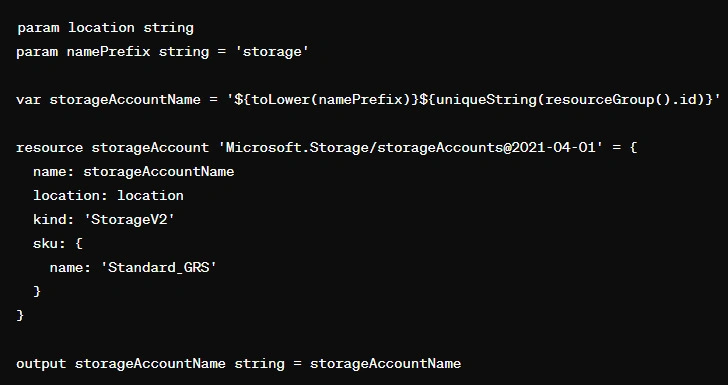
One of the key benefits of variables is their ability to be used within the properties of Azure resources defined in your Bicep file. By referencing variables in resource properties, you can dynamically set values based on your defined variables. For example, you can use a variable to set the name of a storage account or the location of a resource, enabling more flexibility in your Azure resource configurations.
Here is a simple example
Using Variables in Iterative Loops
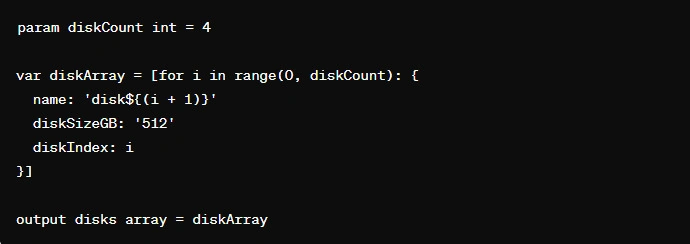
Variables can also be used within iterative loops in Bicep. This is useful when you need to create arrays of objects. Using the “for” keyword with the “range” function, you can iterate a specified number of times and define the properties of each object using the loop index. This enables you to generate arrays with consistent and predictable data structures.
For example, you can use iterative loops and variables in Bicep to create an array of data disks. Each object in the array can have properties such as disk name, disk size, and disk index, making it easy to manage and maintain the array’s data structure.

Join the conversation! Your thoughts help the community grow.