

In this article I would like to share with you how to use validation using JQuery in asp.net. JQuery plays a major role for any technology. It is simple to understand and easy to use. It can create impressive animations and interactions.
Now I am discussing about this article using the simple article.
First of all download uploaded file. In this application I am attaching three JQueries as follows:
jquery-1.3.2.js
jquery-latest.js
jquery.validate.js
Example:
<%@ Page Language="C#" AutoEventWireup="true" CodeFile="Default.aspx.cs" Inherits="_Default"
%>
<!DOCTYPE html PUBLIC "-//W3C//DTD XHTML 1.0 Transitional//EN" "http://www.w3.org/TR/xhtml1/DTD/xhtml1-transitional.dtd">
<html xmlns="http://www.w3.org/1999/xhtml">
<head runat="server">
<title>Validation Example using JQuery</title>
<link rel="stylesheet" href="ValidationStyle.css" type="text/css" />
<script type="text/javascript" src="script/jquery-1.3.2.js"></script>
<script type="text/javascript" src="script/jquery-latest.js"></script>
<script type="text/javascript" src="script/jquery.validate.js"></script>
<%--this javascriptis used to show the message after valid statement.--%>
<script type="text/javascript">
jQuery.validator.setDefaults({
debug: true,
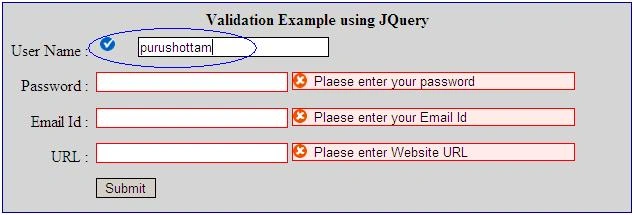
success: "valid"
}); ;
</script>
<%--write the following javascript for passing the parameter for jquery--%>
<script type="text/javascript">
$(document).ready(function() {
$("#form1").validate({
rules: {
<%=txtUserName.UniqueID
%>: {
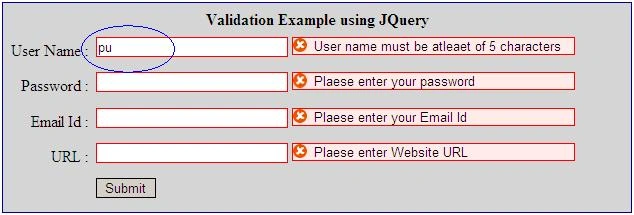
minlength: 5,
required: true
},
<%=txtPassword.UniqueID
%>: {
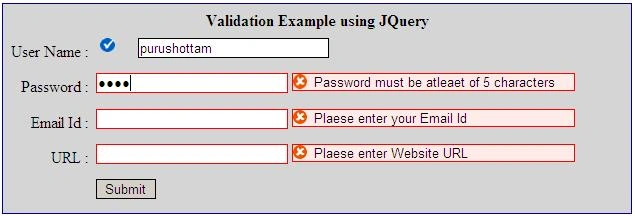
minlength: 5,
required: true
},
<%=txtEmail.UniqueID
%>: {
required: true
},
<%=txtURL.UniqueID
%>: {
required: true
}
}, messages: {
<%=txtUserName.UniqueID
%>:{
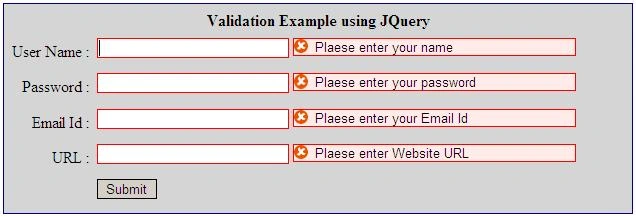
required: "Plaese enter your name",
minlength: "User name must be atleaet of 5 characters"
},
<%=txtPassword.UniqueID
%>:{
required: "Plaese enter your password",
minlength: "Password must be atleaet of 5 characters"
},
<%=txtEmail.UniqueID
%>:{
required: "Plaese enter your Email Id",
},
<%=txtURL.UniqueID
%>:{
required: "Plaese enter Website URL",
}
}
});
});
</script>
</head>
<body>
<form id="form1" runat="server">
<table width="50%" cellpadding="2" cellspacing="4" style="border: solid 1px navy;
background-color: #d5d5d5;">
<tr>
<td colspan="2" align="center">
<b>Validation Example using JQuery</b>
निलेश जांभुळकरPosted Jun 6, 2018, 3:00 AM
<script type="text/javascript"> jQuery.validator.setDefaults({ debug: true, success: "valid" }); ; </script>
charan rajPosted Sep 15, 2014, 3:05 AM
how to validate the dropdownlist using jquery in same method
charan rajPosted Sep 15, 2014, 3:04 AM
Hello sir,
Chirag KayasthaPosted Apr 29, 2014, 3:08 AM
hello sir i am new for jquery, so i want yo know how i use j query in content page in asp.net application
qamar shahzadPosted Sep 3, 2013, 4:36 AM
I have used this in my application and facing the same issue as mentioned by Ravikumar G.... Submit button is getting disabled after using this... I have found that problem is in jquery file which we append in page header.. but as I am novice to JQUERY so unable to find that bug.. Kindly guide if any one know's this solution.....
Ravikumar GPosted Jan 30, 2013, 12:25 AM
All the validations are working fine but when i click on submit button even i enter the correct data in the fields , the form is not submitting. Plz suggest me where I am wrong?... I'm beginner to JQuery.
Sapan SingheditedPosted Jan 25, 2013, 12:39 AMEdited Apr 8, 2013, 6:42 AM
Good Job
sankarprasathPosted Sep 1, 2012, 5:47 AM
i have used above zip file and run it in my VS2010 but validation parts are not working for me..
Buengkan ThaiBuengkanPosted Jun 13, 2012, 5:41 AM
good job
Manoranjan BeheraeditedPosted Apr 29, 2011, 8:34 AMEdited Apr 29, 2011, 8:35 AM
Can u give me javascript validation when we use TextBox validation then error message display in below of the TextBox
Manoranjan BeheraPosted Apr 29, 2011, 8:31 AM
that jQury part very well
christo kleynhansPosted Feb 16, 2011, 6:41 AM
Hello, great artical. I would like to know how you would check multiple textboxes for correct emails entered. The page is for sending emails, the user can send a email to multiple addresses. The problem is that there is only one textbox, the rest are created dynamically when the user clicks on a link "Add Recipient". So it is uncertian how many textboxes there will be. Each textbox created has an ID of: "txtBox" plus a integer number that is one more than the last. How would i validate these textboxes with jQuery?
kenny kennyPosted Feb 5, 2011, 1:08 AM
I am getting error on visual studio 2008 after inserting the code
Raj KumarPosted Jan 18, 2011, 11:01 PM
Good article. keep it up.