

Introduction
In this article, I will demonstrate how to use the Visual Studio feature Paste JSON as Classes or XML as Classes. This feature was introduced in Visual Studio 2013. This compelling feature will help the developer convert JSON to a C# class or XML to a C# class. Before this, developers used to find online tools to convert JSON/XML to C# classes, but after the introduction of this feature in Visual Studio, it became easy for developers to create classes from JSON/XML without writing a single line of code. I have observed that many developers are not aware of this feature available in Visual Studio.
How to use the Visual Studio feature Paste JSON as Classes or XML as Classes?
Let's prepare JSON sample data.
{
   "Users": [
      {
         "UserId": "483c3ac3f38e84297c002546",
         "Email": "[email protected]",
         "Name": "[email protected]",
         "NickName": "test",
         "LoginsCount": 15,
         "Created_At": "2016-11-28T14:10:11.338Z",
         "Updated_At": "2016-12-02T01:17:29.310Z",
         "Last_Login": "2016-12-02T01:17:29.310Z",
         "Email_Verified": true
      },
      {
         "UserId": "583c5484cb79a5fe593425a9",
         "Email": "[email protected]",
         "Name": "[email protected]",
         "NickName": "test1",
         "LoginsCount": 1,
         "Created_At": "2016-11-28T16:00:04.209Z",
         "Updated_At": "2016-11-28T16:00:47.203Z",
         "Last_Login": "2016-11-28T16:00:47.203Z",
         "Email_Verified": true
      },
      {
         "UserId": "483c5484cb79a5fe593425b9",
         "Email": "[email protected]",
         "Name": "[email protected]",
         "NickName": "test1",
         "LoginsCount": 1,
         "Created_At": "2016-11-28T16:00:04.209Z",
         "Updated_At": "2016-11-28T16:00:47.203Z",
         "Last_Login": "2016-11-28T16:00:47.203Z",
         "Email_Verified": false
      },
      {
         "UserId": "383c5484cb79a5fe593423bD",
         "Email": "[email protected]",
         "Name": "[email protected]",
         "NickName": "test1",
         "LoginsCount": 1,
         "Created_At": "2016-11-28T16:00:04.209Z",
         "Updated_At": "2016-11-28T16:00:47.203Z",
         "Last_Login": "2016-11-28T16:00:47.203Z",
         "Email_Verified": false
      }
   ]
}
Open Visual Studio 2022 > Edit > Paste special > paste JSON As classes.
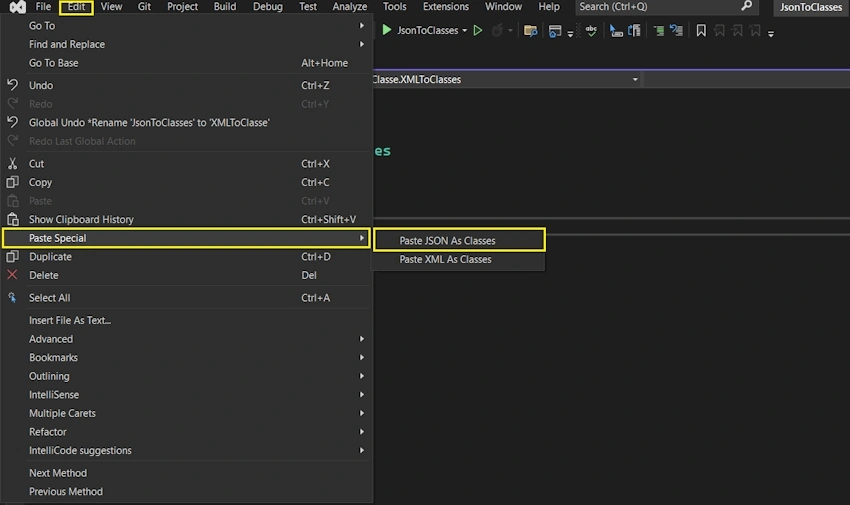
Once JSON is copied and use above option then Visual Studio will take care of class creation for json data.

Now let's take a real-time example of when this feature is useful for developers. Let's take an example: you are starting a new requirement for the API endpoint for GetEmployees, which will return a JSON response, and you need to create classes manually for your JSON response. In that case, we can leverage this feature of Visual Studio to create classes from the JSON response.
Let's take a dummy sample rest pai example using this endpoint: https://dummy.restapiexample.com/api/v1/employees, which returns a list of employees in JSON format as below.
{
  "status": "success",
  "data": [
    {
      "id": 1,
      "employee_name": "Tiger Nixon",
      "employee_salary": 320800,
      "employee_age": 61,
      "profile_image": ""
    },
    {
      "id": 2,
      "employee_name": "Garrett Winters",
      "employee_salary": 170750,
      "employee_age": 63,
      "profile_image": ""
    },
    {
      "id": 3,
      "employee_name": "Ashton Cox",
      "employee_salary": 86000,
      "employee_age": 66,
      "profile_image": ""
    },
    {
      "id": 4,
      "employee_name": "Cedric Kelly",
      "employee_salary": 433060,
      "employee_age": 22,
      "profile_image": ""
    },
    {
      "id": 5,
      "employee_name": "Airi Satou",
      "employee_salary": 162700,
      "employee_age": 33,
      "profile_image": ""
    },
    {
      "id": 6,
      "employee_name": "Brielle Williamson",
      "employee_salary": 372000,
      "employee_age": 61,
      "profile_image": ""
    },
    {
      "id": 7,
      "employee_name": "Herrod Chandler",
      "employee_salary": 137500,
      "employee_age": 59,
      "profile_image": ""
    },
    {
      "id": 8,
      "employee_name": "Rhona Davidson",
      "employee_salary": 327900,
      "employee_age": 55,
      "profile_image": ""
    },
    {
      "id": 9,
      "employee_name": "Colleen Hurst",
      "employee_salary": 205500,
      "employee_age": 39,
      "profile_image": ""
    },
    {
      "id": 10,
      "employee_name": "Sonya Frost",
      "employee_salary": 103600,
      "employee_age": 23,
      "profile_image": ""
    },
    {
      "id": 11,
      "employee_name": "Jena Gaines",
      "employee_salary": 90560,
      "employee_age": 30,
      "profile_image": ""
    },
    {
      "id": 12,
      "employee_name": "Quinn Flynn",
      "employee_salary": 342000,
      "employee_age": 22,
      "profile_image": ""
    },
    {
      "id": 13,
      "employee_name": "Charde Marshall",
      "employee_salary": 470600,
      "employee_age": 36,
      "profile_image": ""
    },
    {
      "id": 14,
      "employee_name": "Haley Kennedy",
      "employee_salary": 313500,
      "employee_age": 43,
      "profile_image": ""
    },
    {
      "id": 15,
      "employee_name": "Tatyana Fitzpatrick",
      "employee_salary": 385750,
      "employee_age": 19,
      "profile_image": ""
    },
    {
      "id": 16,
      "employee_name": "Michael Silva",
      "employee_salary": 198500,
      "employee_age": 66,
      "profile_image": ""
    },
    {
      "id": 17,
      "employee_name": "Paul Byrd",
      "employee_salary": 725000,
      "employee_age": 64,
      "profile_image": ""
    },
    {
      "id": 18,
      "employee_name": "Gloria Little",
      "employee_salary": 237500,
      "employee_age": 59,
      "profile_image": ""
    },
    {
      "id": 19,
      "employee_name": "Bradley Greer",
      "employee_salary": 132000,
      "employee_age": 41,
      "profile_image": ""
    },
    {
      "id": 20,
      "employee_name": "Dai Rios",
      "employee_salary": 217500,
      "employee_age": 35,
      "profile_image": ""
    },
    {
      "id": 21,
      "employee_name": "Jenette Caldwell",
      "employee_salary": 345000,
      "employee_age": 30,
      "profile_image": ""
    },
    {
      "id": 22,
      "employee_name": "Yuri Berry",
      "employee_salary": 675000,
      "employee_age": 40,
      "profile_image": ""
    },
    {
      "id": 23,
      "employee_name": "Caesar Vance",
      "employee_salary": 106450,
      "employee_age": 21,
      "profile_image": ""
    },
    {
      "id": 24,
      "employee_name": "Doris Wilder",
      "employee_salary": 85600,
      "employee_age": 23,
      "profile_image": ""
    }
  ],
  "message": "Successfully! All records has been fetched."
}
Now I will use the paste JSON as classes feature to generate classes from the above response object.
Create a class file with no content as below.

Now click on paste JSON as classes, which will generate classes for us.


Join the conversation! Your thoughts help the community grow.