

In this series of articles, we will discuss the major features of WCF:
A: Introduction
Through the paragraph above, Microsoft told us:
- Bindigs are Bridege or Connection between Programming Model and Channel Model
- Channel Model
- Factories
- Listeners
- Message Encoders
- Transport
- Protocol
We will discuss Bindings, actually, Channel Model in this article in the following order:
- Introduction
- Build App
- Build Service
- Build Host
- Build Clients
- Proxy Approach
- ChannelFactory Approach
- Run and Test the App
- Discussions
- Proxy vs. ChannelFactory
- Channel Stack
B: Build App --- Proxy vs. ChannelFactory
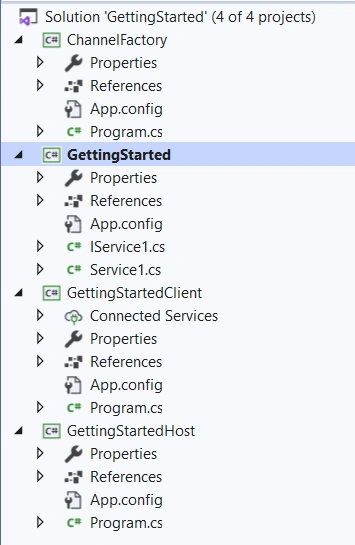
We will make a VS solution named as GettingStarted, with four projects, one WCF Service Library and three Console app (for details, see here):
- WCF Service Library, named GettingStarted, hold the Service Contract
- Console, named GettingStartedHost, hosting the service
- Console, named GettingStartedClient, as a client to consume the service
- Console, named ChannelFactory, as another client to implement ChannelFactory
1, Build Service
This is the Contract of the ABC of WCF Endpoints, we combine the two default classes in the WCF Service Library project into one, named as GettingStartedService.cs, including both the contracts (service contract and operation contract), and the implementations:
- using System.ServiceModel;
- using System;
- // Tutorial: Get started with Windows Communication Foundation applications
- // https://docs.microsoft.com/en-us/dotnet/framework/wcf/getting-started-tutorial
- namespace GettingStartedLib
- {
- [ServiceContract(Namespace = "http://Microsoft.ServiceModel.Samples")]
- public interface ICalculator
- {
- [OperationContract]
- double Add(double n1, double n2);
- }
- public class CalculatorService : ICalculator
- {
- public double Add(double n1, double n2)
- {
- double result = n1 + n2;
- Console.WriteLine("Received Add({0},{1})", n1, n2);
- // Code added to write output to the console window.
- Console.WriteLine("Return: {0}", result);
- return result;
- }
- }
- }
App.config will configure the Address, Binding and Contract of the ABC of WCF Endpoints:
- <services>
- <service name="GettingStartedLib.CalculatorService">
- <host>
- <baseAddresses>
- <add baseAddress = "http://localhost:8000/GettingStarted/CalculatorService" />
- </baseAddresses>
- </host>
- <endpoint address="" binding="wsHttpBinding" contract="GettingStartedLib.ICalculator">
- <identity>
- <dns value="localhost"/>
- </identity>
- </endpoint>
- <endpoint address="mex" binding="mexHttpBinding" contract="IMetadataExchange"/>
- </service>
- </services>
- service name: Contract name = "GettingStartedLib.CalculatorService"
- baseAddress: address = "http://localhost:8000/GettingStarted/CalculatorService"
- binding: binding = "wsHttpBinding"
2, Build Host
- using System;
- using System.ServiceModel;
- using System.ServiceModel.Description;
- using GettingStartedLib;
- namespace GettingStartedHost
- {
- class Program
- {
- static void Main(string[] args)
- {
- // Step 1: Create a URI to serve as the base address.
- Uri baseAddress = new Uri("http://localhost:8000/GettingStarted/");
- // Step 2: Create a ServiceHost instance.
- ServiceHost selfHost = new ServiceHost(typeof(CalculatorService), baseAddress);
- try
- {
- // Step 3: Add a service endpoint.
- selfHost.AddServiceEndpoint(typeof(ICalculator), new WSHttpBinding(), "CalculatorService");
- // Step 4: Enable metadata exchange.
- ServiceMetadataBehavior smb = new ServiceMetadataBehavior();
- smb.HttpGetEnabled = true;
- selfHost.Description.Behaviors.Add(smb);
- // Step 5: Start the service.
- selfHost.Open();
- Console.WriteLine("The service is ready.");
- // Close the ServiceHost to stop the service.
- Console.WriteLine("Press <Enter> to terminate the service.");
- Console.WriteLine();
- Console.ReadLine();
- selfHost.Close();
- }
- catch (CommunicationException ce)
- {
- Console.WriteLine("An exception occurred: {0}", ce.Message);
- selfHost.Abort();
- }
- }
- }
- }
3, Build Clients
There are two approaches for client, we will discuss separately:
1), Proxy Approach
-
In the Solution Explorer window, select the References folder under the GettingStartedClient project, and then select Add Service Reference from the shortcut menu.
-
In the Add Service Reference window, select Discover.The CalculatorService service starts and Visual Studio displays it in the Services box.
-
Select CalculatorService to expand it and display the service contracts implemented by the service. Leave the default Namespace and choose OK.
Visual Studio adds a new item under the Connected Services folder in the GettingStartedClient project.
App.Config
- <?xml version="1.0" encoding="utf-8" ?>
- <configuration>
- <startup>
- <supportedRuntime version="v4.0" sku=".NETFramework,Version=v4.8" />
- </startup>
- <system.serviceModel>
- <bindings>
- <wsHttpBinding>
- <binding name="WSHttpBinding_ICalculator" />
- </wsHttpBinding>
- </bindings>
- <client>
- <endpoint address="http://localhost:8000/GettingStarted/CalculatorService"
- binding="wsHttpBinding" bindingConfiguration="WSHttpBinding_ICalculator"
- contract="ServiceReference.ICalculator" name="WSHttpBinding_ICalculator">
- <identity>
- <dns value="localhost" />
- </identity>
- </endpoint>
- </client>
- </system.serviceModel>
- </configuration>
where,
The serviceModel part has been added that includes the AB, and the name of C of the endpoints. Click the Service Reference, we can see the proxy class that includes the contract, and some additional operations for managing the proxy life cycle and the connection to the service.
- //------------------------------------------------------------------------------
- // <auto-generated>
- // This code was generated by a tool.
- // Runtime Version:4.0.30319.42000
- //
- // Changes to this file may cause incorrect behavior and will be lost if
- // the code is regenerated.
- // </auto-generated>
- //------------------------------------------------------------------------------
- namespace GettingStartedClient.ServiceReference {
- [System.CodeDom.Compiler.GeneratedCodeAttribute("System.ServiceModel", "4.0.0.0")]
- [System.ServiceModel.ServiceContractAttribute(Namespace="http://Microsoft.ServiceModel.Samples", ConfigurationName="ServiceReference.ICalculator")]
- public interface ICalculator {
- [System.ServiceModel.OperationContractAttribute(Action="http://Microsoft.ServiceModel.Samples/ICalculator/Add", ReplyAction="http://Microsoft.ServiceModel.Samples/ICalculator/AddResponse")]
- double Add(double n1, double n2);
- [System.ServiceModel.OperationContractAttribute(Action="http://Microsoft.ServiceModel.Samples/ICalculator/Add", ReplyAction="http://Microsoft.ServiceModel.Samples/ICalculator/AddResponse")]
- System.Threading.Tasks.Task<double> AddAsync(double n1, double n2);
-
- [System.CodeDom.Compiler.GeneratedCodeAttribute("System.ServiceModel", "4.0.0.0")]
- public interface ICalculatorChannel : GettingStartedClient.ServiceReference.ICalculator, System.ServiceModel.IClientChannel {
- }
- [System.Diagnostics.DebuggerStepThroughAttribute()]
- [System.CodeDom.Compiler.GeneratedCodeAttribute("System.ServiceModel", "4.0.0.0")]
- public partial class CalculatorClient : System.ServiceModel.ClientBase<GettingStartedClient.ServiceReference.ICalculator>, GettingStartedClient.ServiceReference.ICalculator {
- public CalculatorClient() {
- }
- public CalculatorClient(string endpointConfigurationName) :
- base(endpointConfigurationName) {
- }
- public CalculatorClient(string endpointConfigurationName, string remoteAddress) :
- base(endpointConfigurationName, remoteAddress) {
- }
- public CalculatorClient(string endpointConfigurationName, System.ServiceModel.EndpointAddress remoteAddress) :
- base(endpointConfigurationName, remoteAddress) {
- }
- public CalculatorClient(System.ServiceModel.Channels.Binding binding, System.ServiceModel.EndpointAddress remoteAddress) :
- base(binding, remoteAddress) {
- }
- public double Add(double n1, double n2) {
- return base.Channel.Add(n1, n2);
- }
- public System.Threading.Tasks.Task<double> AddAsync(double n1, double n2) {
- return base.Channel.AddAsync(n1, n2);
- }
- }
- }
A ICalculatorChannel is created by the proxy class.
Then, finally, we have the client code in Program.cs, where using GettingStartedClient.ServiceReference, this is the reference for the proxy class; CalculatorClient class is created by Proxy:
- using System;
- using GettingStartedClient.ServiceReference;
- namespace GettingStartedClient
- {
- class Program
- {
- static void Main(string[] args)
- {
- //Step 1: Create an instance of the WCF proxy.
- CalculatorClient client = new CalculatorClient();
- // Step 2: Call the service operations.
- // Call the Add service operation.
- double value1 = 100.00D;
- double value2 = 15.99D;
- double result = client.Add(value1, value2);
- Console.WriteLine("Add({0},{1}) = {2}", value1, value2, result);
-
- // Step 3: Close the client to gracefully close the connection and clean up resources.
- Console.WriteLine("\nPress <Enter> to terminate the client.");
- Console.ReadLine();
- client.Close();
- }
- }
- }
2), ChannelFactory Approach
- using System;
- using System.ServiceModel;
- namespace GettingStartedClient
- {
- [ServiceContract(Namespace = "http://Microsoft.ServiceModel.Samples")]
- public interface ICalculator
- {
- [OperationContract]
- double Add(double n1, double n2);
- }
- class Program
- {
- static void Main(string[] args)
- {
- //Step 1: Create an instance of the WCF proxy.
- //CalculatorClient client = new CalculatorClient();
- // This code is written by an application developer.
- // Create a channel factory.
- WSHttpBinding myBinding = new WSHttpBinding();
- EndpointAddress myEndpoint = new EndpointAddress("http://localhost:8000/GettingStarted/CalculatorService");
- ChannelFactory<ICalculator> myChannelFactory = new ChannelFactory<ICalculator>(myBinding, myEndpoint);
- // Create a channel.
- ICalculator client = myChannelFactory.CreateChannel();
- // Step 2: Call the service operations.
- // Call the Add service operation.
- double value1 = 100.00D;
- double value2 = 15.99D;
- double result = client.Add(value1, value2);
- Console.WriteLine("Add({0},{1}) = {2}", value1, value2, result);
- // Step 3: Close the client to gracefully close the connection and clean up resources.
- Console.WriteLine("\nPress <Enter> to terminate the client.");
- Console.ReadLine();
- }
- }
- }
4, Run and Test the App
1), From Visual Studio
This approach is only working for the client built with proxy,
-
Open the solution with administrator right
-
Select the GettingStarted folder, and then select Set as Startup Project from the shortcut menu.
- From Startup Projects, select GettingStarted from the drop-down list, then select Run or press F5.
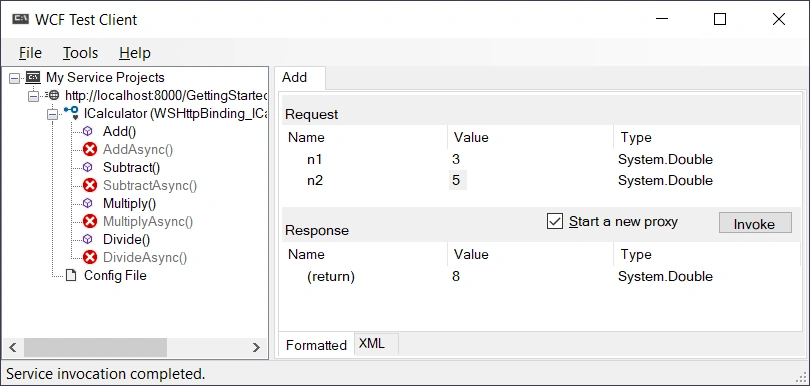
Note
In the original program, there are four operational methods, Add, SubTract, Multiply, and Divide, to make it simple, in this article, I only write one method, Add.
2), From Command Prompt
This approach is only working for the client built with proxy:
-
Open a command prompt as an administrator, and then navigate to your Visual Studio solution directory.
-
To start the service: Enter GettingStartedHost\bin\Debug\GettingStartedHost.exe. The server will be on, something like this

-
To start the Proxy client: Open another command prompt, navigate to your Visual Studio solution directory, then enter GettingStartedClient\bin\Debug\GettingStartedClient.exe.
- To start the ChannelFactory client: Open another command prompt, navigate to your Visual Studio solution directory, then enter ChannelFactory\bin\Debug\ChannelFactory.exe.
Server will be,

Client

C: Discussions
1, Proxy vs. ChannelFactory
1), WCF Proxy approach
A WCF proxy is a CLR class that exposes the service
contract. A Service proxy class has the service contract operations and
some additional operations for managing the proxy life cycle and the
connection to the service.
There are two ways to create a WCF proxy as given below,
-
Using Visual Studio by adding service reference to the client application.
-
Using SvcUtil.exe command-line utility.
A channel factory creates channels of
different types that are used by client to send messages to the service.
ChannelFactory class is used with a known interface to create the
channel. This approach is commonly used when you have access control to
both the server and the client.
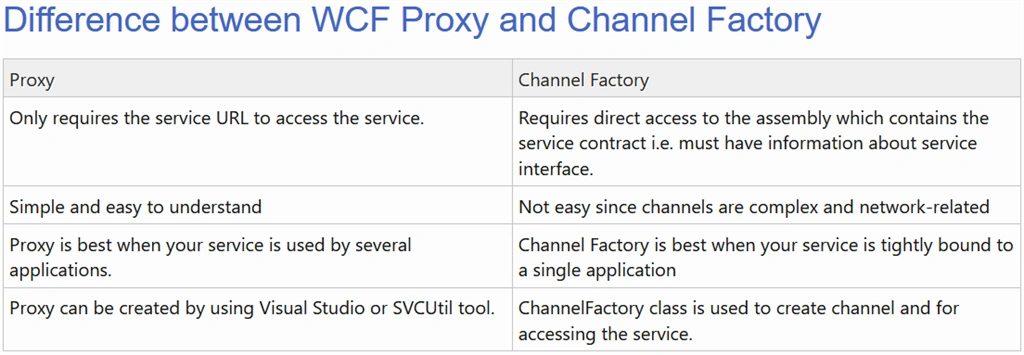
3), Proxy vs. ChannelFactory
2, Channel Stack
Now we know, even for the proxy approach, developer does not use and see Channel, but the proxy class makes one Channel for WCF operation.
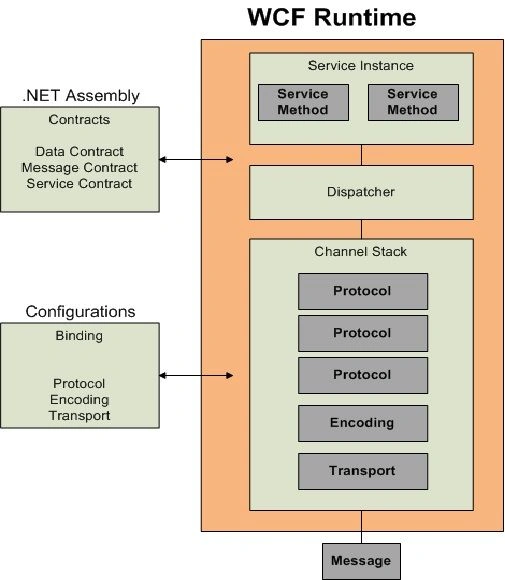
In order to understand WCF Bindings in details, it's important to understand the Channel Stack as part of the WCF runtime.
WCF
binding is composed of binding elements and each binding element
correspond to a specific channel in the Channel Stack. The Channel Stack
can be categorized into two major areas i.e. Protocol Channels and
Transport Channels. Protocol Channels are
Transaction Protocol, Reliable Messaging Protocol and Security Protocol
while Transport Channels includes Message Encoding and Transport
Protocol.
- Channel Stack
- Protocol Channels
- Transaction Protocol
- Reliable Messaging Protocol
- Security Protocol
- Transport Channels
- Message Encoding
- Transport Protocol.
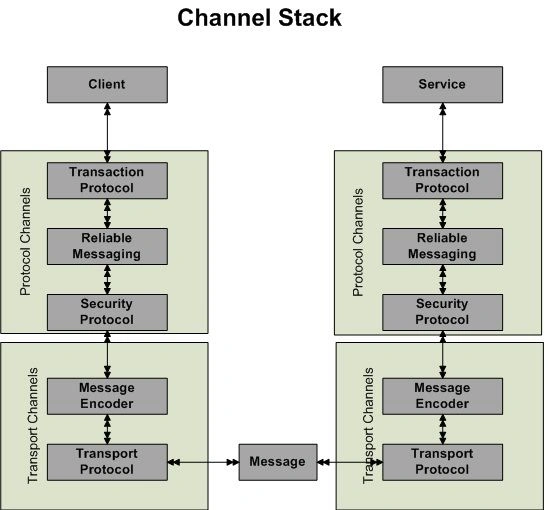
Each
request coming from the client will go through a Channel Stack from top
to bottom and then an encoded byte stream message will travel over the
wire. On the other end, messages travel from the bottom to the top and
reaches the service as shown in the above diagram.
A complete picture of the WCF runtime with Service Instance, Dispatcher and Channel Stack is as follows:
Summary
- Discussions
- Proxy vs. ChannelFactory
- Channel Stack
- Tutorial: Get started with Windows Communication Foundation applications --- MS
- Channel Factory in WCF --- c-sharpcorner
- Difference between Proxy and Channel Factory in WCF --- codeproject
- Understanding WCF Bindings and Channel Stack --- c-sharpcorner
- How to: Use the ChannelFactory --- MS
- Creating dynamic proxy using WCF ChannelFactory --- Geeksaray.com
- Channels, Bindings, and Binding Elements --- MS
Join the conversation! Your thoughts help the community grow.