Introduction
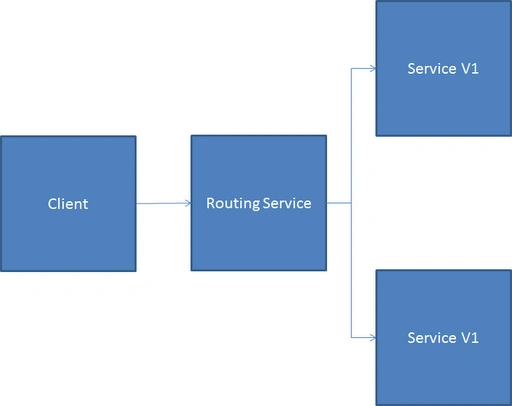
WCF Routing Service is a new feature in .NET 4.0 frameworks. The most basic use of the Routing Service is to aggregate multiple destination endpoints to reduce the number of endpoints exposed to the client applications, and then use message filters to route each message to the correct destination. Messages may be routed based on logical or physical processing requirements, such as a message type that must be processed by a specific service, or based on arbitrary business needs such as providing priority processing of messages from a specific source. The following table lists some of the common scenarios and when they are encountered:
Purpose
The following are the main purposes of the WCF Routing Service:
- Service versioning
- Content-based routing scenario
- Service partitioning
- Protocol bridging
WCF Routing Service
Let me try to explain using sample code.
Step 1
Create two services; one is CalculatorV1 and the other CalculatorV2.
- [ServiceContract]
- public interface ICalculatorV1 {
- [OperationContract]
- int Add(int a, int b);
- }
-
- [ServiceContract]
- public interface ICalculatorV2 {
- [OperationContract]
- int Sub(int a, int b);
- }
-
- public class CalculatorV1: ICalculatorV1 {
- public int Add(int a, int b) {
- return a + b;
- }
- }
-
- public class CalculatorV2: ICalculatorV2 {
- public int Sub(int a, int b) {
- return a - b;
- }
- }
Configuration file
- <system.serviceModel>
- <services>
- <service name="WCFRoutingSample.CalculatorV1">
- <host>
- <baseAddresses>
- <add baseAddress = "http://localhost:8732/CalculatorServiceV1/" />
- </baseAddresses>
- </host>
-
- <endpoint address ="" binding="basicHttpBinding" contract="WCFRoutingSample.ICalculatorV1">
-
- <identity>
- <dns value="localhost"/>
- </identity>
- </endpoint>
-
- <endpoint address="mex" binding="mexHttpBinding" contract="IMetadataExchange"/>
- </service>
- <service name="WCFRoutingSample.CalculatorV2">
- <host>
- <baseAddresses>
- <add baseAddress = "http://localhost:8733/CalculatorServiceV2/" />
- </baseAddresses>
- </host>
-
- <endpoint address ="" binding="basicHttpBinding" contract="WCFRoutingSample.ICalculatorV2">
-
- <identity>
- <dns value="localhost"/>
- </identity>
- </endpoint>
-
- <endpoint address="mex" binding="mexHttpBinding" contract="IMetadataExchange"/>
- </service>
- </services>
- <behaviors>
- <serviceBehaviors>
- <behavior>
- <serviceMetadata httpGetEnabled="True"/>
- <serviceDebug includeExceptionDetailInFaults="False" />
- </behavior>
- </serviceBehaviors>
- </behaviors>
- </system.serviceModel>
Step 2
Now we will host a service with RouteService. We will create a new solution to route the service host; see:
- class Program {
- static void Main(string[] args) {
- var host = new ServiceHost(typeof(RoutingService));
- host.Open();
- Console.WriteLine("Server is running.");
- Console.ReadLine();
- host.Close();
- }
- }
The most important thing is configuration, as in:
- <system.serviceModel>
- <behaviors>
- <serviceBehaviors>
- <behavior name="routingBehv">
- <routing routeOnHeadersOnly="false" filterTableName="filters"/>
- <serviceDebug includeExceptionDetailInFaults="true"/>
- <serviceMetadata httpGetEnabled="true"/>
- </behavior>
- </serviceBehaviors>
- </behaviors>
- <routing>
- <filters>
- <filter name="CalV1ServiceFilter" filterType="EndpointName" filterData="Calv1Service"/>
- <filter name="CalV2ServiceFilter" filterType="EndpointName" filterData="Calv2Service"/>
- </filters>
- <filterTables>
- <filterTable name="filters">
- <add filterName="CalV1ServiceFilter" endpointName="Calv1Service" />
- <add filterName="CalV2ServiceFilter" endpointName="Calv2Service"/>
- </filterTable>
- </filterTables>
- </routing>
- <services>
- <!-- Routing service with endpoint definition -->
- <service name="System.ServiceModel.Routing.RoutingService"
- behaviorConfiguration="routingBehv">
- <endpoint
- address="/Calv1"
- binding="basicHttpBinding"
- contract="System.ServiceModel.Routing.IRequestReplyRouter"
- name="Calv1Service"/>
- <endpoint
- address="/Calv2"
- binding="basicHttpBinding"
- contract="System.ServiceModel.Routing.IRequestReplyRouter"
- name="Calv2Service"/>
-
- <host>
- <baseAddresses>
- <add baseAddress="http://localhost:9000/CalculatorService"/>
- </baseAddresses>
- </host>
- </service>
- </services>
- <client>
- <endpoint address="http://localhost:8732/CalculatorServiceV1"
- binding="basicHttpBinding"
- contract="*"
- name="Calv1Service"/>
- <endpoint address="http://localhost:8733/CalculatorServiceV2"
- binding="basicHttpBinding"
- contract="*"
- name="Calv2Service"/>
- </client>
- </system.serviceModel>
Step 3
Now we will add a client and try to access the route service; see:
- class Program {
- static void Main(string[] args) {
- var binding = new BasicHttpBinding();
- var endpoint = new EndpointAddress("http://localhost:9000/CalculatorService/Calv1");
- var proxy = ChannelFactory < WCFRoutingSample.ICalculatorV1 > .CreateChannel(binding, endpoint);
- Console.WriteLine(proxy.Add(1, 1));
-
- var binding1 = new BasicHttpBinding();
- var endpoint1 = new EndpointAddress("http://localhost:9000/CalculatorService/Calv2");
- var proxy1 = ChannelFactory < WCFRoutingSample.ICalculatorV2 > .CreateChannel(binding1, endpoint1);
- Console.WriteLine(proxy1.Sub(1, 1));
- Console.ReadKey();
- }
- }
Happy coding.


Gohil JayendrasinhPosted Sep 25, 2012, 8:57 AM
Nice article Amit . Thanks You can also access the service like // Create the binding BasicHttpBinding binding = new BasicHttpBinding(); binding.Name = "BindingName"; binding.Security.Mode = BasicHttpSecurityMode.TransportWithMessageCredential; binding.Security.Message.ClientCredentialType = BasicHttpMessageCredentialType.UserName; binding.ReceiveTimeout = new TimeSpan(0, 5, 0); binding.OpenTimeout = new TimeSpan(0, 5, 0); binding.CloseTimeout = new TimeSpan(0, 5, 0); binding.SendTimeout = new TimeSpan(0, 5, 0); // Set the transport security to UsernameOverTransport for Plaintext usernames EndpointAddress endpoint = new EndpointAddress("URL"); //url of service
Rohatash KumarPosted Sep 25, 2012, 1:38 AM
How do I protect my message when there are multiple protocols used during message transit in wcf. Amit
Swati AgarwalPosted Sep 25, 2012, 12:24 AM
Nice article, helps me a lot. I want to know, how to use digital signatures in WCF?