

- Used WCF Service
- Configuration Setting for WCF in web.config
- Used JavaScript,JQuery and JSON.
- Insert,Update and Delete data without refreshing page.
SQL Script
- This is a SQL script for above source code.
- CREATE TABLE [dbo].[ProductInfo](
- [Id] [int] IDENTITY(1,1) NOT NULL,
- [ProductName] [varchar](max) NULL,
- [ProductDescription] [varchar](max) NULL,
- [CreatedDate] [datetime] DEFAULT GETDATE()
- )
- This is service configuration setting.
- We need to add service end point and behavior setting in web.config file.
- there are so many way to host wcf service like self hosting, WAS, IIS and Window service.
- <system.serviceModel>
- <behaviors>
- <endpointBehaviors>
- <behavior name="AspNetAjaxBehavior">
- <enableWebScript />
- </behavior>
- </endpointBehaviors>
- </behaviors>
- <serviceHostingEnvironment aspNetCompatibilityEnabled="true" />
- <services>
- <service name="WCFService.ProductService">
- <endpoint behaviorConfiguration="AspNetAjaxBehavior" binding="webHttpBinding"
- contract="WCFService.IProductService" />
- </service>
- </services>
- </system.serviceModel>
- I add a script reference inside scriptmanager.
- <asp:ScriptManager runat="server">
- <Scripts>
- <asp:ScriptReference Path="~/Script/Product.js" />
- </Scripts>
- <Services>
- asp:ServiceReference Path="~/ProductService.svc" />
- </Services>
- </asp:ScriptManager>
- The following interface method contain insert, update, delete definition only which is used in service call.
- [ServiceContract(Namespace = "WCFService")]
- interface IProductService
- {
- [OperationContract]
- void AddProductDetail(string productName, string productDescription);
- [OperationContract]
- void UpdateProductDetail(int updateId, string productName, string productDescription);
- [OperationContract]
- void DeleteProductDetail(int id);
- [OperationContract]
- string EditProductDetail(int id);
- [OperationContract]
- string LoadAllProductDetail();
- }
productService.cs page
- This file contain functionality which is mentioned in the above interface file.
- [AspNetCompatibilityRequirements(RequirementsMode = AspNetCompatibilityRequirementsMode.Allowed)]
- public class ProductService : IProductService
- {
- #region IproductService Member
- readonly TestProductEntities _testProductEntities = new TestProductEntities();
- [WebInvoke(Method = "POST", BodyStyle = WebMessageBodyStyle.WrappedRequest, RequestFormat = WebMessageFormat.Json, ResponseFormat = WebMessageFormat.Json)]
- public string LoadAllProductDetail()
- {
- try
- {
- var productDetail = (from s in _testProductEntities.ProductInfoes
- select s).ToList();
- var serializer = new JavaScriptSerializer();
- return (serializer.Serialize(productDetail.ToList()));
- }
- catch (Exception ex)
- {
- throw ex;
- }
- }
- #endregion
- }
product.js page
- This is my javascript file and highlighted area displays my service call.
- $(document).ready(function () {
- LoadProduct();
- });
- function BindProduct(results) {
- var myJsonString = JSON.parse(results);
- var string = "<table class='table table-bordered'><tbody>";
- string += '<tr><th>Name</th><th>Description</th><th colspan="2">Action</th></tr>';
- if (myJsonString.length > 0) {
- for (var i = 0; i < myJsonString.length; i++) {
- string += '<tr><td>' + myJsonString[i].ProductName + '</td>';
- string += '<td>' + myJsonString[i].ProductDescription + '</td>';
- string += '<td><span><a href="javascript:void(0);" ' + ' onclick="EditProduct(' + myJsonString[i].Id + ');">';
- string += '<img width="16" height="16" alt="Close" src="Image/Edit.jpg" /></a></span></td>';
- string += '<td><span><a href="javascript:void(0);" ' + ' onclick="DeleteProduct(' + myJsonString[i].Id + ');">';
- string += '<img width="16" height="16" alt="Close" src="Image/close.png" /></a></span></td></tr>';
- }
- }
- string = string + "</tbody></table>";
- $("#bindProduct").html(string);
- }
- function LoadProduct() {
- WCFService.IProductService.LoadAllProductDetail(BindProduct, LoadProduct_success, LoadProduct_fail);
- }
- function LoadProduct_success() {
- }
- function LoadProduct_fail() {
- alert("LoadProduct_fail");
- }
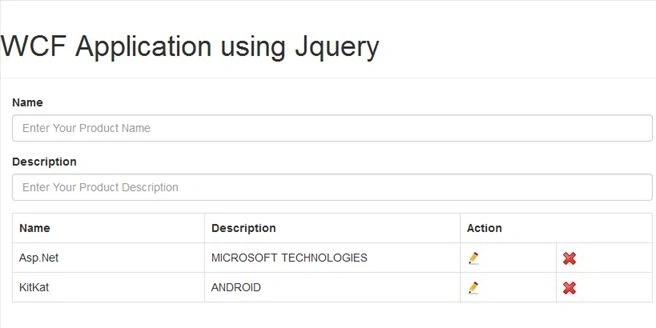
Output
Marcelle JohnsonPosted May 26, 2016, 11:05 AM
What kind of project you used?
Karthikeyan KPosted Oct 2, 2015, 2:20 AM
Good one sir...Thanks for sharing
Santhakumar MunuswamyPosted Oct 1, 2015, 3:55 PM
Nice Article. Thanks for sharing us
Harshad PansuriyaPosted Oct 1, 2015, 8:51 AM
Nice One
Kunal PatelPosted Oct 1, 2015, 8:28 AM
thanks.
Nilesh JadavPosted Oct 1, 2015, 8:00 AM
Nice share sir
Humayun Kabir MamunPosted Oct 1, 2015, 6:56 AM
Nice...
Manas MohapatraPosted Oct 1, 2015, 6:20 AM
Good Share man...
Surya Pratap SinghPosted Oct 1, 2015, 6:00 AM
gud one...\
Muhammad Aqib ShehzadPosted Oct 1, 2015, 5:55 AM
good article
Kunal PatelPosted Oct 1, 2015, 5:46 AM
Thanks everyone.
Rajeesh MenothPosted Oct 1, 2015, 5:34 AM
Good One..
desai jigishPosted Oct 1, 2015, 5:26 AM
Great article dude keep it up..
Sujeet SumanPosted Oct 1, 2015, 5:23 AM
Good Sharing...................
Ankit BansalPosted Oct 1, 2015, 5:08 AM
nice..thanks for sharing..