

First we need to create a Web service as was already discussed in Part 1. Again create a new Web Service in Visual Studio.
Step 1
Open Visual Studio and select "File" -> "New" -> "Web Site...".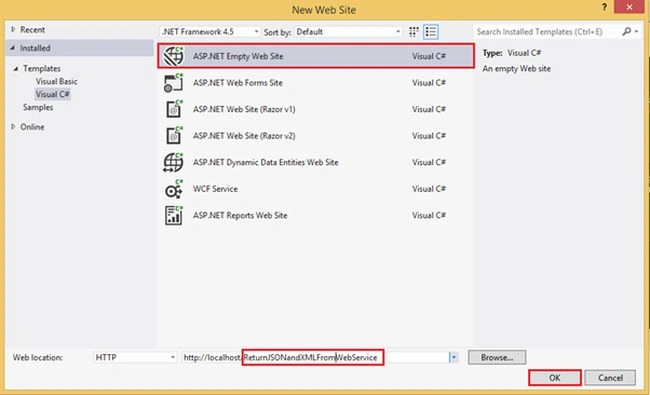
Step 2
Now add a Web Service file (.asmx) to the Web site. 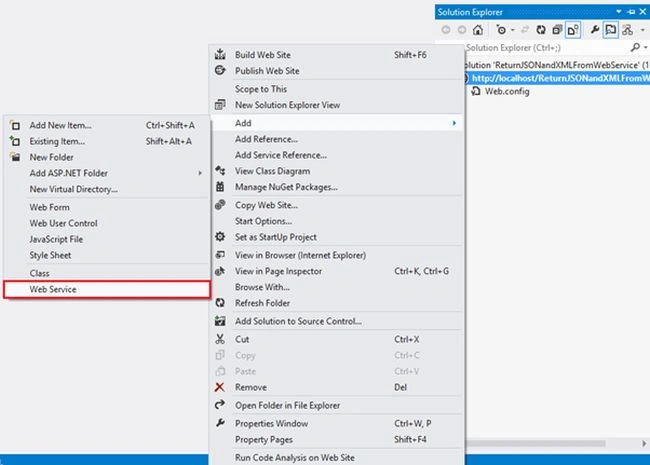
Provide a name for the web service file.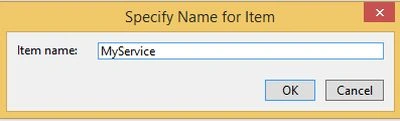
And delete the existing code file from the Solution Explorer so that we can create our own class file to host on this web service.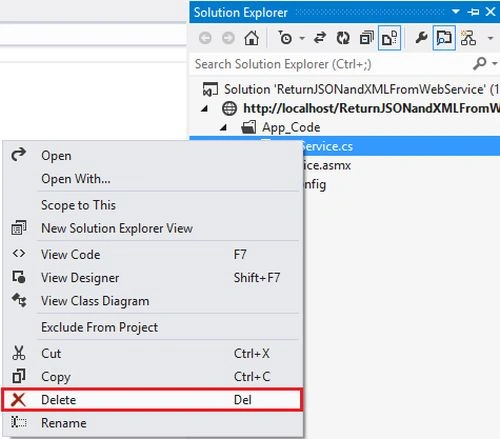
Step 3
Now add a new class file to [WebService] and also a class for a user data type to define the structure.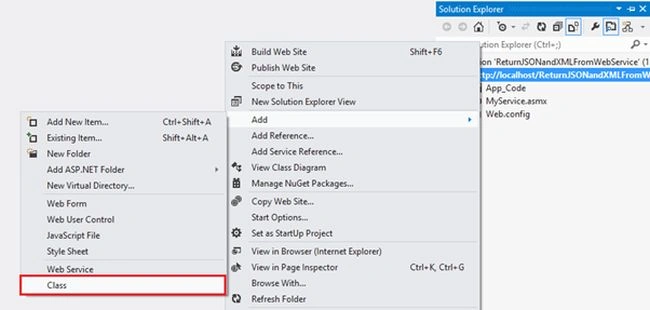
[WebSerivce] Class 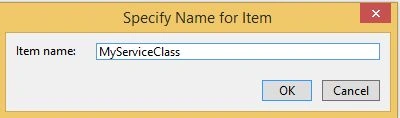
User-define data type for JSON and XML Stucture:
Step 4
Edit the Employee Class and declare a property that we need to use in the JSON and XML object.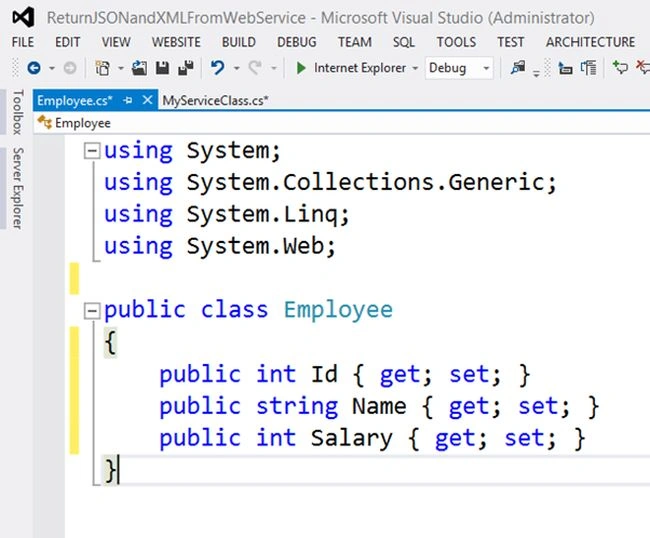
Code:
- public class Employee
- {
- public int Id { get; set; }
- public string Name { get; set; }
- public int Salary { get; set; }
- }
Step 5
Now edit your .asmx file to define the CodeBehind and Class Properties.
Step 6
Next we need to create a [WebService] class MyServiceClass and add all the namespaces first that are required.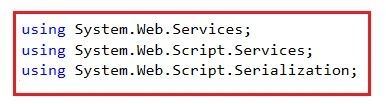
Step 7
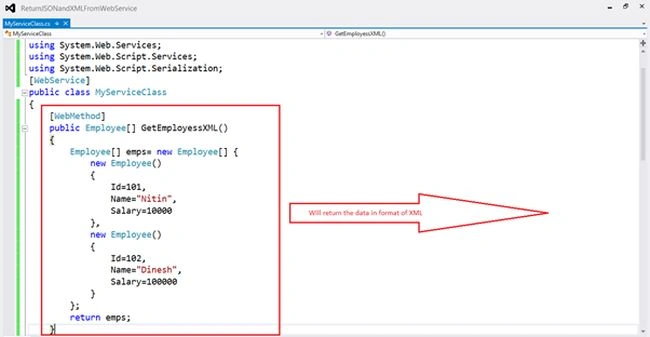
Write the [WebService] attribute over the class name and create the [WebMethod].
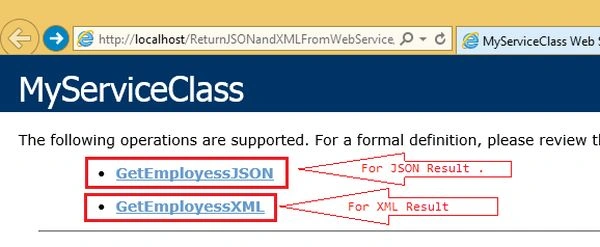
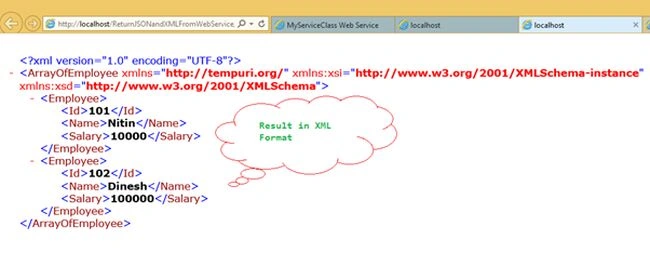
- GetEmployeeXML() for returning the data in XML.
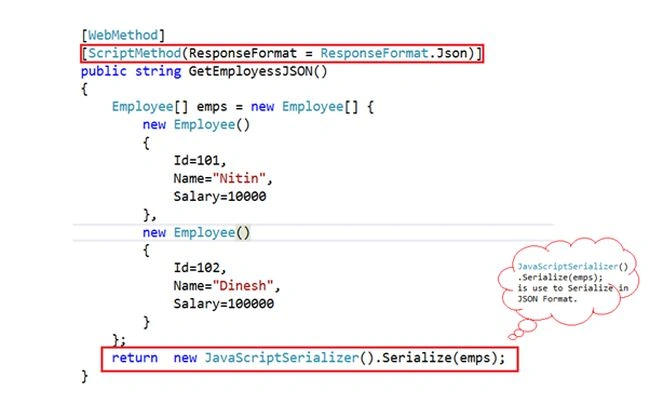
- GetEmployeeJSON() for returning the data in JSON.

Anandu G NathPosted Jan 6, 2024, 9:43 AM
Nice Nitin Pandit
Sufail KalathilPosted Oct 20, 2019, 9:42 PM
How call asp.net web method in postman
Javed AlamPosted Oct 6, 2018, 7:12 AM
In json response I don't need the xml tag as well, because it make erorr when convert to jsonobject for android .
Hadshana KamalanathanPosted Jul 22, 2018, 1:52 AM
Good one...
Jayant KumarPosted Feb 20, 2017, 4:51 AM
If you are returning string then the JSON output is embedded with <string> tag. so better is return void for GetEmployessJSON Method and use JavaScriptSerializer js = new JavaScriptSerializer(); Context.Response.Write(js.Serialize(emps)); at the last to return pure JSON.
Ramesh PalaniappanPosted Sep 7, 2016, 11:57 AM
Good one
Ahmed SalahPosted Jul 5, 2016, 8:51 PM
By DEfault Web Service returns data in XML format. Here you don't have to create an array, you may use a List<T> object instead and return this list.
dipti bistPosted May 20, 2016, 2:57 AM
How to set credentials and password in case we want clients to have access only if they enter valid credentials?
Sr KarthigaPosted Feb 19, 2016, 5:56 AM
Nice Explanation
Santhakumar MunuswamyPosted Nov 28, 2015, 1:42 AM
Good One
Mahavirsinh PadhiyarPosted Nov 23, 2015, 12:40 AM
Can we just return like this "return Json(arraylist, JsonRequestBehavior.AllowGet);" by defining return type as JsonResult (System.Web.Mvc)?
Humayun Kabir MamunPosted Nov 23, 2015, 12:29 AM
Nice...
Rajeesh MenothPosted Nov 23, 2015, 12:04 AM
Good One!
Mukesh KumarPosted Nov 22, 2015, 11:45 PM
Great One sir..
kalu singh raoPosted Nov 21, 2015, 1:32 PM
nice
Ranjan DailataPosted Nov 21, 2015, 1:01 PM
Generally it's not advisable to code each method to return the WebService response. Technologies like WebAPI, returns the response based on the accept-type so you don't really have to bother about coding for a specific format of data. Generally, it's a good practice to have data formatters so it can format your data as per the client needs.
Alok DwivediPosted Oct 14, 2015, 3:37 PM
when i publish this on web this will not giving me response following error occur Request format is unrecognized for URL unexpectedly ending in '/GetEmployessXML'
Vipul PatelPosted Jul 7, 2015, 3:12 AM
i am trying to pass the data from mvc controller to web api in json format and reverse also.i want to use web request and response in my project.please give me some reference or demo ...
Vipul PatelPosted Jul 7, 2015, 3:09 AM
Hiii ,
Raees KhanPosted Jul 2, 2015, 6:41 AM
How to consume getEmployeejson at client app.
vijay gautamPosted Jun 6, 2015, 4:55 AM
thanxx for the awesome tutorial...!!! .One little doubt.. why json data is showing inside XML <String> and how to remove that if we want to..
loli festPosted May 19, 2015, 8:43 AM
I HAVE Visual Studio 2012 Ultimate and when i select "Add" item menu, i can't see "WebService" option, Why?
Dipti DhimanPosted May 14, 2015, 7:19 AM
Useful Article Nitin
Upendra Pratap ShahiPosted May 8, 2015, 1:06 AM
nice...
Sourabh TiwariPosted Feb 21, 2015, 10:56 AM
Nice Example But JSON one is Not Accurate actually its JSON data in XML file trap in <String> node.
Guest UserPosted Feb 6, 2015, 2:04 AM
good one. I think JSON is catching with XML speedly bcause it has minimum meta data payload alongwith.
Rajeev RanjanPosted Feb 5, 2015, 10:55 PM
the way you write article it looks topic is so much simple
Khargesh RajputPosted Feb 5, 2015, 12:41 AM
thanks sir i need to learn web services using json
Dinesh BeniwalPosted Feb 5, 2015, 12:20 AM
Congrats Nitin Pandit Articles of the day on ASP.NET
Zeeshan AzimPosted Jan 10, 2015, 9:05 AM
Very Nice.
Pramod ThakurPosted Dec 26, 2014, 3:05 AM
Nice One :)
Rahul BansalPosted Dec 26, 2014, 1:29 AM
Good one Nitin :)
Mukesh Kumar TiwariPosted Dec 26, 2014, 12:47 AM
Nitin its a very nice article..But i think u should also explain that how we can consume this service in asp.net. I think that will be very beneficial for new programmer, who have no idea abt web service.
Joginder BangerPosted Dec 26, 2014, 12:05 AM
Good job sir
Jitendra KumarPosted Dec 25, 2014, 11:59 PM
Good..
Manish Kumar ChoudharyPosted Dec 25, 2014, 11:08 PM
Nice one..
Praveen KumarPosted Dec 25, 2014, 10:51 PM
superb !