

Introduction
In this article I will explain how to load any website into our Windows 8 apps. This can be done using the WebView control in a Windows store application. The webview control is a container control that hosts web content. To see how it works use the following steps.
Step 1
Open Visual Studio 2012 RC and click on File -> New -> Project; see: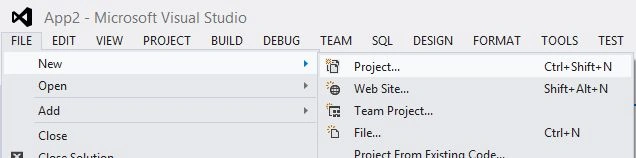
Step 2
A window will appear; in this, select Windows Store from Visual C# from the left pane and then blank page from the center pane then give the name of your application and then click ok.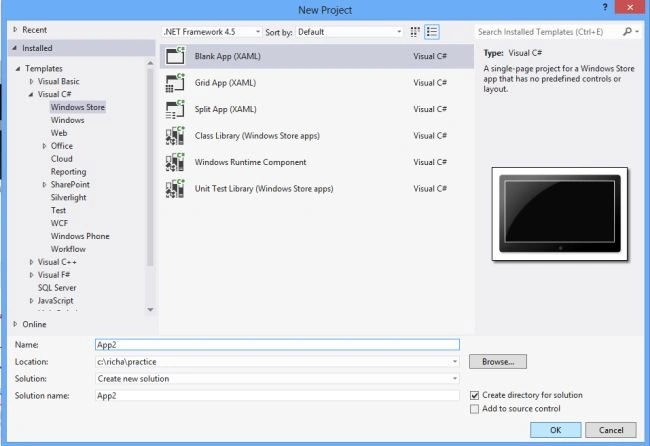
Step 3
Write the following code in the MainPage.xaml file:
<Page
x:Class="App2.MainPage"
xmlns="http://schemas.microsoft.com/winfx/2006/xaml/presentation"
xmlns:x="http://schemas.microsoft.com/winfx/2006/xaml"
xmlns:local="using:App2"
xmlns:d="http://schemas.microsoft.com/expression/blend/2008"
xmlns:mc="http://schemas.openxmlformats.org/markup-compatibility/2006"
mc:Ignorable="d">
<Grid>
<Grid.Background>
<LinearGradientBrush EndPoint="0.5,1" StartPoint="0.5,0">
<GradientStop Color="Black"/>
<GradientStop Color="#FFF1E3B0" Offset="1"/>
</LinearGradientBrush>
</Grid.Background>
<TextBlock Name="text" HorizontalAlignment="Left" VerticalAlignment="Top" Margin="50,50,0,0" Height="50" Width="641" Text="Enter any Site Started with http:// that you want to see in the webview" FontSize="20" Foreground="#FFEEEDF5">
</TextBlock>



Rajiv ChowdheryPosted Oct 6, 2014, 1:55 AM
Thanks,