

It was 1999 when C# (pronounced C sharp) was introduced to the world by Microsoft as a new futuristic programming language, I was fortunate enough to be one of the early adopters of the language. I got my hands on the C# compiler when it was released as an alpha version in Dec 1999. Yes, there used to be alpha releases at that time. It took Microsoft 3 years to get the first stable and usable version of the language. And since then, I have witnessed a newborn turn into a fully mature grownup powerful language.
I wrote and shared my first C# code in 1999.
Today, C# is a fully mature and powerful language. As a matter of fact, I wrote my very first article about C# in 1999 using alpha and beta products. My first articles titled Read Microsoft Access Database in C# was published on C# Corner on Jan 01, 2000. In 2001, I started writing my first book, A Programmer's Guide to ADO.NET using C# published by Apress on April 25, 2002. It took me about a year and half to finish the book.
My first book was published in 2002 on ADO.NET in C#.
WOW! Time flies. Can't believe it has been 19 years since I started C# programming.
I know that Java, C, and C++ are the most popular programming languages but C# has gained good ground in the Microsoft world. Today, C# is one of the top 10 programming languages in the world.
C# Language Evolution
C# (pronounced C sharp) is a modern programming language that was created to build modern software applications for Windows, Web and mobile. C# is a much more powerful programming language than many of us may realize. Not only can you build traditional Windows Client applications and Web applications but you may also use C# to build mobile apps, Windows Store apps, and Enterprise applications. On top of that, C# is cool. Yes, you heard it right. C# is cool. Actually, C# was originally named “C cool” but due to trademark issues, it was renamed to “C sharp”.
The following table summarizes the C# versions with year and features. The current version of C# is 9.0.
| Version | Year | Features |
| 1.0 | 1999-2002 | Modern, Object Oriented, Simple, Flexible, Typesafe, Managed, Garbage Collection, Cross-platform |
| 2.0 | 2005 | Generics, Anonymous Method, Partial Class, Nullable Type |
| 3.0 | 2008 | LINQ, Lamda Expression, Extension Method, Anonymous Type, Var |
| 4.0 | 2010 | Named and Optional Parameters, Dynamic Binding |
| 5.0 | 2012 | Async Programming |
| 6.0 | 2015 | Compiler-as-a-service (Roslyn), Exception filters, Await in catch/finally blocks, Auto property initializers, Dictionary initializer, Default values for getter-only properties, Expression-bodied members. Null propagator, String interpolation, nameof operator |
| 7.0 | 2017 | Tuples, Out variables, Pattern matching, Deconstruction, Local functions, Digit separators, Binary literals, Ref returns and locals, Generalized async return types, Expression bodied constructors and finalizers, Expression bodied getters and setters, Throw can also be used as expression |
| 7.1 | 2017 | Async main, Default literal expressions, Inferred tuple element names |
| 7.2 | 2017 | Reference semantics with value types, Non-trailing named arguments, Leading underscores in numeric literals, private protected access modifier |
| 7.3 | 2018 | Accessing fixed fields without pinning, Reassigning ref local variables, Using initializers on stackalloc arrays, Using fixed statements with any type that supports a pattern, Using additional generic constraints |
| 8.0 | 2019 | Nullable reference types, Async streams, ranges and indices, default implementation of interface members, recursive patterns, switch expressions, target-type new expressions |
| 9.0 | 2020 | Records, Structural Equality & Referential Equality, Target-typed new-expressions, Default in deconstruction, Relax ordering of ref and partial modifiers, Parameter null-checking, Skip locals init, Lambda discard parameters, Attributes on local functions, Native Ints, Function pointers |
| 10.0 | 2021 | TBD |
C# Ecosystem Software Applications
Now let's get back to our question. What can C# do for you?
Well, the answer is, a lot. I would say, nearly anything. Unless you're writing non-Microsoft platform centric code, C# can pretty much be used to write Windows clients applications, Web applications, Mobile apps, Enterprise software, backend and service-oriented applications.
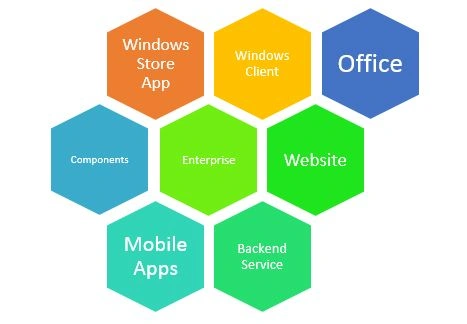
Figure 3 demonstrates the C# world and applications ecosystem.
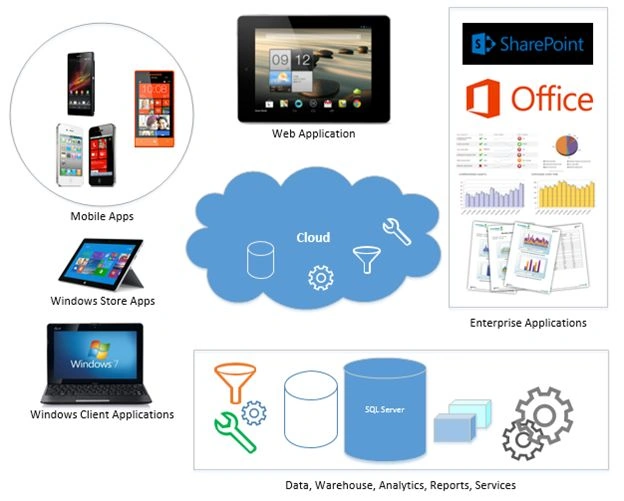
As you can see from Figure 3, the C# language can be used to build any and all kinds of applications. Not only Windows or Web applications but C# can be used to build mobile, Windows Store, and Enterprise applications. C# can also be used within the SQL Server database to build reports, jobs and modules to do the backend work.
Here is a list of types of applications C# can develop.
- Cloud native apps and services
- Windows client applications
- Windows libraries and components
- Windows services
- Web applications
- Web services and Web API
- Native iOS and Android mobile apps
- Backend services
- Azure cloud applications and services
- Backend database using ML/Data tools
- Interoperability software such as Office, SharePoint, SQL Server and so on.
- Artificial Intelligence and Machine learning
- Blockchains and distributed ledger technology including cryptocurrency
- Internet of Things (IoT) devices
- Gaming consoles and gaming systems
- Video games
- AI Development: Can I build AI or machine learning apps in C# like I can in Python?
Windows Client Applications
Windows client applications run on the Windows operating system as executables. Windows applications have been in existence since Microsoft introduced the Windows operating system on Nov 20, 1985. Windows applications development was the initial use of the C# programming language when Microsoft announced it in 1999 to the developer world.
Today, Windows Forms and WPF are two major technologies used to develop Windows client applications. C# can also be used to write non-UI console and WPF Browser based applications. Visual Studio 2013 supports four project templates, including Windows Forms application, WPF application, Console application, and WPF Browser application.
Here are some common properties of Windows applications.
- Windows applications run on a Microsoft Windows operating system.
- Windows applications are typically executables (exes) and dynamic link libraries (DLLs).
- Windows applications run on a PC and take all resources from the local machine.
- Windows applications have a user interface with Windows controls such as buttons, menus, dialogs and forms/windows.
Examples of Windows Applications:
- Microsoft Office (Word, PowerPoint, Excel and so on)
- Internet Explorer
- Skype
- Visual Studio 2012
- Photoshop
- SQL Server 2012
- Paintbrush
The following are some good links to learn these technologies:
Components and Controls
Components and controls are libraries used to build something that is easily sharable and distributable. C# is one of the most commonly used languages to build components and controls in the Microsoft world. A chart control is a perfect example of a sharable control. A GPS library is a perfect example of a library that can be built by a developer and easily distributed to other developers to be used in their applications.
Visual Studio 2013 supports five project templates, including Class Library, Portable Class Library, WPF Custom Control Library, WPF User Control Library, and Windows Forms Control Library.
The following are some good links to learn these technologies:
Web Applications
ASP.NET was released on Jan 05, 2002. Since then, ASP.NET has become one of the most popular technologies to build web applications. ASP.NET can be combined with HTML, JavaScript and other libraries and APIs to build modern web applications.
Visual Studio supports the three major ASP.NET project templates, ASP.NET web applications, ASP.NET MVC web applications, and ASP.NET server controls.
The following are some common properties of Web applications:
- Web applications run on a Web Server.
- Web applications are typically hosted within an ASP.NET or HTML page.
- Windows applications run on the server as well as in the client browser, depending on how the code is written. If C# is used as backend coding, the C# code runs on the server and the front end HTML runs within the client browser.
- Web applications have a user interface with Windows controls such as buttons, text boxes, text and styles.
- Web applications usually have a URL, public or private.
- Web applications are accessed by users from outside of the physical premises of the application via a remote Internet connection and a browser.
The following are examples of Web sites:
- msdn.com
- facebook.com
- c-sharpcorner.com
ASP.NET MVC is one of the newest frameworks to build ASP.NET Web applications. The following are some good links to learn more about ASP.NET Programming:
ASP.NET Core is the latest open source version of .NET. ASP.NET Core is a part of .NET Core, the next evolution of .NET Framework.
Blazor
Blazor is the latest technology of .NET ecosystem. The current version of .NET is .NET 5.0. Blazor has two options - Blazor Server and Blazor WebAssembly. Blazor Server is similar to ASP.NET MVC where the code runs on the server. Blazor WebAssembly is a client side technology where C# code runs in the client web browser.
Windows Services, Web Services, and Web API
Windows Services has been around since early Windows days. A Windows Service (also known as Microsoft Windows Service or Windows NT Service) is an executable application that runs on Windows operating systems. A service usually does not have a user interface, performs operations in the background and does not require any user interaction. Visual Studio comes with a Windows Service project template that is used to create a Windows Service using C# and VB.NET.
Web Services were introduced to provide remote communication among devices over the Internet. The main purpose of a Web Service is to provide data accessibility and updatability remotely using the internet protocols regardless of the platform, Operating System, client browser, and application. Physically, a web service is a software application running on a Web Server that can be called by outside applications using the internet to access and write data.
In the Microsoft world, the web services are developed using ASP.NET and hence called the ASP.NET Web Services. While the exposure and connectivity of a Web Service uses ASP.NET, the backend can be built using the C# language. Windows Communication Foundation (WCF) and the Web API are the latest technologies developed by Microsoft to provide remote communication.
Web APIs are a modern era of Web services that allow developers to expose backend functionality to any kind of application regardless of their platform and language.
Let's understand this using an example and what can be better than using our own C# Corner platform architecture shown in Figure 4.
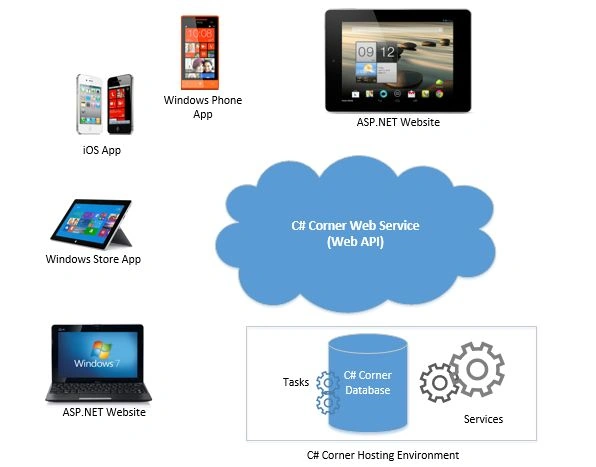
In Figure 4, we have a database server that runs services to do the backend tasks such as calculating points, sending emails, analytics and so on. Some of these backend services run as tasks on SQL Server and some are Windows services.
The Web Service sits on the Web Server and talk to the database server and act as a gateway of data access and manipulation from the clients. Clients are users accessing C# Corner from their web browsers, iOS apps, and other apps.
This gives you an idea of how Windows and Web Services fit in the entire C# universe.
WCF and the Web API are two of the newest technologies in the Web Services space. Here are some good links to learn more about Windows and Web Services.
UWP Apps
Universal Windows Platform (UWP) Apps are windows apps run on Windows 10 or later platforms.
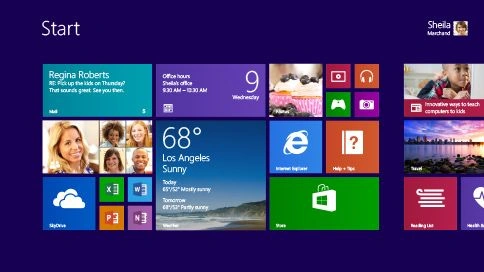
There are two tracks to develop UWP apps. First, use C# and XAML and second, use HTML 5 and JavaScript. C# and XAML are the primary languages to build Windows Store apps. XAML is used to build app screens and C# is used as the language that runs in the backend.
The following are two good links to learn more about Windows Store apps and the XAML language:
Mobile Apps
Mobile apps run on mobile devices. The Apple iOS and Google Android are two major players in the mobile app market. C# supports native mobile app development via Xamarin. Xamarin is a part of Visual Studio 2017 or later versions.
Here are over 900 articles and code samples on Learn Xamarin.
Cloud and Azure
Visual Studio 2017 or later versions provide a complete suite of tools to build cloud based applications for Windows Azure. Windows Azure is Microsoft's operating system for cloud computing and hosting. Using Visual Studio, not only you can build Azure solutions but can also deploy and manage them. C# can also be used to work with SQL Azure, the cloud based version of Microsoft's SQL Server database server.
You may want to check out the following link to learn more about the Cloud and Azure:
Enterprise Cross-Applications Development
So far, we have learned that we can build Windows, Web, Mobile, Services and Components using the C# language but the capabilities of C# does not end here. The C# language may also be used cross-applications to connect and build enterprise solutions.
Some of the critical requirements of an enterprise architecture are connectivity with various types of applications to transfer data. For example, in one of my projects, I had to access data from a SQL Server database, a SharePoint database and store some in MSMQ. There was also data to be transfered from SharePoint Portal Server that was accessed by Office Excel documents and an ASP.NET Website. There was also a reporting component using Crystal Reports and CRM that stored a customer database.
All the preceding can be done using the C# language. I built some adapters and used some existing .NET adapters and built the system using app pure .NET and C#.
The following are some of the products and tools that could be used in an enterprise environment:
- App for Office 2013
- App for SharePoint 2013
- Cloud Business App
- Add-ins for Office 2013 including Excel 2013, InfoPath 2013, PowerPoint 2013, Project 2013, Visio 2013, Word 2013.
- SharePoint development includes SharePoint 2013 Silverlight Web Part, SharePoint 2013 Visual Web Parts, and SharePoint 2013 Reusable Workflow.
- SharePoint, SQL Server, Office
- SQL Server database
- XML
- Flat data
- Object data
The following are some useful links related to these topics:
Bleeding-Edge Technologies
C# fully supports trending bleeding-edge technologies development such as Artificial Intelligence, Machine Learning, Blockchain, Internet of Things, and Intelligent Cloud.
C# is also the primary programming language for any new Microsoft product and platform.
Summary
The C# language has come a long way since it was introduced in 1999. If you have enough experience, you can build nearly any kind of application using C# and related tools.
In this article, I discussed the power and flexibility of C# and its usefulness. There is not much out that can't be built using C# and its related technologies in the Microsoft world. If you are a Microsoft developer, you may already know that you can't live without C#.
I hope you enjoyed it. I look forward to seeing your feedback.
OLAWALE MUMEENPosted Sep 22, 2020, 9:56 AM
Great article
Zulqadar IdrishiPosted Feb 19, 2020, 10:36 PM
Sir, You are lucky. You started c# from its birth.
Raju PaladiyaPosted Feb 19, 2020, 9:05 PM
Great Article !!
Chittaranjan SwainPosted Oct 29, 2019, 11:34 PM
Very Nice article sir...
Pankajkumar PatelPosted Aug 29, 2019, 12:36 AM
Nice article
Uzochukwu MikePosted May 11, 2019, 6:48 AM
Well explained. You know what you are doing man. If you have the time, please tell me the steps I need to build an app with c#. I am web site designer.
Sarathlal SaseendranPosted Feb 3, 2019, 11:27 AM
Nice article sir. I am really humbled to see my blazor article details mentied here. But to be frank, I am not getting any response from viewers on Blazor. I think, very few people are trying it. Hope Microsoft will give some more improvement in this technology and will give confidence to developers.
Thiruppathi RPosted Jan 31, 2019, 7:19 AM
Nice Stuff, Thanks for the article...
Divyang DesaiPosted Jan 30, 2019, 7:10 AM
Great share, Thanks! However, new version of Skype built on top of Electron Js.
Ramzanali MominPosted Aug 28, 2018, 3:58 AM
I have one upload button uploading xlxs file and needed dynamically binding column name into checkbox
Arun Kumar SinghPosted Aug 11, 2018, 2:55 AM
Awesome article it will be more better if u update according to 2018
Amatya AgyeyPosted Nov 2, 2016, 12:27 AM
Nice article sir
Nikhil SanganiPosted Sep 9, 2016, 8:28 AM
Nice One.
SubashPosted Sep 9, 2016, 12:27 AM
Thank you sir nice one
Manav PandyaPosted Sep 8, 2016, 2:18 AM
I mean "programming guide to ADO.NET with C#"
Manav PandyaPosted Sep 8, 2016, 2:16 AM
Sir can you provide me Your above mentioned book to me at [email protected] please if possible ...
Shashank RanePosted Apr 20, 2016, 1:08 AM
Very easy and a brief article..Extremely useful for beginners.Covers almost every aspect of Microsoft Technologies..C# is indeed a very powerful language..Thank You Sir..!!!
Rajeesh MenothPosted Apr 9, 2016, 12:56 PM
Good Article!! Really Inspired!!!
Mahesh ChandPosted Apr 8, 2016, 7:32 AM
This article is 2 years old. I am updating it with the important changes that have happened in past 2 years and they are a lot. C# language is becoming one of the most versatile, powerful, innovative, and evolving programming languages ever. Besides working with low-level hardware OS etc, there is nothing in the application world that can't be built using C# including Cross-platform, target non-Windows devices including iOS and Android. A lot more coming soon. Stay tuned!
Manish PandeyPosted Apr 7, 2016, 3:53 PM
I think there should be one (word - windows/web) correction , if m right. For web application - The following are some common properties of "web" application instead of Windows applications
Manish PandeyPosted Apr 7, 2016, 3:48 PM
Very good article with best explanations.. Thank u very much sir. Keep sharing ..
Humayun Kabir MamunPosted Feb 16, 2016, 6:47 AM
Nice...
Mohamed Gani MnPosted Nov 6, 2015, 11:30 AM
Better access to Db
Mohamed Gani MnPosted Nov 6, 2015, 11:28 AM
Good Explain to us
Sujeet SumanPosted Sep 26, 2015, 2:41 AM
Nice Article.................
Gowtham RajamanickamPosted Apr 1, 2015, 8:55 AM
great....
Abhijit PatilPosted Apr 1, 2015, 4:47 AM
Azure conference #pune .got some basic info about Hololens.excisted to learn deep.Mahesh Chand .write some details on the same.
Mahesh ChandPosted Apr 1, 2015, 4:34 AM
Thank you all for nice comments. Appreciate them. I guess I should update this article. Since I wrote, things have changed and now C# 6.0 is on the way and C# can also be used on HoloLens and Xbox apps.
Yogendra YadavPosted Apr 1, 2015, 2:57 AM
nice article sir...
Altaf AnsariPosted Apr 1, 2015, 1:57 AM
Great Article Mahesh Chand ji.... Awesome very interesting and Knowledgeable...
Tom MohanPosted Mar 31, 2015, 12:28 PM
awesome :)
Abhishek JaiswalPosted Mar 31, 2015, 12:16 PM
A complete scenario and review! :)
Khargesh RajputPosted Mar 31, 2015, 11:43 AM
Nice article about c# journey sir
Afzaal Ahmad ZeeshanPosted Mar 31, 2015, 10:14 AM
Awesome article... Provides a great overview of how Microsoft has proven itself in programming grounds. Especially .NET framework is a great product of Microsoft. I would have called this article, "What can you do with C#"... :) But, its a great article as it stands.
vinayak ghantiPosted Dec 18, 2014, 1:21 PM
love it thanks Mahesh Sir always
Vithal WadjePosted Dec 13, 2014, 12:28 PM
outstanding ,this is article of the year ,thanks for sharing
Shweta LodhaPosted Dec 13, 2014, 4:32 AM
Thank you so much for sharing
Guest UserPosted Dec 13, 2014, 12:14 AM
Mahesh, its one of the best articles of 2014 that I've read. "C Sharp Corner is alo so Cool"!
sushil sutharPosted Dec 12, 2014, 1:13 PM
very interesting article
sonu alamPosted Aug 31, 2014, 1:49 AM
Thanks sir.
Ankur JainPosted Aug 20, 2014, 2:53 AM
nice article sir, i have a question as a learner from your kind of experience person, that if there is java already available for developing all kind of application then why Microsoft think about to develop a programming language like c# and introduced it with .Net Framework, i know there is always a topic of discussion which is better one java or c#, some of my friends always said that JAVA is better and as a c# lover i always said nope c# is better that JAVA with some genuine reasons, but always the discussion is endless and topic remains unanswered??
trang pioPosted Aug 20, 2014, 2:38 AM
Great article! thanks sir :)
mohammad AbdullahPosted May 18, 2014, 2:54 AM
thanks a lot
Gopi ChandPosted May 12, 2014, 9:16 AM
Article actually explains what c# can do...like it sir..
Ehtesham MehmoodPosted May 7, 2014, 7:31 PM
Its ok Sir :) You did it with every aspect :)
Ehtesham MehmoodPosted May 6, 2014, 4:45 PM
Thanx for this article Sir Am waiting for this article since along time :)
Swapnal ChonkarPosted May 5, 2014, 4:54 AM
Nice article sir :)
Mahesh ChandPosted May 4, 2014, 7:23 AM
Thank you all. Hope you enjoyed it. Next article coming on Native vs. HTML 5 Mobile apps.
Sunny SharmaPosted May 3, 2014, 1:10 AM
thanks for this great article, sir !!
Guest UserPosted May 2, 2014, 9:57 PM
good one
Mukesh Kumar TiwariPosted Apr 29, 2014, 7:51 AM
nice article.....
Vithal WadjePosted Apr 28, 2014, 3:44 PM
great Articles Thanks sir
Biswa Pujarini MohapatraPosted Apr 28, 2014, 2:46 PM
Very informative. Nice Articl
Abhijit PatilPosted Apr 28, 2014, 11:28 AM
really knowledgeable artical sir
Muneer SyedaPosted Apr 28, 2014, 11:14 AM
Good one ....!!!
Sourabh MishraPosted Apr 28, 2014, 4:12 AM
Nice Article Sir. :)
Former memberPosted Apr 28, 2014, 3:19 AM
Nice article !!
Nilesh AvhadPosted Apr 28, 2014, 2:30 AM
from start to end.... this is the article
Anil KumarPosted Apr 28, 2014, 12:52 AM
Great article,
Oguzhan TasPosted Apr 27, 2014, 2:01 PM
Good article
Abhishek GoswamiPosted Apr 27, 2014, 1:25 PM
Great Article.... Thanks for sharing
Vipin TyagiPosted Apr 27, 2014, 12:59 PM
knowledgeable
Mayur DighePosted Apr 27, 2014, 10:14 AM
Awesome Article....Thanks for sharing.
Sanjay SinghPosted Apr 27, 2014, 7:19 AM
very nice article sir .. thanks of sharing it with us
Sam HobbsPosted Apr 27, 2014, 7:08 AM
Originally, a Windows Service was a Windows version of a DOS Device Driver. Most (I think all) Windows Device Drivers are a Windows Service.
Sam HobbsPosted Apr 27, 2014, 7:06 AM
Thank you for a great article. I will be very impressed if you can explain why Microsoft chose C#. I am a programmer, not a musician, so a "#" is a pound sign. So C# is C pound as far as I cam concerned. I wish Microsoft had chosen a name that was more friendly to search engines. The other language C plus plus (I cannot use a plus sign here due to this web site's software) is also not friendly to search engines but I wish C# was.
Suthish NairPosted Apr 27, 2014, 3:37 AM
well document article.. good one MC.. please format..
Lakshmanan Sethu SankaranarayanPosted Apr 27, 2014, 2:25 AM
mindboggling information.