

This article will provide an overview of ADO.NET In it, I’ll provide the basics of ADO.NET, describe its advantages over current data access technologies and briefly introduce ADO.NET classes and namespaces as well as show how to use them to write simple database applications using Visual Studio .NET.
What Is ADO.NET?
ADO.NET stands for ActiveX Data Object is a database access technology created by Microsoft as part of its .NET framework that can access any kind of data source. It’s a set of object-oriented classes that provides a rich set of data components to create high-performance, reliable and scalable database applications for client- server applications as well as distributed environments over the Internet and intranets.
In the ADO.NET model, unlike ADO (in connected state) and previous data access technologies applications connect to the data sources when they are reading or updating the data. After that the connection closes. This is important because in client- server or distributed applications, having connection resources open all the time is one of the most resource- consuming parts. You don’t have to connect to a data source all the time; the only time you need to connect to a data source is when you are reading and writing final changes to a data source.
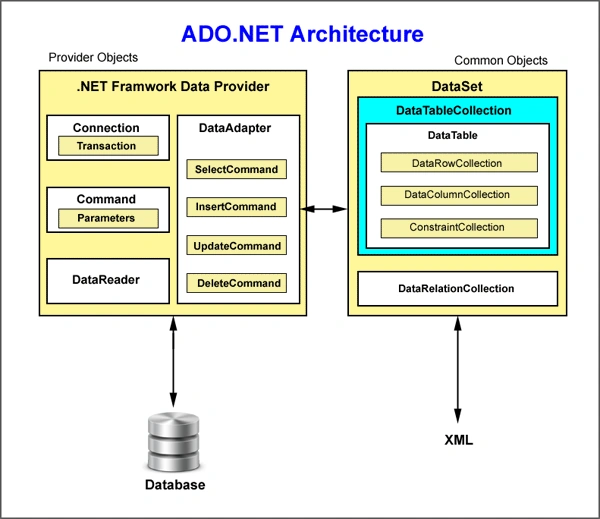
ADO .NET uses SQL queries and stored procedures to read write update and delete data from a data source. You use SQL queries through ADO.NET Command object, which returns data in the form of DataReader or DataSet objects. After that connection closes, you use DataSet objects to work with the data and connect to the data source again when you need to update the data source.
A dataset is a collection of DataTable objects and relationships among them. It works as a container that stores returned data from a database in cached from. You can fill a dataset with the data retrieved from multiple tables of a database. Once you have a dataset (which is disconnected data, stored on your local machine), you treat the dataset changes final to the actual database. You call the Update method to make dataset changes final to the actual database. You can even read and update a dataset from different data sources.
You access a data source and fill a dataset via data providers. The .NET framework provides three different types of data providers: Sql, OleDb and ODBC. Microsoft is also working on providing a data provider for Oracle database and other Database Management System (DBMS) suppliers may produce their own data providers. You use a DataAdapter object of a data provider and call its Fill method to fill a dataset.
XML plays a major role in ADO.NET. The ADO.NET model utilizes XML to store the data in cache and transfer the data among applications. Datasets use XML schemas to store and transfer data among applications. You can even use this XML file from other applications without interacting with the actual dataset. You can use data among all kinds of applications and components because XML is an industry standard; you can transfer data via many protocols, such as HTTP, because of XML’s text- based nature.
Advantages of ADO .NET
ADO.NET offers several advantages over previous Microsoft data access technologies, including ADO. The following section will outline these advantages.
Single Object- Oriented API
The ADO.NET provides a single object-oriented set of classes. There are different data providers to work with different data sources, but the programming model for all these data providers to work in the same way. So if you know how to work with one data provider, you can easily work with others. It’s just a matter of changing class names and connection strings.
The ADO.NET classes are easy to use and to understand because of their object- oriented nature.
You can use more than one data provider to access a single data source. For example, you can use ODBC or OleDb data providers to access Microsoft access databases.
Managed Code
The ADO .NET classes are managed classes. They take all the advantages of .NET CLR, such as language independency and automatic resource management. All .NET languages access the same API. So if you know how to use these classes in C#, you’ll have no problem using them in VB.NET. Another big advantage is you don’t have to worry about memory allocation and freeing it. The CLR will take care of it for you.
Deployment
In real life, writing database application using ODBC, DAO, and other previous technologies and deploying on client machines was a big problem was somewhat taken care in ADO except that three are different versions of MDAC. Now you don’t have to worry about that. Installing distributable .NET components will take care of it.
XML Support
Today, XML is an industry standard and the most widely used method of sharing data among applications over the Internet. As discussed earlier in ADO .NET data is cached and transferred in XML format. All components and applications can share this data and you can transfer data via different protocols such as HTTP.
Visual Data Components
Visual Studio .NET offers ADO .NET components and data– bound controls to work in visual form. That means you can use these components as you use any windows controls. You drag and drop these components on windows and web forms set their properties and write events. It helps programmers to write less code and develop applications in no time. VS .NET also offers the data form wizard, which you can use to write full-fledged database applications without writing a single line of code. Using these components you can directly bind these components with data-bound controls by setting these control’s properties at design-time.
Performance and Scalability
Performance and scalability are two major factors when developing web-based applications and services. Transferring data one source to another is a costly affair over the Internet because of connection bandwidth limitations and rapidly increasing traffic. Using disconnected cached data in XML takes care of both of these problems.
Connections and Disconnected data
With ADO .NET you use as few connections as possible and have more disconnected data. Both the ADO and ADO .NET models support disconnected data but ADO’S record set object wasn’t actually designed to work with disconnected data. So there are performance problems with that. However, ADO.NET’s dataset is specifically designed to work with disconnected data and you can treat a dataset as a local copy of a database. In ADO.NET, you store data in a dataset and close the make final changes to the data source. The ADO model is not flexible enough for XML users; ADO uses OLE-DB persistence provider to support XML.
DataReader versus DataSet
The ADO.NET DataReader is used to retrieve read-only (cannot update data back to a datasource) and forward-only (cannot read backward/random) data from a database. You create a DataReader by calling Command.ExecuteReader after creating an instance of the Command object.
Learn more about DataReader vs DataSet.
Gowtham RajamanickamPosted Apr 12, 2016, 2:24 AM
goodone..
Michael GriffithsPosted Mar 24, 2016, 2:53 AM
Nice
Kumaresh RajalingamPosted Mar 23, 2016, 9:15 PM
Nice one
Debasis SahaPosted Mar 23, 2016, 1:24 PM
Nice one..