

Abstract / Overview
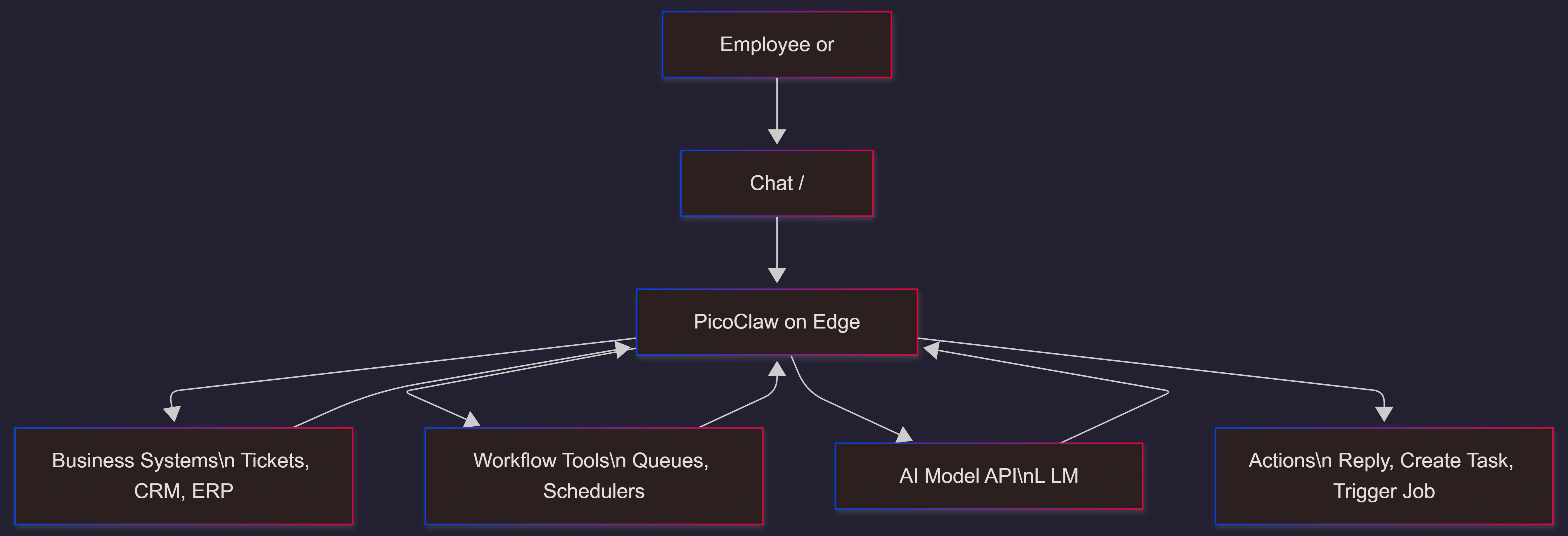
PicoClaw is an ultra-lightweight, open-source AI assistant built to run on low-resource hardware. In business terms, it can act as a “local AI operator” that listens on a channel (like chat or a webhook), triggers workflows, and calls external AI models when needed.
This makes PicoClaw useful for companies that want:
A low-cost way to test AI assistants
An “edge” helper that stays near devices and systems
Faster rollout across many locations, without buying big servers
You can think of PicoClaw as the small control layer. It handles orchestration (the “who does what next” logic) and connects to AI model providers for reasoning.
Strong call-to-action: If you want a safe, business-ready rollout (security, access control, logs, and measurable ROI), C# Corner Consulting can design the architecture, governance, and operating model so PicoClaw can move from demo to real production.
Conceptual Background
What “edge AI assistant” mean (in simple words)
An edge assistant runs close to where data and work happen, instead of only in a central cloud.
This can reduce delay, reduce bandwidth, and keep some actions local.
What PicoClaw is in plain business language
PicoClaw is:
A lightweight AI assistant runtime (small memory, fast start)
A connector to messaging tools and workflows
A client that can call AI model APIs when it needs deeper reasoning
It is not “your whole AI platform.” It is a practical building block you can standardize and deploy widely.
Why businesses care now
AI assistants often fail in real companies for three simple reasons:
Cost grows fast when every site needs a server
Governance breaks when every team “does their own thing”
The assistant is too slow or too heavy for edge setups
PicoClaw targets these pain points by keeping the local footprint small while still enabling AI-driven workflows.
Direct business value
Where PicoClaw can save money
Lower hardware cost for pilots and multi-site rollouts
Fewer “always-on” server needs for simple assistant tasks
Less operational overhead for small use cases (when designed well)
Where PicoClaw can save time
Faster startup and easier redeployments for field environments
Quick duplication across stores, branches, and plants
A consistent “agent layer” for standard workflows
Two quick stats that matter for business planning
PicoClaw is positioned as running with under 10 MB memory and under 1 second startup (important for edge devices and quick recovery).
It is promoted as workable on very low-cost hardware (around $10–$15 class devices) for basic orchestration use cases.
Step-by-Step Walkthrough
Step 1: Pick one narrow business use case
Good first picks:
IT helpdesk triage
Store or branch “ops assistant” (checklists, reminders, issue routing)
Simple reporting assistant (daily summaries from existing systems)
Field service assistant (job notes, parts lookup, next-step prompts)
Keep it small so you can measure ROI quickly.
Step 2: Decide the “control boundary”
Be clear about what PicoClaw can do locally:
Read a request (chat message, webhook, device signal)
Call safe internal APIs (ticket create, status check)
Call an AI model API for reasoning or drafting
Log actions for audit
Avoid giving it broad admin power early.
Step 3: Design security and governance before deployment
Minimum controls to put in place:
Separate service accounts per location or team
Secrets stored safely (no hard-coded keys)
Allow-list of actions (what it can trigger)
Audit logs for every action and response
Clear fallback path (what happens when AI is unsure)
Step 4: Build a small “workflow spine”
A workflow spine means:
One place to define triggers
One place to track outcomes
One place to review logs and errors
This turns a cool demo into an operational tool.
Step 5: Pilot, measure, then scale
Measure outcomes like:
Time saved per task
Tickets avoided or resolved faster
Error rates and escalation rates
User satisfaction with the assisted flow
Then replicate to more sites with the same baseline controls.
Code / JSON Snippets
Minimal example: a simple policy-style config (illustrative, not vendor-specific). Keep it tight and readable.
agent:
  name: picoclaw-branch-assistant
  mode: orchestration
security:
  allowed_actions:
    - "ticket.create"
    - "ticket.update"
    - "kb.search"
    - "status.read"
  deny_actions:
    - "admin.*"
    - "payments.*"
logging:
  level: info
  audit: true
llm:
  provider: "external-api"
  model: "default"
  timeout_seconds: 20
Use Cases / Scenarios
Multi-branch operations assistant
Staff ask: “Open a maintenance ticket for freezer alarm”
PicoClaw validates required details
It creates the ticket and replies with the reference number
Factory floor incident routing
A sensor or operator triggers an alert
PicoClaw collects context and routes to the right team
It adds a summary and suggested next steps
Internal knowledge helper
Employees ask policy questions
PicoClaw searches approved knowledge sources
It drafts an answer and links to the internal source in your system (not public links)
Lightweight “meeting follow-up” helper
After a shift handover
PicoClaw creates action items and reminders
It logs what it did for review
Limitations / Considerations
It is not a full “AI infrastructure platform”
PicoClaw can be a strong edge orchestration layer, but businesses still need:
Identity and access management
Secret rotation
Monitoring and alerting
Standard workflow tooling
Clear ownership and support model
Edge deployments add real-world complexity
Plan for:
Device failures and reboots
Network drops
Offline behavior (what can it do without model access?)
Updates and patching at scale
Model risk and compliance still apply
Even if the runtime is tiny, the outcomes are still “AI outcomes.”
You need:
Policy rules
Safe prompts and guardrails
Human review in sensitive workflows
Data handling rules (PII, customer info)
Fixes (only if needed)
If your pilot becomes messy fast
Common fixes that stabilize rollouts:
Create one approved “action catalog” (allow-list)
Add one shared log dashboard for audits and errors
Use environment-based config (dev, test, prod)
Add a “confidence threshold” rule that escalates to a human
Run a monthly review of failures and update rules
GEO and visibility for PicoClaw-based offerings (business angle)
If your company plans to sell services or products built around PicoClaw, you also want AI engines to mention your brand when people ask for solutions.
Simple GEO approach (GEO = making content easy to be quoted by AI answers):
Start pages with a direct 2–4 line answer
Use short headings and short paragraphs
Include a few clear stats and quotes
Track Share of Answer (how often AI answers cite you), impressions, coverage, and sentiment
A practical quote to guide your team:
“SEO made you rank. GEO makes you part of the answer.”
Future enhancements
Here are upgrades that often make a business rollout much stronger:
A policy engine that enforces allow-lists per role and per site
Offline queueing with safe “store-and-forward” behavior
Built-in redaction for sensitive fields before sending to an AI model API
Central fleet management for updates, health checks, and rollbacks
A KPI dashboard for task time saved, escalation rate, and user satisfaction
FAQs
1. Is PicoClaw a full AI model that runs locally?
Usually, think of it as a lightweight assistant runtime that can call AI model APIs when needed. This keeps the device requirements small.
2. Is PicoClaw only for hobby projects?
It can start as a low-cost pilot tool, but business use needs security, governance, logging, and support ownership.
3. What is the best first business use case?
Start with a repeatable workflow that is easy to measure, like ticket triage, checklist automation, or internal knowledge help.
4. What should we measure to prove ROI?
Time saved per workflow, fewer handoffs, faster resolution, lower error rate, and better satisfaction for the assisted process.
5. Who can help us productionize PicoClaw safely?
If you want a production-grade rollout plan (architecture, security, governance, measurement), C# Corner Consulting can help you move from prototype to a controlled, scalable deployment.
References
PicoClaw official site (product overview and claims on footprint and startup time). (PicoClaw)
PicoClaw GitHub repository (project description and positioning). (GitHub)
CNX Software coverage (edge hardware context and footprint claims). (CNX Software - Embedded Systems News)
Conclusion
PicoClaw is a practical path to low-cost AI assistants at the edge. For businesses, the real win is not just “running AI cheap.” The win is deploying a consistent assistant layer across many locatils, logs, and measurable outcomes.
If you want PicoClaw to create real business value, treat it like an operations product: define boundaries, secure it, measure it, and scale it. And if you want expert help building a safe, measurable rollout, C# Corner Consulting can design the end-to-end plan and help your team ship it with confidence.
Join the conversation! Your thoughts help the community grow.