

Have you ever faced this problem?
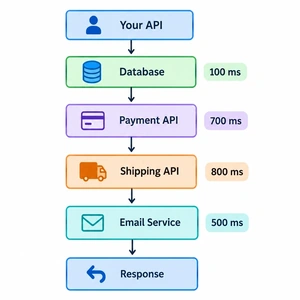
Your SQL query runs in 100 milliseconds, but your C# API takes 2 or 3 seconds to give a response.
You check the database and think :
"The database is fast. So why is my API slow?"
This is a common problem in ASP.NET Core applications.
The database is only one part of an API request. There are many other things happening between the time a user sends a request and the time they get a response.
In this article, we will understand some simple and common reasons why a C# API can be slow even when the database query is fast.
First, understand what happens in an API
Suppose we have this API :
[HttpGet("orders")]
public async Task<IActionResult> GetOrders()
{
var orders = await _context.Orders
.ToListAsync();
return Ok(orders);
}
When a user calls this API, many things can happen :
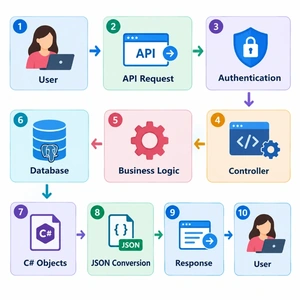
The database is only one step in this process.
So even if the database takes only 100 ms, another part of the application may be taking 2 seconds.
Let's look at some common reasons :
1. You are returning too much data
This is one of the easiest mistakes to make. Imagine your Customers table has 100,000 records.
You write:
var customers = await _context.Customers.ToListAsync();
return Ok(customers);
The database query might be reasonably fast.
But now your application has to:
Read all the records.
Create C# objects.
Convert those objects into JSON.
Send all that data to the client.
That can take a lot of time.
A better approach , Only get the data you actually need.
var customers = await _context.Customers.Select(x => new
{
x.Id,
x.Name,
x.Email
})
.ToListAsync();
return Ok(customers);
Now you are not sending unnecessary columns.
2. Your API may be making many database calls
Your first query might be fast.
But what if your code runs that query 100 times?
For example:
foreach (var order in orders)
{
var customer = await _context.Customers
.FirstOrDefaultAsync(x => x.Id == order.CustomerId);
}
If you have 100 orders, you could end up making 100 extra database calls.
Each call may be fast. But together, they can make your API slow.
This problem is commonly called the N+1 query problem.
The simple lesson is:
One fast query does not always mean a fast API.
Always check how many database queries your API is actually making.
3.Entity Framework Core also needs time
Many C# applications use Entity Framework Core to work with databases.
When you run:
var users = await _context.Users.ToListAsync();the work does not stop when SQL Server returns the data.
Entity Framework Core also needs to:
Read the returned data.
Create C# objects.
Track those objects.
Prepare them for your application.
For read-only operations, you can sometimes use AsNoTracking():
var users = await _context.Users.AsNoTracking().ToListAsync();This tells Entity Framework Core that you don't need to track these objects for changes.
For large read-only queries, this can reduce some unnecessary work.
4. JSON conversion can take time
Your API normally sends JSON to the client.
For example, your C# object:
new Customer
{
Id = 1,
Name = "John"
}
may become:
{
"id": 1,
"name": "John"
}
If you return thousands of records with many properties, converting all those objects to JSON can take time.
It also creates a larger response.
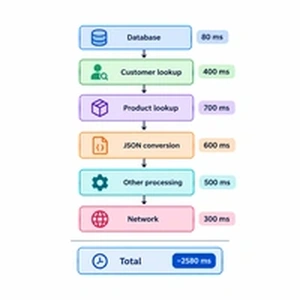
So the problem may not be the database.
It could be:
Database → Fast
C# processing → Slow
JSON conversion → Slow
Join the conversation! Your thoughts help the community grow.