

This article explains how to change a Windows Forms background image every second and how to change the background color every second.
Step 1
Go to the VS 2012 Menu and select "File" -> "New" -> "Project..." then select Visual C# -> Window Forms Application and create the Windows Forms application.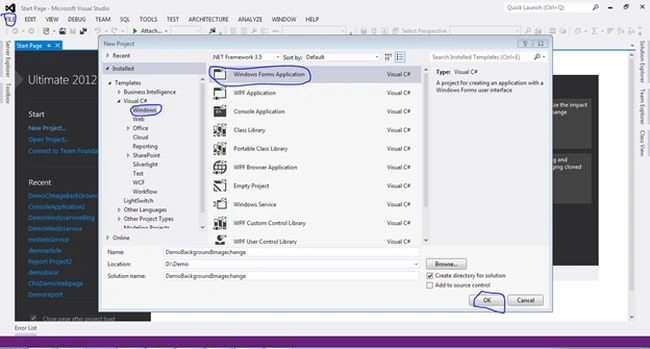
Step 2
Then we will select the resources.resx file from the Solution Explorer.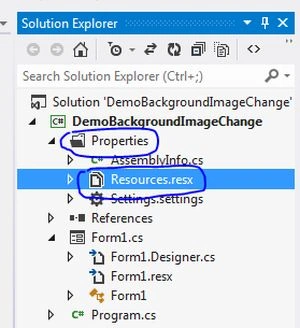
Then go to the top of the resources file where we can see multiple options. Here I will select the images option because we want to add an existing file in the resources.resx file.
If you want to store global variables, global image files, global text files and so on in the Windows application then you should go to the resource file for the setting of all these configurations.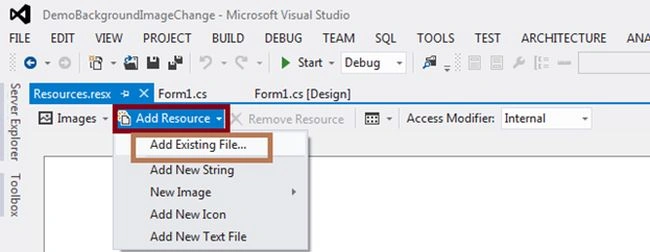
I have two images in the resource file and then select all the images and press F4 for setting the properties of the images. Then select persistence properties to embed them in the .resx.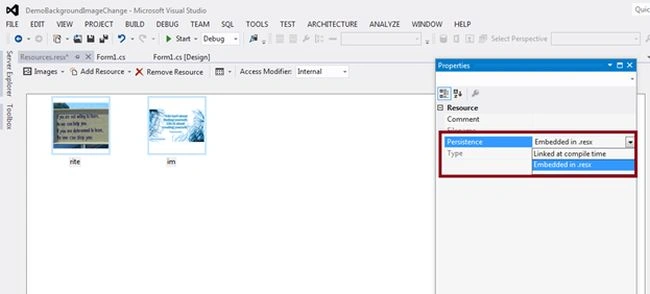
Step 3
Then go to the Form1.cs file and write this code to change the background image every second.
- using System;
- using System.Collections.Generic;
- using System.ComponentModel;
- using System.Data;
- using System.Drawing;
- using System.Linq;
- using System.Text;
- using System.Windows.Forms;
- namespace DemoBackgroundImageChange
- {
- public partial class Form1 : Form
- {
- public Form1()
- {
- this.BackgroundImage = Properties.Resources.im;
- InitializeComponent();
- var timer = new Timer();
- //change the background image every second
- timer.Interval = 1000;
- timer.Tick += new EventHandler(timer_Tick);
- timer.Start();
- }
- void timer_Tick(object sender, EventArgs e)
- {
- //add image in list from resource file.
- List<Bitmap> lisimage = new List<Bitmap>();
- lisimage.Add(Properties.Resources.im);
- lisimage.Add(Properties.Resources.rite);
- var indexbackimage = DateTime.Now.Second % lisimage.Count;
- this.BackgroundImage = lisimage[indexbackimage];
- }
- }
- }
Output:
Step 4
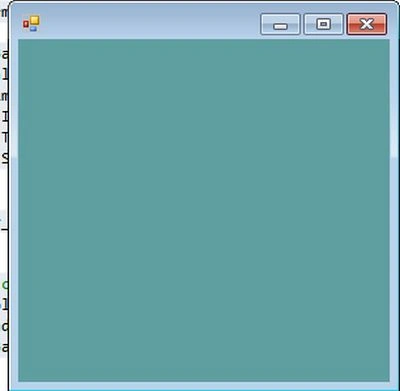
Code to change the form background color every second.
- using System;
- using System.Collections.Generic;
- using System.ComponentModel;
- using System.Data;
- using System.Drawing;
- using System.Linq;
- using System.Text;
- using System.Windows.Forms;
- namespace DemoBackgroundImageChange
- {
- public partial class Form2 : Form
- {
- public Form2()
- {
- this.BackColor = Color.Green;
- InitializeComponent();
- var timer = new Timer();
- timer.Interval = 1000;
- timer.Tick += new EventHandler(timer_Tick);
- timer.Start();
- }
- void timer_Tick(object sender, EventArgs e)
- {
- //set color in background
- var colors = new[] { Color.CornflowerBlue, Color.Green, Color.Aqua, Color.Azure, Color.CadetBlue };
- var index = DateTime.Now.Second % colors.Length;
- this.BackColor = colors[index];
- }}
Mohammad ImranPosted Mar 30, 2019, 6:34 AM
How can i upload and download pdf files in database folder instead of direct database? Please tell me code here..
Hieu HaPosted Nov 15, 2017, 8:08 PM
How can I force the background image to fit its container ???
Mohammed AshrafPosted Jun 13, 2016, 9:50 PM
Good one
Manish Kumar ChoudharyPosted Dec 25, 2014, 11:59 PM
Nice one..
Vithal WadjePosted Dec 25, 2014, 9:47 PM
nice explanation,keep it up