

Introduction
In this article we will see how to send a SMS from Windows Phone 8.
The SMS Compose Task enables the application to launch a messaging application and options to send a SMS. We can assign the recipient by default or provide an option to the end user to select the recipient from the contacts.
Let us see the procedure to do a SMS task from the Windows Phone 8 application. Open the Visual Studio 2012 IDE and create a new Windows Phone 8 application with a valid name. Once the application is created add some controls to do the SMS compose task. The design looks as in the following:
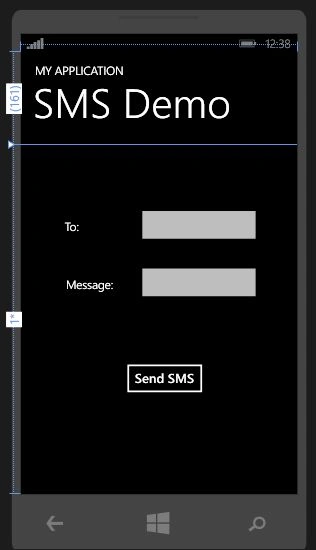
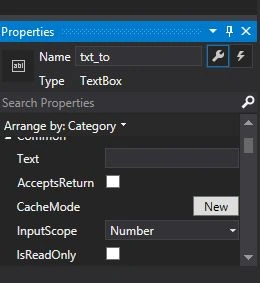
We need to set the input scope as a number for “To TextBox”, because to enter a number only. Change the input scope of “To TextBox” as “Number” as in the following:
XAML Code
- <Grid x:Name="ContentPanel" Grid.Row="1" Margin="12,0,12,0">
- <Button x:Name="btn_send" Content="Send SMS" HorizontalAlignment="Left" Margin="161,370,0,0" VerticalAlignment="Top" Click="btn_send_Click"/>
- <TextBlock HorizontalAlignment="Left" TextWrapping="Wrap" Text="Message:" VerticalAlignment="Top" Margin="66,229,0,0"/>
- <TextBlock HorizontalAlignment="Left" TextWrapping="Wrap" Text="To:" VerticalAlignment="Top" Margin="64,128,0,0"/>
- <TextBox x:Name="txt_to" HorizontalAlignment="Left" Height="72" TextWrapping="Wrap" Text=" " VerticalAlignment="Top" Width="221" Margin="187,103,0,0" InputScope="Number"/>
- <TextBox x:Name="txt_body" HorizontalAlignment="Left" Height="72" TextWrapping="Wrap" Text=" " VerticalAlignment="Top" Width="221" Margin="187,203,0,0"/>
- </Grid>
- Using Microsoft.Phone.Tasks;
- To
- Body
Now go to the button click event and write the following code to do the SMS compose task. First create a new object for the SmsComposeTask to send a new SMS to any recipient.
C# Code
- private void btn_send_Click(object sender, RoutedEventArgs e)
- {
- SmsComposeTask objSendsms = new SmsComposeTask();
- objSendsms.To = txt_to.Text.ToString();
- objSendsms.Body = txt_body.Text.ToString();
- objSendsms.Show();
- }
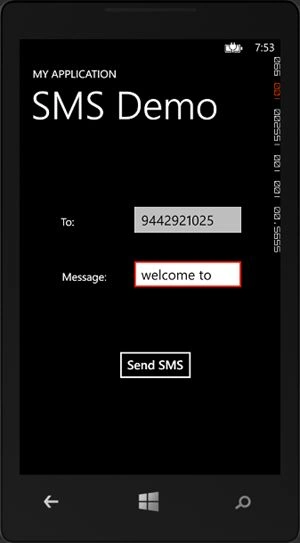
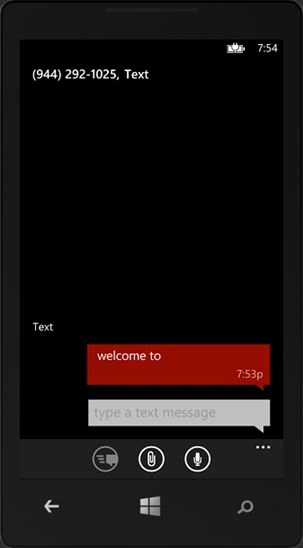
You can test this application in your device. Finally your output looks as in the following:
Kumaresh RajalingamPosted Feb 19, 2016, 7:58 PM
good one
Kumaresh RajalingamPosted Feb 19, 2016, 7:58 PM
Nice explanation
Sr KarthigaPosted Feb 16, 2016, 10:16 PM
good one
Sr KarthigaPosted Feb 16, 2016, 10:16 PM
Nice explanation
Suresh MPosted Dec 24, 2014, 1:26 AM
using Microsoft.Phone.Tasks;
Abdulrahman MohammedPosted Dec 23, 2014, 5:33 PM
I got error in using windows.phone.tasks
Suresh MPosted Sep 15, 2014, 4:42 AM
I think u can't read and push message in inbox
prince rajPosted Sep 5, 2014, 12:47 AM
Any idea About How To Push Message in inbox ?