

Introduction
This article explains the Save Appointment task. It enables the user to save an appointment in their phone calendar. It can be very useful for various to-do based apps. Let's see how to use it.
Save Appointment Task
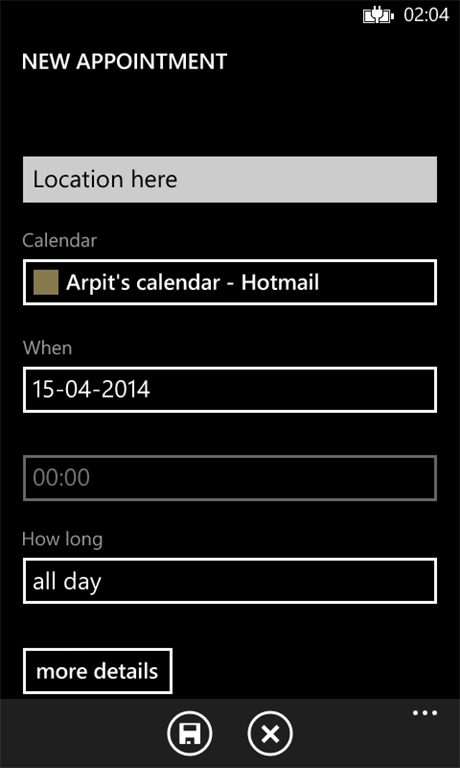
This is a kind of launcher provided by Windows Phone to launch the mobile calendar from an app so that the user can save the appointment. The task can be customized with various properties for its proper use.
Before using this task we need to include the following namespace:
using Microsoft.Phone.Tasks;To use this task we need to use the following procedure:
- Create a new instance of Save Appointment task.
Microsoft.Phone.Tasks.SaveAppointmentTask sat = new SaveAppointmentTask();
- Next is to set various properties of this task.
sat.AppointmentStatus = Microsoft.Phone.UserData.AppointmentStatus.Busy;
sat.Details = detTxt.Text;
sat.EndTime = DateTime.Today;
sat.IsAllDayEvent = true;
sat.Location = locTxt.Text;
sat.Reminder = Reminder.ThirtyMinutes;
sat.StartTime = DateTime.Today;
sat.Subject = subTxt.Text;
- Finally, show this task by calling the Show method.
pct.Show();
Properties that we can set for this task are as follows:
- Appointment Status
Sets the appointment status that will be set for the new appointment when the calendar application is launched.
- Details
Sets the details text that will be set for the new appointment when the calendar application is launched.
- End Time
Sets the end time for the new appointment when the calendar application is launched.
- Is All Day Event
Sets the whether the new appointment shown when the calendar application is launched is an all day event.
- Location
Sets the location text that will be set for the new appointment when the calendar application is launched.
- Reminder
Sets the reminder time that will be set for the new appointment when the calendar application is launched.
- Start time
Sets the start time that will be set for the new appointment when the calendar application is launched.
- Subject
Sets the subject text that will be set for the new appointment when the calendar application is launched.
Demo
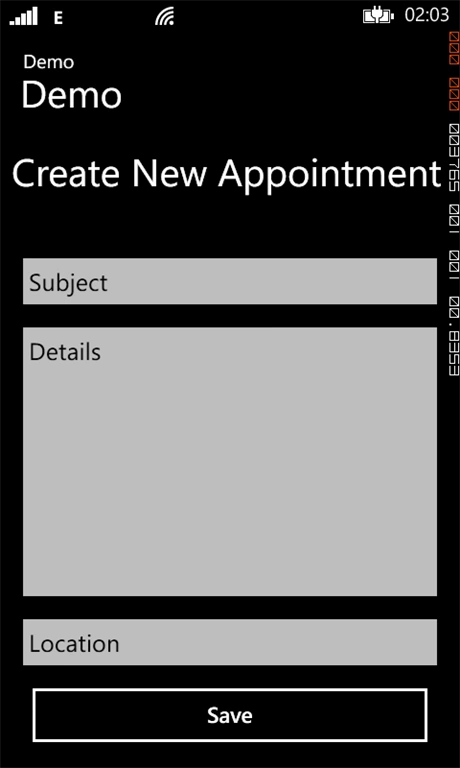
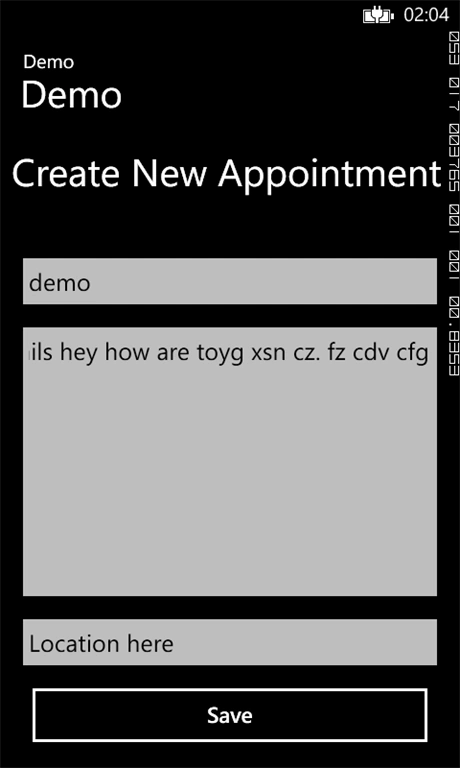
The following code demonstrates how to use the Save Appointment task to save an appointment from our app page.
XAML
<phone:PhoneApplicationPage
x:Class="Demo.MainPage"
xmlns="http://schemas.microsoft.com/winfx/2006/xaml/presentation"
xmlns:x="http://schemas.microsoft.com/winfx/2006/xaml"
xmlns:phone="clr-namespace:Microsoft.Phone.Controls;assembly=Microsoft.Phone"
xmlns:shell="clr-namespace:Microsoft.Phone.Shell;assembly=Microsoft.Phone"
xmlns:d="http://schemas.microsoft.com/expression/blend/2008"
xmlns:mc="http://schemas.openxmlformats.org/markup-compatibility/2006"
mc:Ignorable="d"
FontFamily="{StaticResource PhoneFontFamilyNormal}"
FontSize="{StaticResource PhoneFontSizeNormal}"
Foreground="{StaticResource PhoneForegroundBrush}"
SupportedOrientations="Portrait" Orientation="Portrait"
shell:SystemTray.IsVisible="True">
<!--LayoutRoot is the root grid where all page content is placed-->
<Grid x:Name="LayoutRoot" Background="Transparent">
<Grid.RowDefinitions>
<RowDefinition Height="Auto"/>
<RowDefinition Height="*"/>
</Grid.RowDefinitions>
<!--TitlePanel contains the name of the application and page title-->
<StackPanel x:Name="TitlePanel" Grid.Row="0" Margin="12,17,0,28">
<TextBlock Text="Demo" Style="{StaticResource PhoneTextNormalStyle}" Margin="12,0"/>
<TextBlock Text="Demo" Margin="9,-7,0,0" FontSize="40" />
</StackPanel>
<!--ContentPanel - place additional content here-->
<Grid x:Name="ContentPanel" Grid.Row="1" Margin="12,0,12,0">
<StackPanel Orientation="Vertical">
<TextBlock Text="Create New Appointment" FontSize="40" Height="106"></TextBlock>
<TextBox Name="subTxt" Text="Subject"></TextBox>
<TextBox Name="detTxt" Text="Details" Height="304"></TextBox>
<TextBox Name="locTxt" Text="Location"></TextBox>
<Button x:Name="btnOpen" Click="btnOpen_Click" Content="Save" HorizontalAlignment="Left" Width="436" Height="80" VerticalAlignment="Bottom" Margin="10,0,0,0"/>
</StackPanel>
</Grid>
</Grid>
</phone:PhoneApplicationPage>
C# Code Behind
using Microsoft.Phone.Controls;
using System;
using System.Collections.Generic;
using System.Linq;
using System.Net;
using System.Windows;
using System.Windows.Controls;
using System.Diagnostics;
using Microsoft.Phone.Tasks;
using System.Windows.Media;
namespace Demo
{
public partial class MainPage : PhoneApplicationPage
{
// Constructor
public MainPage()
{
InitializeComponent();
}
private void btnOpen_Click(object sender, RoutedEventArgs e)
{
/* Step 1 */
Microsoft.Phone.Tasks.SaveAppointmentTask sat = new SaveAppointmentTask();
/* Step 2 */
sat.AppointmentStatus = Microsoft.Phone.UserData.AppointmentStatus.Busy;
sat.Details = detTxt.Text;
sat.EndTime = DateTime.Today;
sat.IsAllDayEvent = true;
sat.Location = locTxt.Text;
sat.Reminder = Reminder.ThirtyMinutes;
sat.StartTime = DateTime.Today;
sat.Subject = subTxt.Text;
/* Step 3 */
sat.Show();
}
}
}
The Show method is used to launch the task.
Output
Gowtham RajamanickamPosted Apr 18, 2015, 4:09 AM
good on
Gowtham RajamanickamPosted Apr 18, 2015, 4:07 AM
good