

Introduction
The <area> tag is used only within a <map> tag. The <area> tag is used to define the areas on the image map that whenever the user clicks on the area the other page that the user is navigated to. The image map is used to divide the image into clickable areas and the clickable areas work like a hyperlink.
Syntax
In the <area> tag there are very many element-specific attributes as described below.
Alt: This attribute is used only when the web page cannot render the image and the href attribute on the web page. It is used as an alternative text message in place of an image if the image is not rendered.
Class: This attribute is used to specify a class name for an element. It associates a particular area within an image map with a CSS class.
Coords: This attribute is used to define the clickable area of any shape on the image map. It contains a set of values specifying the coordinate of the hotspot region. You can only set the area; not the shape directly here. If you want to set your shape then you should use a shape attribute also. The Shape attribute can contain a rectangle shape, circle shape, and polygon shape.
- <area
- alt="alternative text"
- class="class name(s)"
- coords="comma-separated list of values"
- dir="ltr | rtl"
- href="URL"
- id="unique alphanumeric identifier"
- lang="language code"
- nohref="nohref"
- shape="circle | default | poly | rect"
- target="frame or window name | _blank | _parent | _self |_top"
- title="advisory text"/>
- rect: left, top, right, bottom
- circle: center-x, center-y, radius
- poly: x1, y1, x2, y2,
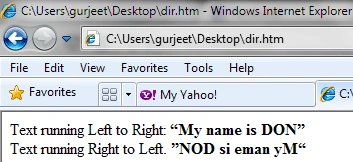
dir: this attribute is used for text direction for the content in an element.
- <div>
- Text running Left to Right:
- <bdo dir="ltr">
- <b>
- <q>My name is DON</q>
- </b>
- </bdo>
- </div>
- <div>
- Text running Right to Left.
- <bdo dir="rtl">
- <b>
- <q>My name is DON</q>
- </b>
- </bdo>
- </div>
-
alternate
-
archives
-
author
-
bookmark
-
external
-
feed
-
first
-
help
-
index
-
last
-
license
-
next
-
nofollow
-
noreferrer
-
prev
-
search
-
sidebar
-
tag
-
up
shape: This attribute is used to define the shape for the clickable area in the image map for the link. Possible values are:
default: you can specify default value also.
rect: rect value defines a rectangular region
circle: circle value defines a circular region
poly: poly value defines the polygon region.
target: Specifies where to open the target URL specified in href attribute.
- _blank : blank value indicates a new window must be open.
- _parent: parent value is used in the situation where a frameset file is nested inside another frameset file. A link in one of the inner frameset documents which uses "_parent" will load the new document where the inner frameset file had been.
- _self: self value indicates the frame contains the source link. It works the same as if you had not used TARGET at all.
- _top: top value indicates that it will use a full browser window.
type: This attribute is used to specify the type of media in the form of the MIME type for the hyperlink.
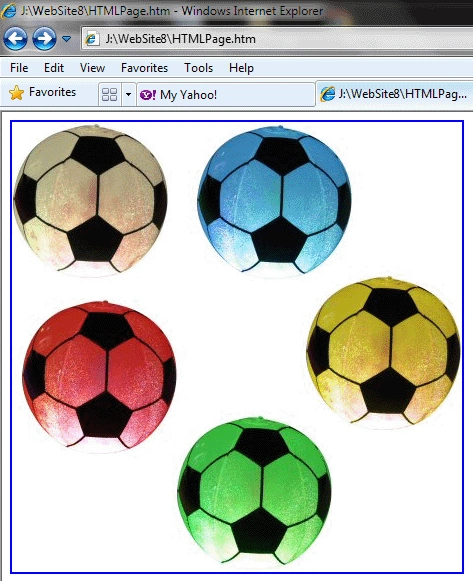
Note: One thing always remember whenever you use area tag in map tag. Your <img> tag must contain usemap value with #. If you ignore this your clickable image not work on Internet Explorer or FireFox, so always use # in usemap value of <img> tag.
- <img src="image/all balls.jpg" style="width: 450px; height: 450px;" alt="Balls" usemap="#BallMap" />


Join the conversation! Your thoughts help the community grow.