
Introduction
The BindingNavigator control provides a UI for navigating records in a form. Generally, this control is used with the BindingSource control to move from one record to another record. By default this control has a series of buttons for moving to next and previous records as well as first and last records, to add a new record, and to delete a record. Here we will use this control in our Windows application.
At first, we should have some records. So we create a Database and insert some records into the database table.
Create Database
CREATE DATABASE EMP

USE EMP

CREATE TABLE EMP_DETAIL
(
    E_ID INT PRIMARY KEY,
    E_NAME VARCHAR(30),
    E_AGE INT,
    E_CITY VARCHAR(30),
    E_DEPARTMENT VARCHAR(20)
)

INSERT INTO EMP_DETAIL VALUES(11,'ALOK KUMAR',24,'DELHI','IT')
INSERT INTO EMP_DETAIL VALUES(12,'RAJESH TRIPATHI',22,'ALLAHABAD','SALES')
INSERT INTO EMP_DETAIL VALUES(13,'SATISH KUMAR',23,'JHANSI','PRODUCT')
INSERT INTO EMP_DETAIL VALUES(14,'MANOJ SINGH',22,'NOIDA','MARKETING')
INSERT INTO EMP_DETAIL VALUES(15,'AMIT MAHESHWARI',25,'ALLIGARH','IT')
INSERT INTO EMP_DETAIL VALUES(16,'DEEPAK DWIJ',24,'NOIDA','IT')
I am showing a screenshot of all records of an EMP_DETAIL table so that it can become easy to understand.
SELECT * FROM EMP_DETAIL
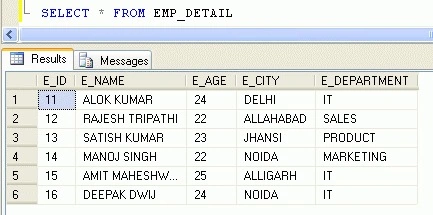
Now create a Windows Forms application. Follow the given steps.
Step 1. Go to Toolbox and take a BindingSource and a BindingNavigator control.

Step 2. It will add to your form like in the following figure.
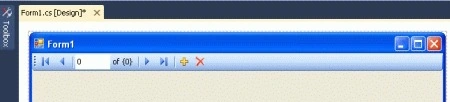
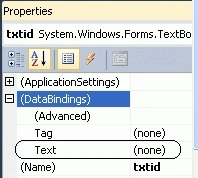
Step 3. Now we set the DataSource and DataMember properties to a BindingSource object. For doing it you can get help here. Now select BindingNavigator and go to its property window. Set the "BindingSource" property to bindingSource1. Look at the following figure.

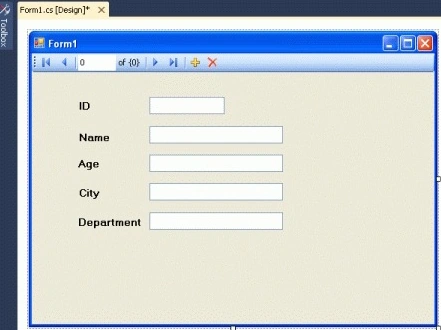
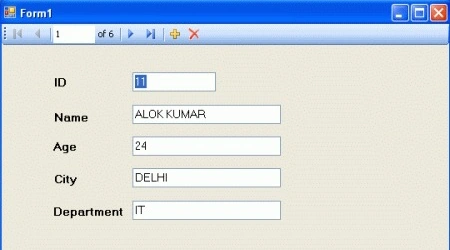
Step 4. Take five Labels and five TextBox controls. Set the Text property of the Labels to "ID", "Name", "Age", "City", and "Department" and the name property of the TextBoxes to "textid", "textname", "textage", "textcity" and "textdepartment". (In this example I have set these properties as given.)



krishan mohanPosted Apr 28, 2016, 12:56 AM
like it
krishan mohanPosted Apr 28, 2016, 12:55 AM
thanks d
Iadh HamdiPosted May 4, 2015, 10:55 AM
Very good article, simple, educative and full of knowledge. Thank you sir!!!
Honey ChawlaPosted Jan 16, 2014, 5:32 AM
thanks alot alok it helped me alot and continue posting article related to csharp forms
Sam HobbsPosted Jan 26, 2012, 4:38 PM
Thank you Alok for explaining the details of using these controls. There are other articles that show how to get applications such as these generated automatically with little or no code written by us and this article explains many of the details of what the applicaitons do.