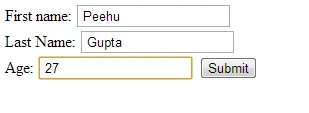
In this article, we will discuss how to create a database and how to easily create a table in it and how to insert data in this table. Here we create a database (mydb) and create a table (Emp) and insert data like (First name, last name, and Age) in this table using TextBoxes like this
Step 1: First we create some controls like TextBox and Button to enter our data like this:
- First name: <input type="text" id="xtfname" /><br />
- Last Name: <input type="text" id="xtlname" /><br />
- Age: <input type="text" id="xtAge" />
- <input type="button" onclick="Show()" value="Submit" /><br/><br/><br/>
- <div id="result" name="result"><b>Result:</b></div>
Step 2: Now we will write the code for the JavaScript function Show(). But first we create a database like this
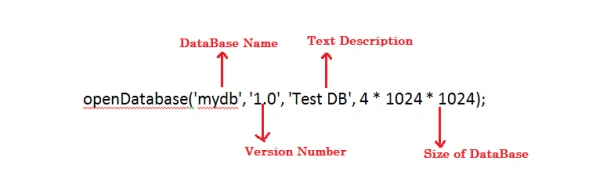
var db = openDatabase('mydb', '1.0', 'Test DB', 4 * 1024 * 1024);
Here we create a database using the openDatabase method to determine whether the database exists, if the database is not available then it will create the new database. In my case, it creates the database (db).
Now we will look at this method
Now we will write the function Show(). Here we use the values of the TextBox and store it in the variables like this:
- var a=document.getElementById('xtfname').value;
- var b=document.getElementById('xtlname').value;
- var c=document.getElementById('xtAge').value;
Now we will write the transaction method (to control the transaction and for commit and rollback depending on the situation) like this:
- db.transaction(function (x) {
- x.executeSql('Create table if not exists Emp (fname,lname,age)');
- x.executeSql('insert into Emp (fname,lname,age) VALUES ("'+a+'","'+b+'","'+c+'")');
- });
Here we create a Table Emp and insert values in this table. We insert the values of the a, b and c variables.
- db.transaction(function(x) {
- x.executeSql('select * from Emp', [], function(x, totals) {
- var len = totals.rows.length,
- i;
- msg = "<p><b>Total Number Of Staff: " + len + "</b></p>";
- document.querySelector('#result').innerHTML += msg;
- for (i = 0; i < len; i++) {
- msg = "<p>" + "First Name: " + totals.rows.item(i).fname + "</p>";
- msg1 = "<p>" + "Last Name: " + totals.rows.item(i).lname + "</p>";
- msg2 = "<p>" + "Age: " + totals.rows.item(i).age + "</p>";
- document.querySelector('#result').innerHTML += msg + msg1 + msg2;
- document.getElementById('xtfname').value = " ";
- document.getElementById('xtlname').value = " ";
- document.getElementById('xtAge').value = " ";
- }
- }, null);
- });
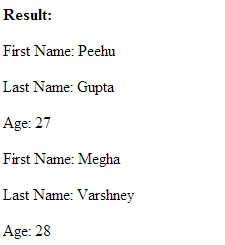
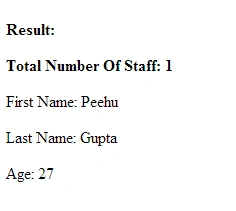
In this code, first, we execute the select query, that will be helpful to show us all the records and then we will set the values of fname, lname, and Age in the msg, msg1, and msg2 that will show the output like this


Vinoth SwaminathanPosted Jun 29, 2013, 3:00 AM
if its possible to mysql db/
Vinoth SwaminathanPosted Jun 29, 2013, 2:58 AM
thanks for this article..
pani rajaPosted Jun 18, 2013, 8:44 AM
good article but i need to know some information like where these data is going to store (which Data base) and how to view thge data base details
Resmi SatishPosted Jun 3, 2013, 2:10 AM
new knowledge for me...
Ravi ShekharPosted May 15, 2013, 7:28 AM
Thanks for this blog.
Ravikumar GPosted May 14, 2013, 6:36 AM
New in HTML5 ,good one...
Mahak GuptaPosted May 8, 2013, 6:08 AM
Thanks
mehmet tPosted May 6, 2013, 8:37 AM
new information
Suthish NairPosted May 6, 2013, 4:40 AM
good one..