

This article has been excerpted from book "The Complete Visual C# Programmer's Guide" from the Authors of C# Corner.
The MainMenu, MenuItem, and ContextMenu classes
are controls that represent menu functionality. These classes are derived from
the Menu class, an abstract, base class.
The Menu Class
Table 9.9 lists and describes some of the Menu class properties and methods.
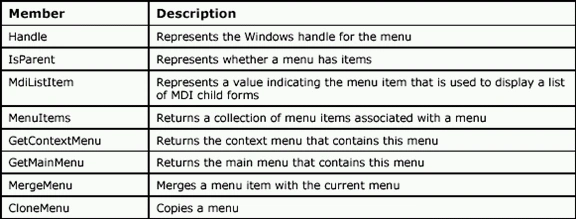
Table 9.9: Menu Class Members
The MenuItemCollection Class
The MenuItemCollection class represents the collection of MenuItem objects
stored in the MainMenu or the ContextMenu. This class is used to count, add, or
remove menu items from a menu. The MenuItemCollection properties and methods are
defined in Table 9.10 and Table 9.11, respectively.

Table 9.10: MenuItemCollection Class Properties
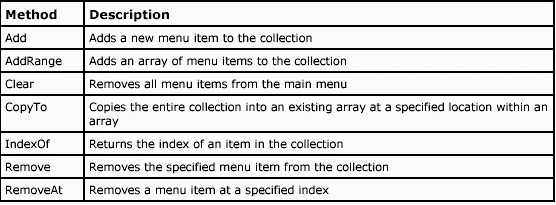
Table 9.11: MenuItemCollection Methods
The MenuItem Class
The MenuItem class represents individual items displayed in a menu. To display
menu items, you must add the menu item to a context menu or a main menu. The
MenuItems property of the ContextMenu or MainMenu classes represents the
collection of all the menu items. Table 9.12 defines some of the MenuItem
properties.
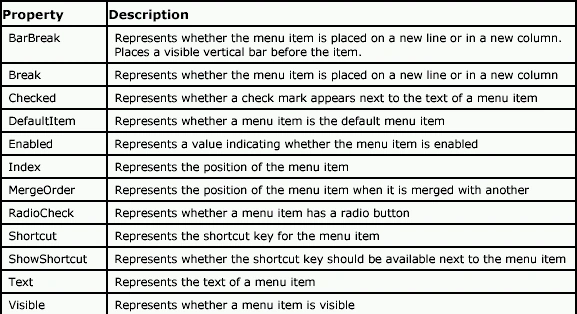
Table 9.12: MenuItem Class Properties
Adding Menu Items to a Form
Menus can be created by dragging the MainMenu control from your toolbox and
setting its properties and items. Double-clicking an item adds an event handler
for that item. Menus can also be created programmatically. To do so, first
create a MainMenu object and then create menu items using the MenuItem class and
add the items to the main menu using the MainMenu.MenuItems.Add method. The
MainMenu.MenuItems.Add method takes a MenuItem instance as a parameter. The
source code in Listing 9.8 creates a menu and four menu items. Once done, the
menu is added to the form.
Listing 9.8: Creating a Main Menu and Four Menu Items
public void
CreateMenus()
{
// Create a main menu
MainMenu myMenu =
new MainMenu();
// Create menu items and set their
properties
MenuItem item1 =
new MenuItem();
MenuItem item2 =
new MenuItem();
MenuItem item3 =
new MenuItem();
MenuItem item4 =
new MenuItem();
item1.Text = "Create Database";
item2.Text = "Open Database";
item3.Text = "Help";
item4.Text = "Exit";
myMenu.MenuItems.Add(item1);
myMenu.MenuItems.Add(item2);
myMenu.MenuItems.Add(item3);
myMenu.MenuItems.Add(item4);
MenuItem generic =
null;
int index = 0;
generic = new
MenuItem();
generic.Text = "Table";
generic.Click += new
EventHandler(this.GenericClick);
myMenu.MenuItems[1].MenuItems.Add(index++, generic);
generic = new
MenuItem();
generic.Text = "Row";
generic.Click += new
EventHandler(this.GenericClick);
myMenu.MenuItems[1].MenuItems.Add(index++, generic);
generic = new
MenuItem();
generic.Text = "Column";
generic.Click += new
EventHandler(this.GenericClick);
myMenu.MenuItems[1].MenuItems.Add(index++, generic);
// Bind the MainMenu to Form
Menu = myMenu;
}
To test this application, create a Windows application and call the CreateMenu
method from the Form1_Load method. The output of Listing 9.8 is shown in Figure
9.20.
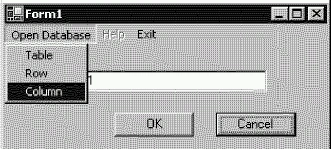
Figure 9.20: Adding Menus to a Form
Adding Events to Menu Items Selection handlers can be added by using the click
event of the MenuItem class. In the following code, you add a click event
handler to the four menu items:
item1.Click
+= new System.EventHandler(this.item1Click);
item2.Click += new System.EventHandler(this.item2Click);
item3.Click += new System.EventHandler(this.item3Click);
item4.Click += new System.EventHandler(this.item4Click);
Listing 9.9 shows the code for the event handlers.
Listing 9.9: Click Event Handlers for Menu Items
private void
item1Click(object sender, System.EventArgs
e)
{
MessageBox.Show("Create
Database Menu Item");
}

Join the conversation! Your thoughts help the community grow.