

Introduction
HTML5 has introduced a new set of Semantic Elements that help developers to define the structure of a page in a much simpler manner.
Semantic means meaning and Semantic Element means elements with meaning. A Semantic Element helps the developer and the browser to understand its meaning. There are two types of Semantic Elements:
-
Semantic : These elements clearly define their content like <form>, <img>, <table> and so on.
-
Non-semantic: These elements have no definition, they don't define anything about their content like <span> and <div>.
Traditional HTML Layouts
Developers have been using <div> elements to manage the entire structure of an HTML page that includes elements like a header, an article, footer or a sidebar and you need to use an id or class attributes to assign the role of the div elements. Let's design a traditional HTML layout before heading to HTML5 Semantic Elements.
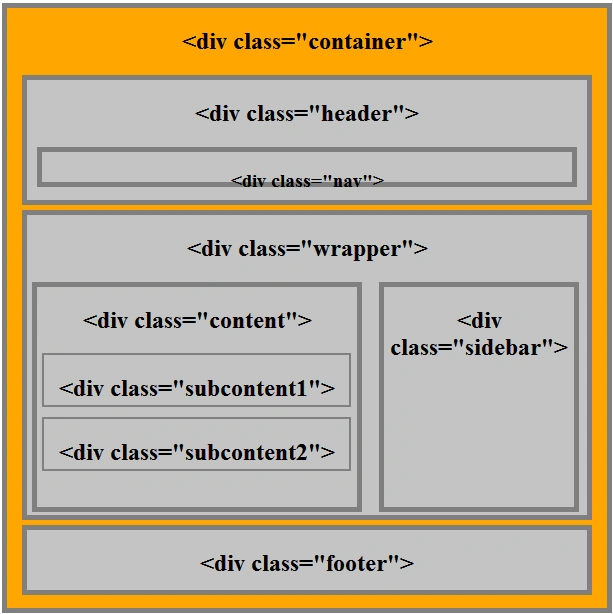
Example
- <!DOCTYPE html>
- <html xmlns="http://www.w3.org/1999/xhtml">
- <head runat="server">
- <title>HTML Basic Structure</title>
- <style>
- .container {
- width: 600px;
- height: 600px;
- margin: auto;
- border: 5px solid #7f7f7f;
- background: orange;
- text-align: center;
- }
- .header {
- margin: 0px 15px 5px 15px;
- height: 120px;
- width: 560px;
- border: 5px solid #7f7f7f;
- background: #c3c3c3;
- }
- .nav {
- width: 530px;
- height: 30px;
- margin: 0px 15px 0px 10px;
- border: 5px solid #7f7f7f;
- background: #c3c3c3;
- }
- .wrapper {
- width: 560px;
- height: 300px;
- margin: auto;
- border: 5px solid #7f7f7f;
- background: #c3c3c3;
- text-align: center;
- }
- .content {
- float: left;
- margin: 0px 5px 5px 5px;
- height: 220px;
- width: 320px;
- border: 5px solid #7f7f7f;
- background: #c3c3c3;
- }
- .subcontent {
- border: 2px solid #7f7f7f;
- width: 305px;
- height: 50px;
- margin: 10px 5px;
- }
- .sidebar {
- margin: 0px 8px 6px 8px;
- float: right;
- width: 190px;
- height: 220px;
- border: 5px solid #7f7f7f;
- background: #c3c3c3;
- }
- .footer {
- width: 560px;
- height: 60px;
- margin: 5px 15px;
- border: 5px solid #7f7f7f;
- background: #c3c3c3;
- text-align: center;
- }
- </style>
- </head>
- <body>
- <form id="form1" runat="server">
- <div>
- <!--container-->
- <div class="container">
- <h2><div class="container"></h2>
- <!--header-->
- <div class="header">
- <h2><div class="header"></h2>
- <!--nav bar-->
- <div class="nav">
- <h3><div class="nav"></h3>
- </div>
- <!--end nav bar-->
- </div>
- <!--end header-->
- <!--wrapper-->
- <div class="wrapper">
- <h2><div class="wrapper"></h2>
- <!--content-->
- <div class="content">
- <h2><div class="content"></h2>
- <!--end subcontent-->
- <div class="subcontent"><h2><div class="subcontent1"></h2></div>
- <div class="subcontent"><h2><div class="subcontent2"></h2></div>
- <!--end subcontent-->
- </div>
- <!--end content-->
- <!--sidebar-->
- <div class="sidebar"><h2><div class="sidebar"></h2></div>
- <!--end sidebar-->
- </div>
- <!--end wrapper-->
- <!--start footer-->
- <div class="footer"><h2><div class="footer"></h2></div>
- <!--end footer-->
- </div>
- <!--end container-->
- </div>
- </form>
- </body>
- </html>
Join the conversation! Your thoughts help the community grow.