

Introduction
Before writing this article I have seen many articles written on this topic,even in c-sharpcorner itself.
Let's have look at the following image which specify different routes organised in manner:
Courtesy: lapresse
Image :1
Whenever I add a new route in an application I scratch my head and think 3 times, because whenever I add new a route I get weird results. I am sure many of you have encountered a similar problem.
I hope this article will help you to understand, how routing works in MVC?
So before going in depth, let's first understand the what and why of routing.
What is a Route and Why to use one
As the name implies, a route is a path or way that takes you to a destination. Like a bus route, train route and so on.
In ASP.NET MVC, routes are responsible for redirecting your request to the specific action (which belongs to the controller). It specifies how the incoming URLs will be mapped to the controller action.
The same exists here, in MVC we define routes to invoke a specific action in the controller. And we always want to keep it clean and readable, for example http://www.c-sharpcorner.com/Authors/56fb14/ instead of
http://c-sharpcorner.com/ Authors?Id=56fb14. It not only improves readability but also it is Search Engine friendly (nice description here: ASP.NET MVC and Search Engine Optimization.
Routing is a great feature of MVC since we don't need to specify all URLs individually for each request. Instead we specify a pattern for routes called an URL Pattern. If the incoming URL matches the pattern then the Routing system processes it.
How Routing in MVC
We implement routing in MVC using a RoutTable. And there are four sections that must be configured in the web.config that are required for Routing in MVC; they are:
- system.web.httpModules section
- system.web.httpHandlers section
- system.webserver.modules section
- system.webserver.handlers section.
After getting this configuration done we need to create a RoutTable with our application routes.
Generally we register routes in the Global.ashx file and we invoke a RegisterRoutes method in the Application_Start() method.
Configuring Routes
Here is how we define and configure routes for a MVC application.
Let's have a look at the RegisterRoutes method:
- public static void RegisterRoutes(RouteCollection routes)
- {
- routes.IgnoreRoute("{resource}.axd/{*pathInfo}");// This is to ignore access of .axd files
- routes.MapRoute(
- "Admin" /* Route name */,
- "Admin/{Controller}/{action}" /* URL with parameters */,
- new { controller = "Administrator", action = "Index" /* Parameter defaults */ }
- );
- routes.MapRoute(
- "Default" /* Route name */,
- "{controller}/{action}/{id} /* URL with parameters */",
- new { controller = "Home", action = "Index", id = "" } /* Parameter defaults */
- );
- //we can add more as per our need..
- }
And we can register routes using:
- protected void Application_Start()
- {
- …
- RouteConfig.RegisterRoutes(RouteTable.Routes);
- }
Understanding URL Pattern
When we request URLs in a MVC application RoutHandler extracts values for the request.
For example if we use http://localhost/Admin /Manage/AddUser
Then it will invoke the AddUser action in the Manage controller inside the Admin Area (read more here: http://msdn.microsoft.com/en-us/library/ee671793(VS.100).aspx) as per the route pattern defined in the RegisterRoute method which is:
- routes.MapRoute(
- "Admin" /* Route name */,
- "Admin/{controller}/{action}" /* URL with parameters */,
- new { controller = "Administrator", action = "Index" /* Parameter defaults */ } );
- Your action should be
- public ViewResult Index()
- {
- return View();
- }
The MapRout method has the following 3 parameters:
- Route Name: We usually give a unique name to a route for differentiating it from the others. We can specify null if we want. Actually it is not important in routing. We generally use a RedirectToAction or just Action and hardly use RedirectToRoute which is the purpose of giving route a name.
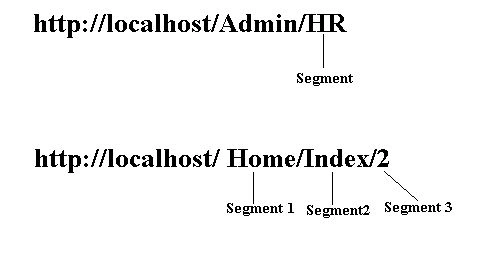
- URL Pattern: In URL pattern we declare variables and when an URL is requested the pattern extracts values from the URL segments, as shown in Image 2.
- Default Values: When an incoming URL matches a route, the MVC Framework takes the value of the controller variable and looks for the appropriate name.
Note: the MVC routing system doesn't find an exact match in the RoutTable (Route Pattern) but it uses the first match always and even the Routing engine doesn't have any specific knowledge of actions, controllers or action parameters, it just extracts values from the variables and in our case the variables are {controller} {action}.
Some invalid and valid URL patterns:
| Requested URL | Match Route | Error |
| http://localhost/Admin/HR/CreateStructure | Admin/{Controller}/{Action} | No Error |
| http://localhost/Admin/HR | Admin/{Controller}/{Action} | No Error |
| http://localhost/Admin | None | Too few segments |
| http://localhost/Admin/HR/EditStructure/1 | None | Too many segments |
| http://localhost | {controller}/{action}/{id} | No Error |
| http://localhost/ Home | {controller}/{action}/{id} | No Error |
| http://localhost/ Home/Index/2 | {controller}/{action}/{id} | No Error |
chanchalPosted Mar 3, 2021, 8:02 PM
I want URL like www.domain.com/marketplace/Entry.us?id=101&uid=1012 Can you please suggest the route please.
Anupam SinghPosted Aug 20, 2015, 2:49 PM
Hi Chanchal Karma thanks, actually this article is to demonstrate internal working of routes, there is no demo project for this, you can create you own sample MVC project or can use default MVC template and make in route config file as per article and you will see impacts, how it works.
Chanchal KarmaPosted Aug 20, 2015, 8:35 AM
Great Articles, But your not Attached and Downlodes Files, So Plz Add Whole App.
Anupam SinghPosted Jun 2, 2014, 7:41 AM
Thank you all :) .
Lakshmanan Sethu SankaranarayanPosted Jun 2, 2014, 7:04 AM
Intro is so good!
Akhil MittalPosted Jun 2, 2014, 5:27 AM
Nicely taken.Good
Khan Abrar AhmedPosted May 29, 2014, 9:38 AM
Thanks for sharing the knowledge it will help us in feature.
Dinesh BeniwalPosted May 29, 2014, 7:20 AM
Great work anupam
Sachin KaliaPosted May 29, 2014, 6:31 AM
Very well described :)