

1-Thread with priority
Thread priority is used by the thread scheduler for determining the order of execution of threads. And you are free to set a thread's priority as needed. A higher-priority thread gets more CPU time than a lower priority one. You can use the method setPriority() of the thread class.
Syntax
Here level is an integer value but it must be within the range of MIN_PRIORITY and MAX_PRIORITY. The value of MAX_PRIORITY is 10 and the value of MIN_PRIORITY is 1; all the threads return a default priority specified as NORM_PRIORITY and its value is 5. These are all the priority defined as static final variables in the Thread class.
You can also able to get the current priority setting with the help of the getPriority() method of the Thread class.
Syntax
Example-
- class MyThread extends Thread
- {
- String name;// name of the thread
- public MyThread(String name)
- {
- super();
- this.name = name;
- }
- // run method implementation
- public void run()
- {
- int count = 0;
- while (true)
- {
- try
- {
- sleep(100);
- } catch (InterruptedException e)
- {
- System.out.println("thread Interrupted" );
- }
- System.out.println(name+":" + count++);
- if (count == 5)
- break;
- }
- }
- }
- // tester class
- public class TestPrority
- {
- public static void main(String[] args)// body of the main method
- {
- MyThread thread1 = new MyThread("thread1");
- System.out.println("current priority of thread :"+thread1.getPriority());
- thread1.setPriority(10);
- System.out.println("after set now priority of thread :"+ thread1.getPriority());
- MyThread thread2 = new MyThread("thread2");
- System.out.println("current priority of thread :"+ thread1.getPriority());
- thread2.setPriority(1);
- System.out.println("after set now priority of thread :"+ thread1.getPriority());
- thread2.start();
- thread1.start();
- }//main close
- }
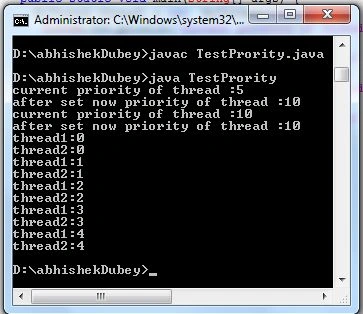
Description-In this example we set an explicit priority of both threads thread1 which has priority 10 means it has max_priority and thread2 has the min_priority so in the TestPriority class start first thread2 but execute the first thread1; see the following output carefully:
Output:
2-Using isAlive() and join() method with thread
However, this is hardly a satisfactory solution and it also raises a larger question; that is how can a thread know when another thread has ended? So the thread class provides a method isAlive(). This method helps you to determine whether a thread isAlive or not. The other method is join(). This method is finished the wait of any thread. This method waits until the thread on which it is called terminates. Its name comes from the concept of the calling thread waiting until the specified thread joins it. Additional forms of join() allow you to specify a maximum amount of time that you want to wait for a specified thread to terminate.
Syntax
final boolean isAlive()
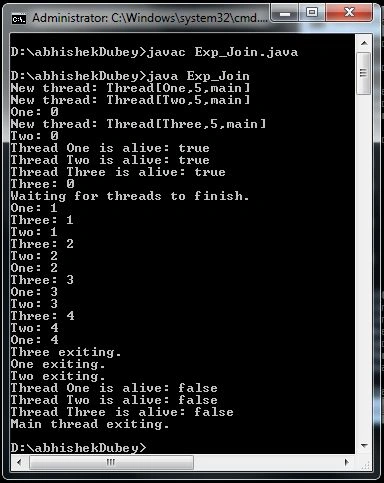
the isAlive() method returns a boolean value; true when the thread is still in the running state and otherwise it returns false.
Syntax
final void join();
Eaxmple
- class MyThread implements Runnable
- {
- String name; // String variable thread
- Thread t;
- // defination of constructor.....
- MyThread(String threadname) {
- name = threadname;
- t = new Thread(this, name);
- System.out.println("New thread: " + t);
- t.start(); // Start the thread
- }
- // body of run method
- public void run()
- {
- try {
- for (int i = 0; i < 5; i++) {
- System.out.println(name + ": " + i);
- Thread.sleep(2000);
- }
- } catch (InterruptedException e) {
- System.out.println(name + " interrupted.");
- }
- System.out.println(name + " exiting.");
- }
- }
- class Exp_Join {
- public static void main(String args[]) {
- // creating threa ..........
- MyThread ob1 = new MyThread("One");
- MyThread ob2 = new MyThread("Two");
- MyThread ob3 = new MyThread("Three");
- // check it is is Alive or not here ans is true printed because all isAlive
- System.out.println("Thread One is alive: " + ob1.t.isAlive());
- System.out.println("Thread Two is alive: " + ob2.t.isAlive());
- System.out.println("Thread Three is alive: " + ob3.t.isAlive());
- //join() used with in try block because it throws InterruptedException exception
- try {
- System.out.println("Waiting for threads to finish.");
- ob1.t.join();
- ob2.t.join();
- ob3.t.join();
- } catch (InterruptedException e) {
- System.out.println("Main thread Interrupted");
- }
- // now thread is existing so isAlive method return false
- System.out.println("Thread One is alive: " + ob1.t.isAlive());
- System.out.println("Thread Two is alive: " + ob2.t.isAlive());
- System.out.println("Thread Three is alive: " + ob3.t.isAlive());
- System.out.println("Main thread exiting.");
- }
- }
Output:
For a detailed tutorial on MultiThreading in Java Click
Resource
Join the conversation! Your thoughts help the community grow.