

Introduction
Toast messages are short pop-up messages that show up for a few seconds and then fade away. Toast messages automatically disappear after a timeout.
The basic Toast message creation contains the following things,
Toast messages are short pop-up messages that show up for a few seconds and then fade away. Toast messages automatically disappear after a timeout.
The basic Toast message creation contains the following things,
- Context - usually the application or activity context
- Message - The text message to display. Use a CharSequence object or String
- Duration - The time the pop-up is visible. There are two time options:
- SHORT - Last forabout 2 seconds
- LONG - Last for about 4 seconds
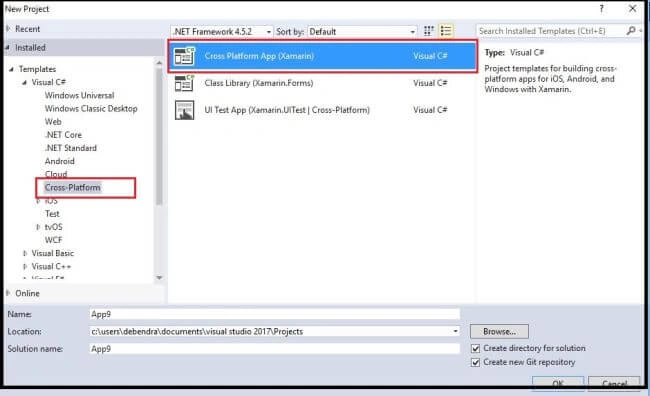
To implement a Toast Message, let's create a new Xamarin project as follows.
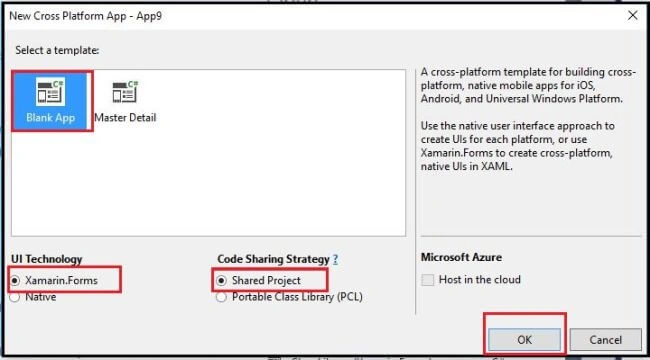
Now select a Blank App as shown below,
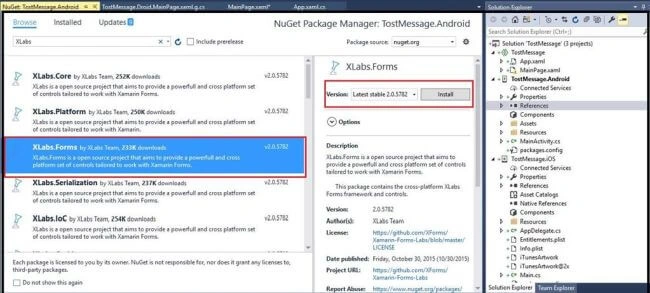
In the reference add the following third party XLab dll for some third party controls .
Xamarin Forms Labs\XLab is an open source project that aims to provide a powerful and cross platform set of controls and helpers tailored to work with Xamarin Forms.
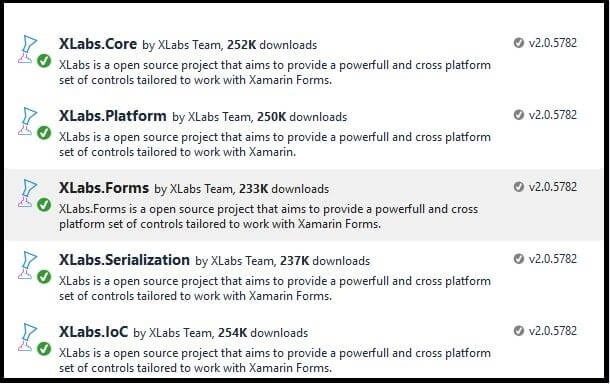
Now you will find the following Dll added to your project.
To use all the XLab controls, add the following assembly in the project.
Now select a Blank App as shown below,
In the reference add the following third party XLab dll for some third party controls .
Xamarin Forms Labs\XLab is an open source project that aims to provide a powerful and cross platform set of controls and helpers tailored to work with Xamarin Forms.
Now you will find the following Dll added to your project.
To use all the XLab controls, add the following assembly in the project.
- xmlns:controls="clr-namespace:XLabs.Forms.Controls;assembly=XLabs.Forms"
Hadshana KamalanathanPosted Sep 3, 2018, 1:29 PM
Thank you for sharing...