

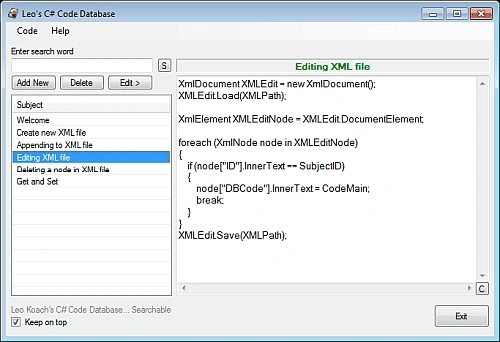
This is my first article about my very first C# Study application. While I was reading books and watching videos, I thought to create something that I would also use, nothing fancy, simple to use. This application can be used for notes as well, not only for codes. The code itself, not the application and its functionality, is the most important part, and will be the main part of my following articles (if I am approved by you... the readers)
Background
I started this code using Access DB. Then I purchased a laptop that came with 64bit Win7 OS. This is my first 64 bit machine and didn't know how my code would react. Apparently there are some issues with MS Jet engine vs 64 bit systems. Even though I found out some fixes and fix-around, I decided to move on to the other things. I tried SQL Express... Very powerful database, I love SQL. I used SQL servers for my previous applications (not in C#), and I love it. Although, I wanted this program to be very light and very "portable + Sharable" without any pain (or less pain). So, Instead of using a "Home-made" text based DB, I decided to use XML. This way if someone wants to transfer XML into another database, would be able to do so easily. This is my first time dealing with XML, and I enjoyed a lot.
Using the code
There are two forms and two custom classes for this program.
- Form1 (Main form)
- Form Settings
- IO class
- XML class
Since the entire code is available for download, I would like to show a few methods/codes here that I like because of their work.
Tooltip setup: I use "_toolTip" class almost all my "form load" methods to show control tips for my users. Simple, but since this is a beginners article, I thought maybe some of you just might missed it. There is also "#region" "#endregion" usage here. It's a very nice tool to pack some of your codes out of the way.
#region ToolTips
// Set some tooltips here
_toolTip.SetToolTip(btnCopy, "Copy to ClipBoard");
_toolTip.SetToolTip(btnNew, "Add new code with this subject");
_toolTip.SetToolTip(btnExit, "Exit program");
_toolTip.SetToolTip(lstSubjects, "Click to see the code");
_toolTip.SetToolTip(chkOnTop, "Check to keep this window top of all windows");
_toolTip.SetToolTip(btnSearch, "Search DB");
_toolTip.SetToolTip(txtCodeMain, "Double Click to copy code into clipboard");
#endregion
Resizing and positioning the form: Even there is "StartPosition" property for Windows forms, I still use following code to adjust my form size using current screen bounds.
// Resize the form using current screen size
this.Width = Screen.PrimaryScreen.Bounds.Width / 2;
this.Height = Screen.PrimaryScreen.Bounds.Height - 300;
I use "Split" a lot in my codes. Sometimes it is much easer to pass information throughout classes and methods. Split also a "cheap" way to pass field information, I believe it does take less memory than arrays. Finding the right character is the thing, which I used "backspace" character here, since it can't be passed through a textbox.
XMLDatabase clsXML = new XMLDatabase(); // Create instance of XMLDatabase class
ArrayList CurrentSubjectList = new ArrayList(); // Create instance of ArrayList
// This will loaded with the ArrayList
// sent by clsXML object
string[] SplitText = new string[2]; // Each item in the array will contain a tring
// that will be splited by 'Backspace' character
CurrentSubjectList = clsXML.GetSubjectList(clsIO.XMLPath, SearchWord); // Get the ArrayList from clsXML
char Splitchr = (char)8; // 'char 8' is Backspace character.
foreach (string FullString in CurrentSubjectList) // Start looping the ArrayList
{
SplitText = FullString.Split(Splitchr); // Split Item
ListViewItem s_Items; // Set ListView item to add new information
s_Items = lstSubjects.Items.Add(SplitText[0]); // Add Subject ID to the first (not visiable) colomn
s_Items.SubItems.Add(SplitText[1]); // Add Subjectname to second (visiable) colomn
}
ListView control one of my favorite controls (above). When used with "Details" mode, it can be very nice tool to show items for my database fields. I don't like bounding data, so everything is dynamically coded to fill ListView control... even when I use SQL or Access database. No bounding... I hate bounding things to my application. Application must be totally free of ties between any data source, and connection should be done after program runs, when needed... (totally personal).
I probably won't repeat all this "simple" information for my next articles, but they're extremely useful things which some of you might be missing.
Here is another idea to change some of the control properties depending on a condition. It's a class that ables/disables controls during runtime.
private void EnableDisableButtons(bool EDButtons) // Change some of the control properties here
{
// Menu items
TSAddNew.Enabled = EDButtons;
TSEdit.Enabled = EDButtons;
TSDelete.Enabled = EDButtons;
TSRefresh.Enabled = EDButtons;
// Buttons
btnSearch.Enabled = EDButtons;
btnNew.Enabled = EDButtons;
btnEdit.Enabled = EDButtons;
btnDelete.Enabled = EDButtons;
// Main codeview
txtCodeMain.Enabled = EDButtons;
txtSubject.Enabled = EDButtons;
}
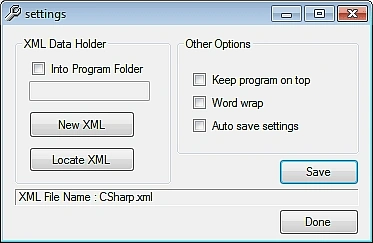
Following code shows "overload" class. I had to keep the original constructor and add another one, because I need to set some of the control values during instantiation.
public frmSettings()
{
InitializeComponent();
}
// Settings form constructor overload
public frmSettings(string OnTopStr, string WordWrapStr, string AutoSaveStr)
{
InitializeComponent();
// Set some control values
if (OnTopStr == "1")
{ chkOnTop.Checked = true; }
if (WordWrapStr == "1")
{ chkWordWrap.Checked = true; }
if (AutoSaveStr == "1")
{ chkAutoSave.Checked = true; }
IOFile clsIO = new IOFile(); // Create instance of IOFile class
if (clsIO.ErrHap == null)
{
Scripting.FileSystemObject FsO = new Scripting.FileSystemObject(); // Create instance of FileSystemObject class
lblXML.Text = "XML File Name : " + FsO.GetFileName(clsIO.XMLPath); // XML file name into label box
XMLDatabaseLocation = clsIO.XMLPath; // Set XML file path
}
}
Rest of the article will show XML file manipulations. XML portion probably the only place my code gets complicated(!). I hope you will find them useful.
Create an XML file with 3 child nodes. So, there is a main tag, a parent tag and three children tags.
XmlTextWriter XMLWrite = new XmlTextWriter(XMLPath, System.Text.Encoding.UTF8);
XMLWrite.WriteStartDocument();
XMLWrite.WriteStartElement("Codes"); // Main tag
XMLWrite.WriteStartElement("NewCode"); // Parent tag
XMLWrite.WriteElementString("ID", "1"); // Child 1
XMLWrite.WriteElementString("DBSubject", "Welcome"); // Child II
XMLWrite.WriteElementString("DBCode", "Thank you for using CodeDatabase by Leo Koach (2010)"); // Child III
XMLWrite.WriteEndElement();
XMLWrite.WriteEndElement();
XMLWrite.WriteEndDocument();
XMLWrite.Flush();
XMLWrite.Close();
Appending records (nodes) at the end of the XML file.
XmlDocument xmlDoc = new XmlDocument();
xmlDoc.Load(XMLPath);
XmlElement subRoot = xmlDoc.CreateElement("NewCode");
//ID
XmlElement appendedElementID = xmlDoc.CreateElement("ID");
XmlText xmlTextID = xmlDoc.CreateTextNode(GetLatestID(XMLPath));
appendedElementID.AppendChild(xmlTextID);
subRoot.AppendChild(appendedElementID);
xmlDoc.DocumentElement.AppendChild(subRoot);
//Subject
XmlElement appendedElementSubject = xmlDoc.CreateElement("DBSubject");
XmlText xmlTextSubject = xmlDoc.CreateTextNode(CodeSubject);
appendedElementSubject.AppendChild(xmlTextSubject);
subRoot.AppendChild(appendedElementSubject);
xmlDoc.DocumentElement.AppendChild(subRoot);
//Code
XmlElement appendedElementCode = xmlDoc.CreateElement("DBCode");
XmlText xmlTextCode = xmlDoc.CreateTextNode(CodeMain);
appendedElementCode.AppendChild(xmlTextCode);
subRoot.AppendChild(appendedElementCode);
xmlDoc.DocumentElement.AppendChild(subRoot);
xmlDoc.Save(XMLPath);
There might be another way to edit a nod information, although this looks pretty good and works just fine for me. All I am doing here is to loop XML nodes and search for ID field for the ID I'm passing. If match found, change selected field information with the new one.
XmlDocument XMLEdit = new XmlDocument();
XMLEdit.Load(XMLPath);
XmlElement XMLEditNode = XMLEdit.DocumentElement;
foreach (XmlNode node in XMLEditNode) // Loop through XML file
{
if (node["ID"].InnerText == SubjectID) // Check for the ID field information
{
node["DBCode"].InnerText = CodeMain;
break;
}
}
XMLEdit.Save(XMLPath);
Deleting portion of the XML file is done as follows. Just like above code, I am looking for the ID field. If I find it, I only delete the parent node that ID field and other children fields located. I probably could merge those two loops into one, but for learning purposes, this is ok. You're always welcome to do your own merging. That could save you writing extra lines of codes.
XmlDocument XMLDelete = new XmlDocument();
XMLDelete.Load(XMLPath);
XmlElement XMLDeleteNode = XMLDelete.DocumentElement;
foreach (XmlNode node in XMLDeleteNode)
{
if (node["ID"].InnerText == SubjectID) // Find the match for the ID field
{
node.ParentNode.RemoveChild(node); // Delete the parent for the children (fields)
break;
}
}
XMLDelete.Save(XMLPath);
Getting a field information (node) from XML file, and throwing exception. I included a bit more code here to show how I used the Try/Catch and Exception thrower. When exception is throwing like this, it comes back to the "sender" (I like to call it that way, it's actually sending exception back to the method which class was initiated). Same as other three codes, I loop through the XML until I find my ID.
XmlDocument XMLRead = new XmlDocument(); // Create instance of XmlDocument class
try
{
XMLRead.Load(XMLPath); // Set XMLRead object's path value
XmlNodeList XMLItems = XMLRead.SelectNodes("Codes/NewCode"); // Create instance of XmlNodeList class
// and set its node value
foreach (XmlNode node in XMLItems) // Loop Node for the child node items
{
if (node["ID"].InnerText == SubjectID) // Find the ID number
{
StrInf = node["DBCode"].InnerText; // Set return value to Main Code value from the XML file
break; // Exit loop
}
}
return StrInf;
}
catch (Exception exc)
{
throw exc;
}
By the way, the ID field always grows to higher numbers even if anything deleted from XML file. I could (and easy to do) find the missing number and assign that for the next ID (for example, I have data from ID number 1 through 40... and I deleted number 23. So there is a gap now. Next time when I enter a new data, I could just find number 23 and assign my ID to it). I like the way it is though. To get the latest number, I have another loop that reads the ID field only and adds "1".
public string GetLatestID(string xmlFilePath)
{
int LastIDEntry = 0;
XmlDocument XMLGetLastID = new XmlDocument();
XMLGetLastID.Load(xmlFilePath);
XmlNodeList XMLItems = XMLGetLastID.SelectNodes("Codes/NewCode");
foreach (XmlNode node in XMLItems)
{
LastIDEntry = Convert.ToInt32(node["ID"].InnerText) + 1;
}
return Convert.ToString(LastIDEntry);
}
I know there are probably better ways than looping through XML files, which could slow things down when file gets larger, and I need your help to find them (if any).
Points of Interest
This code is for C# beginners (like myself). I love coding and enjoy any challenges come with it. I research a lot to learn (even at my age) a lot. These days internet is my only source (99.90% of the time) to do researches for C#. Hopefully some of you will copy/paste and use some of my codes here. I like to modify the codes I find to fit my code, which probably the best way to learn (next to watching C# videos). I hope to see you at my next article "Study II" :)
Ancuta APosted Feb 17, 2011, 5:25 PM
i can't seem to discover how to use your application. i would really like to see how it works because i have to do something like this..if you cam tell me some steps.thanks
sujit kalagaraPosted Jan 21, 2011, 6:58 AM
this is really good for freshers. thanks a lot Leo
SughanyaPosted May 6, 2010, 5:23 AM
Well done work. Thanks Leo!
Leo KoachPosted Mar 13, 2010, 9:07 AM
"Performance Considerations In deciding whether to use the List(T) or ArrayList class, both of which have similar functionality, remember that the List(T) class performs better in most cases and is type safe. If a reference type is used for type T of the List(T) class, the behavior of the two classes is identical. However, if a value type is used for type T, you need to consider implementation and boxing issues."-MS From MS website. Sometimes my findings are "first-come-first-served". If one works, I don't even conceder there would be a second almost identical option. // Method that I send List <T> from (in XMLDatabase class) public List <string> GetSubjectList(string xmlFilePath, string FindWord) { List<string> SubjectArray = new List<string> (); // I kept the name ... ... SubjectArray.Add(node["ID"].InnerText + Splitchr + node["DBSubject"].InnerText); // in a loop ... ******************* // Where I set my List in Form class ... XMLDatabase clsXML = new XMLDatabase(); // Create instance of XMLDatabase class List<string> CurrentSubjectList = new List<string> (); // Create instance of List < T > // This will loaded with the List < T > // sent by clsXML object ... It's like saying "My name is Leo, but it's better if you call me Mr. Leo so you'll get my gender right each time" ArrayList vs List<T>
Leo KoacheditedPosted Mar 13, 2010, 3:39 AMEdited Mar 13, 2010, 8:14 AM
I did some homework and checked LINQ. It is a very powerful tool... changes the whole thing and make XML coding easier. I have came up with a few changes for my article code so far, and I am going to stop here until I get myself a LINQ book or set of videos. I found a website which I suggest you to visit if you want to learn more about LINQ. Very nice, easy to understand videos done by Mike Taulty. His Linq videos from 2007, although still up to date for most I believe... http://www.microsoft.com/uk/msdn/nuggets/presenter/11/mike-taulty.aspx?pg=7 ------------------------------------------------------------------------------- Here are the code changes i made for my article piece (I will post them here, I won't change the original post) Adding new XML file now has shorter lines of code. // Create new XML Document // ********************************************************************** XDocument XMLNew = new XDocument( new XDeclaration("1.0", "UTF8", "true"), new XElement("Codes", new XElement("NewCode", new XElement("ID", "1"), new XElement("DBSubject", "Welcome"), new XElement("DBCode", "Thank you for using CodeDatabase by Leo Koach (2010)") ))); XMLNew.Save(XMLPath); As you can see, I am using nodes and their vlaues instead of nodes and their attributes. I felt more comfortable that way. (And I really am not sure what is the difference between two other than how to read them syntax wise.) The second code I have changed is "Appending new data" into our XML file... // Append a node with information to same XML file // ********************************************************************** XDocument XMLAdd = XDocument.Load(XMLPath); XMLAdd.Element("Codes").Add(new XElement("NewCode", new XElement("ID", GetLatestID(XMLPath)), new XElement("DBSubject", CodeSubject), new XElement("DBCode", CodeMain))); XMLAdd.Save(XMLPath); So far I am pretty good to use linq, but then it got more complicated for me to understand the concept deeper. That's why I need to study a lot about Linq more. Easy, although it's a new text for me. Editing portion of the code is half done. I might need your help to find out the solution. It is on the code if you read it, //Change information on a node // ********************************************************************** XElement XMLEdit = XElement.Load(XMLPath); var DBCodes = from NewCode in XMLEdit.Descendants("NewCode") where NewCode.Element("ID").Value == SubjectID select NewCode; // This should be one line code. Since count is always 1, there is no reason for 'foreach' foreach (var NewCode in DBCodes) { NewCode.Element("DBCode").ReplaceNodes(CodeMain); } XMLEdit.Save(XMLPath); I also couldn't find a "deletion" option the way my XML file structured. There are options for with attributes, but mine doesn't have any... so, the code stays as is for now. Also, I will get rid of the ArrayList if I can find another way to carry a list of information from XML class to my main form class. I wanted to keep all XML work in one class, so the best way is to pass it through right now, using ArrayList.
Leo KoacheditedPosted Mar 12, 2010, 6:18 PMEdited Mar 13, 2010, 8:13 AM
I uploaded the source into my article...
Jeff EtringerPosted Mar 12, 2010, 5:09 PM
Where can i download your sample source? I would love to take a look at this, sounds very interesting.
Mahesh ChandPosted Mar 12, 2010, 3:21 PM
and explained. Good work Leo.