

WPF DateTimePicker Control
The DateTimePicker control is an addition to the DatePicker
control that allows users to pick a date and time using a calendar. This
article demonstrates how to use a DateTimePicker control in WPF with the help of
XAML and C#.
Creating a DateTimePicker
The DateTimePicker element represents a WPF DateTimePicker control in XAML.
<wpfx:DateTimePicker />
The DateTimePicker control is defined in the System.Windows.Controls namespace. When you drag and drop a DateTimePicker control from Toolbox to the page, you will notice the code listed in Listing 1 is added to the XAML file for the DateTimePicker control.
<wpfx:DateTimePicker Height="25" HorizontalAlignment="Left" Margin="42,26,0,0" Name="DateTimePicker1" VerticalAlignment="Top" Width="250" />
Listing 1
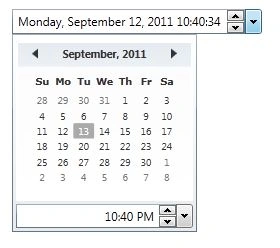
The output looks like Figure
1. You can click on the up and down arrows to change the day and time and also
can use the drop down arrow to load the monthly calendar view. You can also
change the time from the bottom of the control.
abiePosted Apr 17, 2020, 5:10 AM
@mahesh can we add a property like black out dates in this?
Pawan Kumar TiwariPosted Oct 4, 2017, 2:11 AM
In WPF not present datetime control so external dll are used or anything else please eloberate i can try some dll but not to used datetime with toghether as above sample fig 1
Nasrin SPosted Apr 21, 2017, 8:13 AM
Nice blog.. How to use SelectedDate attribute
Former memberPosted Aug 16, 2013, 1:30 AM
Nice Article