

Introduction
Commands provide a mechanism for the view to update the model in the MVVM architecture. Commands provide a way to search the element tree for a command handler. The ICommand interface is defined inside the System.Windows.Input namespace. It has two methods and an event.
bool CanExecute(object parameter);
void Execute(object parameter);
event EventHandler CanExecuteChanged;
The Execute method is only invoked when CanExecute returns true. In case the CanExecute method returns false then the binding control is disabled automatically.
In order to know the CanExecute value, listen to the CanExecuteChanged event, which may vary based on the parameter passed.
Using Code
Use of ICommand
The ICommand interface is generally used in the MVVM architecture. Here in the Button control, the Command property is bound to the "UpdateCommand". Since UpdateCommand is nothing but an ICommand instance, while loading the window it will check the CanExecute return value and if it returns true then it will enable the button control and the Execute method is ready to be used otherwise the button control is disabled.
<Button x:Name="btnUpdate" Width="100" Height="20" HorizontalAlignment="Center" Grid.Row="1" Content="Update" Command="{Binding Path=UpdateCommand}"/>
Passing a parameter to the CanExecute and Execute methods
A parameter can be passed through the "CommandParameter" property. Once the button is clicked the selected address value is passed to the ICommand.Execute method.
The CommandParameter is sent to both CanExecute and Execute events.
<Button x:Name="btnUpdate" Width="100" Height="20" HorizontalAlignment="Center" Grid.Row="1" Content="Update" Command="{Binding Path=UpdateCommand}" CommandParameter="{Binding ElementName=lstPerson, Path=SelectedItem.Address}">
</Button>
Tasks of CanExecuteChanged
CanExecuteChanged notifies any command sources (like a Button or CheckBox) that are bound to that ICommand that the value returned by CanExecute has changed. Command sources care about this because they generally need to update their status accordingly (eg. a Button will disable itself if CanExecute() returns false).
Listen CanExecuteChanged
The CommandManager.RequerySuggested event is raised whenever the CommandManager thinks that something has changed that will affect the ability of commands to execute. This might be a change of focus, for example. This event happens to fire a lot.
public event EventHandler CanExecuteChanged
{
    add { CommandManager.RequerySuggested += value; }
    remove { CommandManager.RequerySuggested -= value; }
}
ICommand in MVVM
UI
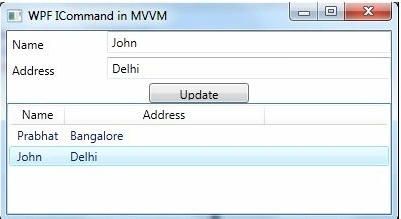
Model
Create a folder named Model and a class named Person. Implement INotifyPropertyChanged and override the PropertyChanged event. Define two properties, Name and Address.
public class Person : INotifyPropertyChanged
{
    private string name;
    private string address;
    public event PropertyChangedEventHandler PropertyChanged;
    public void OnPropertyChanged(string propertyName)
    {
        PropertyChanged?.Invoke(this, new PropertyChangedEventArgs(propertyName));

    public string Name
    {
        get { return name; }
        set
        {
            name = value;
            OnPropertyChanged("Name");
        }
    }
    public string Address
    {
        get { return address; }
        set
        {
            address = value;
            OnPropertyChanged("Address");
        }
    }
}
Andrea CPosted Jan 24, 2021, 6:09 PM
I'm new with MVVM and I'm missing something. How the list view row is updated with the text boxes content on the button Update click? There is not code for that. Maybe in binding?
juan perezPosted Mar 4, 2020, 6:21 AM
How to access viewmodel data inside Updater instance?
Sam SolizPosted Jun 19, 2019, 10:59 AM
What does the Update button do besides invoking the Execute command? How can you update the name and address from the Execute function?
Neil JohnsonPosted Feb 19, 2019, 3:47 AM
When We fire PreviewMouseWheel, the event data which is the distance the mouse wheel travels is passed to into Event Handler. SO on the basis of that Event Handler argument we do some calculation. private void OnPreviewMouseWheel(object sender, MouseWheelEventArgs e) {} How we can get event data while implementing commands. Thanks.
Guest UserPosted Oct 15, 2017, 11:32 AM
How to clear text boxes when entered
Mustafa KORURPosted Oct 20, 2014, 4:05 AM
thanks
Muneer AkhtarPosted Jul 8, 2014, 4:48 AM
Newbie to WPF with MVVM , Could somebody let me know where to put INotifyPropertyChanged? Either in ViewModel or Model
james relyeqPosted Feb 15, 2014, 8:17 AM
public void Execute(object parameter) {} never gets called
Priyank ThakkarPosted Jan 31, 2014, 4:56 AM
Thanks a lot prabhat... this exampled helped me to understand many things..
Prabhat KumarPosted Sep 14, 2013, 1:19 PM
Expose an event from your viewmodel and trigger it from your view
Sekhar BabuPosted Sep 13, 2013, 11:34 AM
can we call a method which takes no parameter from view through command in viewmodel
jenifer nishanthPosted Jul 9, 2013, 6:04 AM
Sample is not working
Nick VarPosted Feb 16, 2013, 7:09 AM
Thanks for article!