

Introduction
In this article, we will learn how to implement PayUMoney payment gateway in an Android Xamarin application. Using payment gateway, we can use credit card, debit card, or Netbanking facility for paying online.
Let’s start,
Step 1
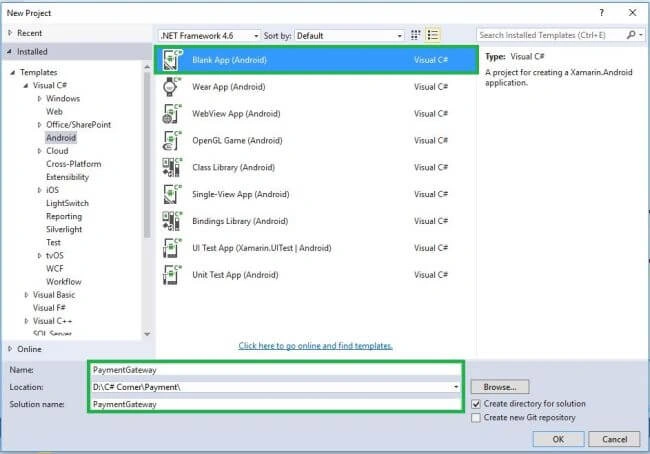
Open Visual Studio->New Project->Templates->Visual C#->Android->Blank App
Select Blank App. Then give Project Name and Project Location.
Step 2
Next, create New Layout for Payment Success and Failure Page.
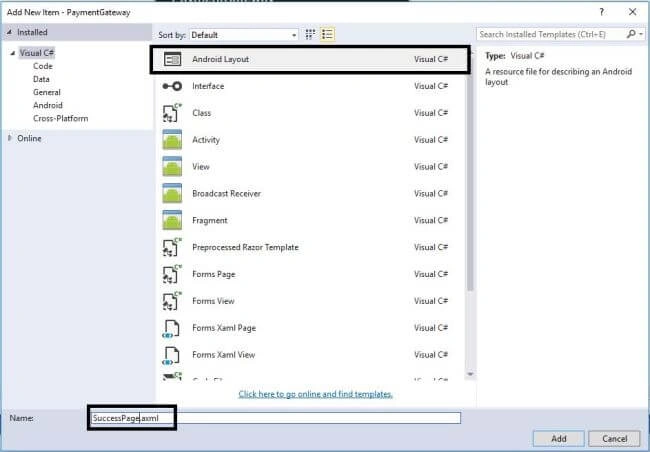
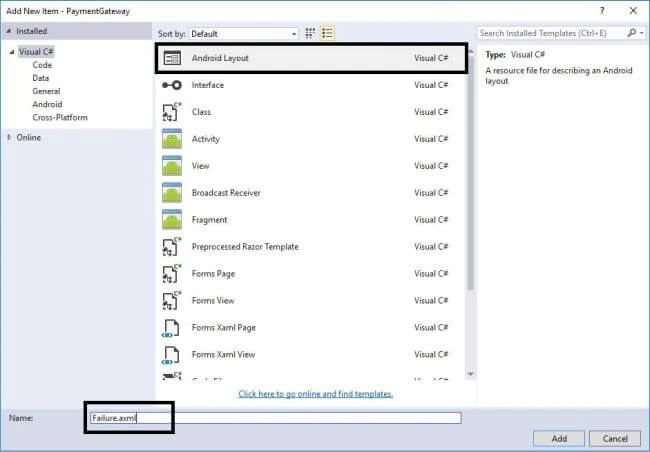
Go to Solution Explorer-> Project Name->Resources->layout, then right click to Add->New Item. This opens a new Dialog box where you need to select Android Layout and give names as Success.axml and Failure.axml.
Step 3
After this, create Activity Page for both design pages.
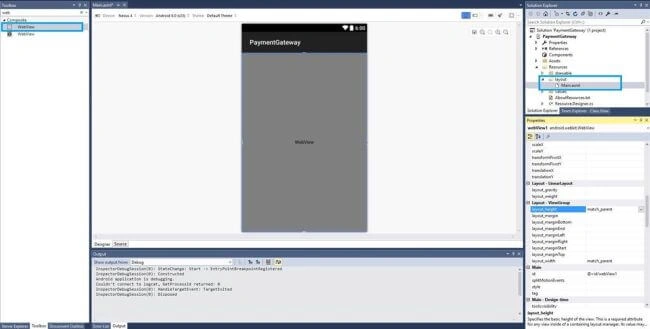
Next,open Solution Explorer-> Project Name->Resources->Layout->Main.axml and click to add WebView.
Step 5
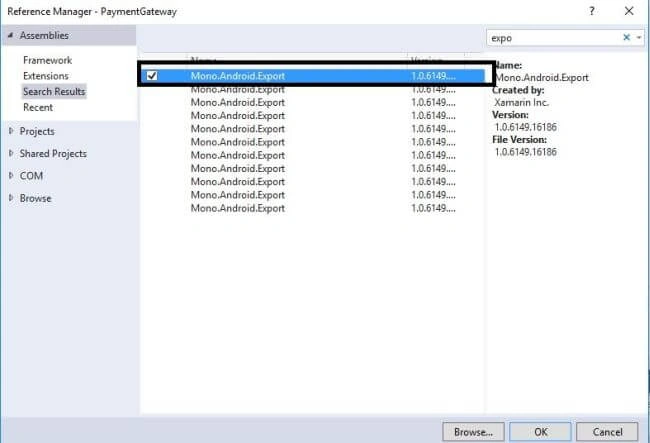
Add Reference Namespace for Mono.Android.Export. Solution Explorer-> Project Name-> References-> Mono.Android.Export.
Step 6
After that, open Solution Explorer-> Project Name->MainActivity.cs then Add below Namespaces.
- using Android.Webkit;
- using Java.Lang;
- using Android.Util;
- using Java.Security;
- using System.Text;
- using Android.Net.Http;
- using Java.Interop;
Step 7
Next step is to create variables and then declare the variables in OnCreate().
C# Code
- private static string txnid;
- private static string TAG = "MainActivity";
- private static WebView webviewPayment;
- private WebViewClient webViewClient = new MyWebViewClient();
- private static Context context;
- private static string SUCCESS_URL = "https://www.payumoney.com/mobileapp/payumoney/success.php";
- private static string FAILED_URL = "https://www.payumoney.com/mobileapp/payumoney/failure.php";
- private static string firstname = "Anbu";
- private static string email = "[email protected]";
- private static string productInfo = "test";
- private static string mobile = "8220155182";
- public static string totalAmount = "100";
OnCreate Method
C# Code
- webviewPayment = (WebView) FindViewById(Resource.Id.webView1);
- webviewPayment.Settings.JavaScriptEnabled = true;
- webviewPayment.Settings.SetSupportZoom(true);
- webviewPayment.Settings.DomStorageEnabled = true;
- webviewPayment.Settings.LoadWithOverviewMode = true;
- webviewPayment.Settings.UseWideViewPort = true;
- webviewPayment.Settings.CacheMode = CacheModes.NoCache;
- webviewPayment.Settings.SetSupportMultipleWindows(true);
- webviewPayment.Settings.JavaScriptCanOpenWindowsAutomatically = true;
- webviewPayment.AddJavascriptInterface(new PayUJavaScriptInterface(this), "PayUMoney"); //JavaInterface
- Java.Lang.StringBuilder url_s = new Java.Lang.StringBuilder();
- url_s.Append("https://test.payu.in/_payment"); //PauMoney Test URL
- Log.Info(TAG, "call url " + url_s);
- webviewPayment.PostUrl(url_s.ToString(), Encoding.UTF8.GetBytes(getPostString()));
- webviewPayment.SetWebViewClient(webViewClient);
Step 8
Implement WebViewClient() by declaring MyWebViewClient Refer on WebViewClient.
C# Code
- //WebView Client Run Time
- private class MyWebViewClient: WebViewClient {
- public override void OnPageStarted(WebView view, string url, Android.Graphics.Bitmap favicon) {
- base.OnPageStarted(view, url, favicon);
- }
- public override void OnPageFinished(WebView view, string url) {
- base.OnPageFinished(view, url);
- }
- public override void OnReceivedSslError(WebView view, SslErrorHandler handler, SslError error) {
- Log.Info("Error", "Exception caught!");
- handler.Cancel();
- }
- }
Step 9
Followed Web Client declare Java Interface. Using after complete payment process its redirect to Success of Failure.
C# Code
raghwc chaubeyPosted Jan 24, 2020, 2:02 PM
Do you have any sample for Xamarin form.
Liju DanielPosted Oct 14, 2019, 2:41 AM
Hi Anbu, Do you have any idea about; how to integrate Billdesk Payment in Xamarin forms application...?
Rameez ShaikhPosted Jun 24, 2019, 1:33 AM
Hi Anbu, firstly i would like to thank u for this very helpful article. Just for test purpose i ran you solution with my key, salt, email and mob number respectively... I runs the project sucessfully on device but evey time the PayUBiz page shows error "Sorry some error occured" with no description.. Can you please guide on this issue. Thanks...
James MountneyPosted Feb 7, 2019, 7:40 PM
Hi Anbu, i downloaded the zip file, then un zipped it. I ran the application, but every time i run it goes straight to the ' Sorry we are unable to process your payment page'. What am i missing ?
ranveer singhPosted Jul 21, 2018, 12:09 AM
Do you have any sample for Xmarin Forms Payumoney Payment Gateway Intergraion
Pooja JainPosted Jun 19, 2018, 12:01 AM
Hi Anbu, Unfortunately, I'm getting these errors... [LogEntry: Time=6/19/2018 9:42:03 AM +05:30, Level=Error, Title=Build Error, Message=? 'Resource.Layout' does not contain a definition for 'Failure'? 'Resource.Layout' does not contain a definition for 'SuccessPage'? 'Resource.Layout' does not contain a definition for 'Main' ? 'Resource.Id' does not contain a definition for 'webView1']
suresh vallePosted Sep 21, 2017, 2:48 AM
Hi Anbu, nice article it working for me, but failure and success url not working its not redirecting to failure and success activities. can you please help me how can i resolve this issue.
How to?Posted Aug 17, 2017, 4:18 AM
When i add it to intent activity init any program it will shows white blank screen.why?
Vignesh ManiPosted Mar 20, 2017, 1:31 PM
Good article. THank you fro sharing.
Madhanmohan DevarajanPosted Mar 20, 2017, 9:39 AM
Keep up the good work anbu!
Anu VPosted Mar 20, 2017, 5:13 AM
Nice article.. Thanks for sharing..
Thennarasu NPosted Mar 20, 2017, 1:53 AM
Super Work brother Keep sharing Useful Information