

I
have seen that when we have two numbers and want more mathemetical
operations between them even we have to write them again and again for
different operations...
check it...
Here is the code to develop this smart calculator
using System.Collections.Generic; using System.ComponentModel; using System.Data; using System.Drawing; using System.Text; using System.Windows.Forms; using System.Media; namespace calculator { public partial class Form1 : Form { public Form1() { InitializeComponent(); } #region "Declaration" long a; #endregion #region "Buttons" private void button1_Click(object sender, EventArgs e) { a = Convert.ToInt64(textBox4.Text) + Convert.ToInt64(textBox4.Text); textBox3.Text = Convert.ToString(a); } private void button3_Click(object sender, EventArgs e) { a = Convert.ToInt64(textBox4.Text) - Convert.ToInt64(textBox2.Text); textBox3.Text = Convert.ToString(a); } private void button4_Click(object sender, EventArgs e) { a = Convert.ToInt64(textBox4.Text) * Convert.ToInt64(textBox2.Text); textBox3.Text = Convert.ToString(a); } private void button5_Click(object sender, EventArgs e) { a = Convert.ToInt64(textBox4.Text) / Convert.ToInt64(textBox2.Text); textBox3.Text = Convert.ToString(Convert.ToDecimal(a)); } private void button6_Click(object sender, EventArgs e) { a = Convert.ToInt64(textBox4.Text) * Convert.ToInt64(textBox4.Text); textBox3.Text = Convert.ToString(a); } private void button2_Click(object sender, EventArgs e) { textBox4.Focus(); textBox4.Text = ""; textBox2.Text = ""; textBox3.Text = ""; } private void closeToolStripMenuItem_Click(object sender, EventArgs e) { Application.Exit(); } private void openCalculatorToolStripMenuItem_Click(object sender, EventArgs e) { Form1 a = new Form1(); DialogResult d = a.ShowDialog(); } private void textBox4_KeyPress(object sender, KeyPressEventArgs e) { if (char.IsLetter(e.KeyChar) == true) { MessageBox.Show("Character values are not allowed ", "Information", MessageBoxButtons.OK, MessageBoxIcon.Information); e.Handled = true; } if (char.IsPunctuation(e.KeyChar) == true) { MessageBox.Show("Symbols are not allowed ", " Information ", MessageBoxButtons.OK, MessageBoxIcon.Information); e.Handled = true; } } private void textBox2_KeyPress(object sender, KeyPressEventArgs e) { if (char.IsLetter(e.KeyChar) == true) { MessageBox.Show("Character values are not allowed ", "Information", MessageBoxButtons.OK, MessageBoxIcon.Information); e.Handled = true; } if (char.IsPunctuation(e.KeyChar) == true) { MessageBox.Show("Symbols are not allowed ", " Information ", MessageBoxButtons.OK, MessageBoxIcon.Information); e.Handled = true; } } private void button7_Click(object sender, EventArgs e) { Application.Exit(); } private void helpTopicsToolStripMenuItem_Click(object sender, EventArgs e) { System.Diagnostics.Process.Start("C:\\WINDOWS\\Help\\calc.chm"); } #endregion #region "About Calculator" private void aboutCalculatorToolStripMenuItem_Click(object sender, EventArgs e) { About_Calculator a = new About_Calculator(); DialogResult k = a.ShowDialog(); } } } #endregion |
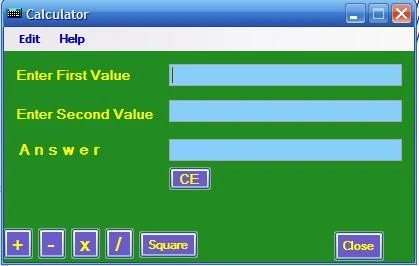
Here is the INTERFACE of Smart Calculator
For further help
Contact : [email protected]
Thanks
NIkhil kumar
Nikhil KumarPosted Jan 9, 2010, 9:43 AM
Nice advice tim !
Tim ClaasonPosted Jan 8, 2010, 9:53 AM
Another thing to do is to put a KeyPress (or Keydown, or whatever) event handler; this would handle the operator, and thereby increase functionality with a minimal number of lines of code