Introduction
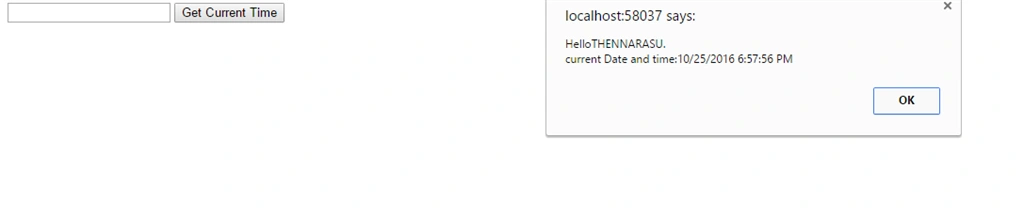
In this blog, I will explain how to display a message from Controller in View, using JavaScript alert MessageBox. The message sent from Controller to View will be displayed in JavaScript Alert MessageBox using the ViewBag Object.
Controller
First, we create a new project using Visual Studio. Choose Project template MVC. Now, we create a Controller. Controller has two action methods, mentioned below:
- Action method for handling the GET operation.
Inside this Action method, only the view is returned.
- Action method for handling POST operation.
This Action method handles the form submission and it accepts the value of the form element as a parameter.
The name value fetched from the Form collection and the current Server date and time is set to a ViewBag object named “Message”.
Controller Code
- using System;
- using System.Collections.Generic;
- using System.Linq;
- using System.Web;
- using System.Web.Mvc;
-
- namespace AlertMessge.Controllers
- {
- public class HomeController : Controller
- {
- public ActionResult Index()
- {
- return View();
- }
-
- [HttpPost]
- public ActionResult Index(string name)
- {
- ViewBag.Message = String.Format("Hello{0}.\\ncurrent Date and time:{1}", name, DateTime.Now.ToString());
- return View();
- }
-
- }
- }
VIEW
The View consists of an HTML form, which has been created using the Html.BeginForm method with the parameters, as mentioned below:
- ActionName
Name of the Action. In this case, the name is Index.
- ControllerName
Name of the Controller. In this case, the name is Home.
- FormMethod
It specifies the Form Method i.e. GET or POST. In this case, it will be set to POST.
The Form consists of two elements i.e. a TextBox and a Submit Button.
The ViewBag object named Message is checked for NULL and if it is not NULL, the value of the object is displayed, using JavaScript alert MessageBox.
View Code
- @{
- Layout = null;
- }
-
- <!DOCTYPE html>
-
- <html>
- <head>
- <meta name="viewport" content="width=device-width"/>
- <title>Index</title>
- </head>
- <body>
- @using (Html.BeginForm("Index", "Home", FormMethod.Post))
- {
- <input type="text" id="txtName" name="name"/>
- <input type="submit" id="btnSubmit" value="Get Current Time"/>
- }
- @if (ViewBag.Message != null)
- {
- <script type="text/javascript">
- window.onload = function () {
- alert("@ViewBag.Message");
- };
- </script>
- }
- </body>
- </html>
Summary
In this section, I explained the message sent from Controller to View, which will be displayed In JavaScript alert MesssageBox using the ViewBag object.


Former memberPosted Feb 23, 2020, 9:49 AM
Rofl now that is crap
mudassar khanPosted Dec 21, 2019, 1:34 PM
Copied from ASPSnippets.com https://www.aspsnippets.com/Articles/ASPNet-MVC-Display-Message-from-Controller-in-View-using-JavaScript-Alert-MessageBox.aspx
imran osmanzaiPosted Jan 6, 2018, 1:15 AM
Good job dear brother very help full for me
Syed ShanuPosted Oct 26, 2016, 7:56 PM
Good Start keep writing more.
Anu VPosted Oct 26, 2016, 1:18 AM
Nice..