

To allow user to select only one checkbox at a time in LongListselector or ListBox of windows phone follow the below given steps. To achieve this the key points are implementing INotifyPropertyChanged Interface and setting Binding Mode Mode=TwoWay, so that whenever change occurs either in data or in UI, both get reflected.
Credits: Scott Logic
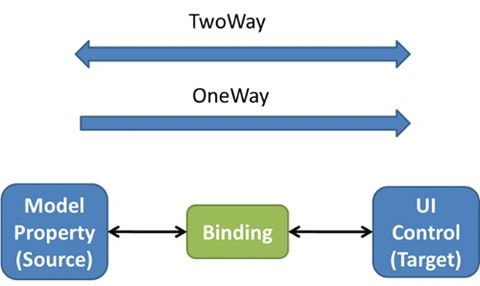
Step 1:
First create the UI for our LongListSelector.
- <phone:PhoneApplicationPage
- x:Class="LongListSelector_With_Check_Boxes.MainPage"
- xmlns="http://schemas.microsoft.com/winfx/2006/xaml/presentation"
- xmlns:x="http://schemas.microsoft.com/winfx/2006/xaml"
- xmlns:phone="clr-namespace:Microsoft.Phone.Controls;assembly=Microsoft.Phone"
- xmlns:shell="clr-namespace:Microsoft.Phone.Shell;assembly=Microsoft.Phone"
- xmlns:d="http://schemas.microsoft.com/expression/blend/2008"
- xmlns:mc="http://schemas.openxmlformats.org/markup-compatibility/2006"
- mc:Ignorable="d"
- FontFamily="{StaticResource PhoneFontFamilyNormal}"
- FontSize="{StaticResource PhoneFontSizeNormal}"
- Foreground="{StaticResource PhoneForegroundBrush}"
- SupportedOrientations="Portrait" Orientation="Portrait"
- shell:SystemTray.IsVisible="False">
- <phone:PhoneApplicationPage.Resources>
- <Style x:Key="CheckBoxStyle" TargetType="CheckBox">
- <Setter Property="Template">
- <Setter.Value>
- <ControlTemplate TargetType="CheckBox">
- <Grid Background="Transparent" HorizontalAlignment="Left">
- <!--Margin input-->
- <VisualStateManager.VisualStateGroups>
- <VisualStateGroup x:Name="CommonStates">
- <VisualState x:Name="Normal"/>
- <VisualState x:Name="MouseOver"/>
- <VisualState x:Name="Disabled">
- <Storyboard>
- <ObjectAnimationUsingKeyFrames Storyboard.TargetProperty="BorderBrush" Storyboard.TargetName="CheckBackground">
- <DiscreteObjectKeyFrame KeyTime="0" Value="{StaticResource PhoneDisabledBrush}"/>
- </ObjectAnimationUsingKeyFrames>
- <ObjectAnimationUsingKeyFrames Storyboard.TargetProperty="Fill" Storyboard.TargetName="CheckMark">
- <DiscreteObjectKeyFrame KeyTime="0" Value="{StaticResource PhoneDisabledBrush}"/>
- </ObjectAnimationUsingKeyFrames>
- <ObjectAnimationUsingKeyFrames Storyboard.TargetProperty="Fill" Storyboard.TargetName="IndeterminateMark">
- <DiscreteObjectKeyFrame KeyTime="0" Value="{StaticResource PhoneDisabledBrush}"/>
- </ObjectAnimationUsingKeyFrames>
- <ObjectAnimationUsingKeyFrames Storyboard.TargetProperty="Foreground" Storyboard.TargetName="ContentContainer">
- <DiscreteObjectKeyFrame KeyTime="0" Value="{StaticResource PhoneDisabledBrush}"/>
- </ObjectAnimationUsingKeyFrames>
- </Storyboard>
- </VisualState>
- </VisualStateGroup>
- <VisualStateGroup x:Name="CheckStates">
- <VisualState x:Name="Checked">
- <Storyboard>
- <ObjectAnimationUsingKeyFrames Storyboard.TargetProperty="Visibility" Storyboard.TargetName="CheckMark">
- <DiscreteObjectKeyFrame KeyTime="0">
- <DiscreteObjectKeyFrame.Value>
- <Visibility>Visible</Visibility>
- </DiscreteObjectKeyFrame.Value>
- </DiscreteObjectKeyFrame>
- </ObjectAnimationUsingKeyFrames>
- </Storyboard>
- </VisualState>
- <VisualState x:Name="Unchecked"/>
- <VisualState x:Name="Indeterminate">
- <Storyboard>
- <ObjectAnimationUsingKeyFrames Storyboard.TargetProperty="Visibility" Storyboard.TargetName="IndeterminateMark">
- <DiscreteObjectKeyFrame KeyTime="0">
- <DiscreteObjectKeyFrame.Value>
- <Visibility>Visible</Visibility>
- </DiscreteObjectKeyFrame.Value>
- </DiscreteObjectKeyFrame>
- </ObjectAnimationUsingKeyFrames>
- </Storyboard>
- </VisualState>
- </VisualStateGroup>
- </VisualStateManager.VisualStateGroups>
- <Grid Margin="{StaticResource PhoneTouchTargetLargeOverhang}">
- <Grid.ColumnDefinitions>
- <ColumnDefinition Width="32"/>
- <ColumnDefinition Width="*"/>
- </Grid.ColumnDefinitions>
- <Grid Grid.Column="0" VerticalAlignment="Top">
- <Border x:Name="CheckBackground" BorderBrush="#9db0b5" BorderThickness="{StaticResource PhoneBorderThickness}" Background="{TemplateBinding Background}" HorizontalAlignment="Left" Height="32" IsHitTestVisible="False" VerticalAlignment="Center" Width="32"/>
- <Rectangle x:Name="IndeterminateMark" Fill="{StaticResource PhoneRadioCheckBoxCheckBrush}" HorizontalAlignment="Center" Height="16" IsHitTestVisible="False" Visibility="Collapsed" VerticalAlignment="Center" Width="16"/>
- <Path x:Name="CheckMark" Data="M0,123 L39,93 L124,164 L256,18 L295,49 L124,240 z" Fill="#9db0b5" FlowDirection="LeftToRight" HorizontalAlignment="Center" Height="21" IsHitTestVisible="False" Stretch="Fill" StrokeThickness="3" StrokeLineJoin="Round" Visibility="Collapsed" VerticalAlignment="Center" Width="23"/>
- </Grid>
- </Grid>
- </Grid>
- </ControlTemplate>
- </Setter.Value>
- </Setter>
- </Style>
- <DataTemplate x:Key="groupHeaderTemplate">
- <StackPanel Grid.Row="0" Background="White">
- <TextBlock Text="{Binding Title}" Foreground="Red"></TextBlock>
- </StackPanel>
- </DataTemplate>
- <phone:JumpListItemBackgroundConverter x:Key="BackgroundConverter"/>
- <phone:JumpListItemForegroundConverter x:Key="ForegroundConverter"/>
- <Style x:Key="LLSJumpListStyle" TargetType="phone:LongListSelector">
- <Setter Property="GridCellSize" Value="113,113"/>
- <Setter Property="LayoutMode" Value="Grid" />
- <Setter Property="ItemTemplate">
- <Setter.Value>
- <DataTemplate>
- <Border Background="{Binding Converter={StaticResource BackgroundConverter}}" Width="113" Height="113" Margin="6" >
- <TextBlock Text="{Binding Key}" FontFamily="{StaticResource PhoneFontFamilySemiBold}" FontSize="48" Padding="6"
- Foreground="{Binding Converter={StaticResource ForegroundConverter}}" VerticalAlignment="Center"/>
- </Border>
- </DataTemplate>
- </Setter.Value>
- </Setter>
- </Style>
- <Style x:Name="DividerStyle" TargetType="Border">
- <Setter Property="BorderBrush" Value="Gray"></Setter>
- <Setter Property="BorderThickness" Value="0 0 0 1"></Setter>
- <Setter Property="Margin" Value="0 18 0 18"></Setter>
- <Setter Property="Width" Value="450"></Setter>
- <Setter Property="Opacity" Value="0.7"></Setter>
- </Style>
- </phone:PhoneApplicationPage.Resources>
- <!--LayoutRoot is the root grid where all page content is placed-->
- <Grid x:Name="LayoutRoot" Background="Transparent">
- <Grid.RowDefinitions>
- <RowDefinition Height="Auto"/>
- <RowDefinition Height="*"/>
- </Grid.RowDefinitions>
- <StackPanel x:Name="TitlePanel" Grid.Row="0" Margin="12,17,0,28">
- <TextBlock Text="Demo App" Style="{StaticResource PhoneTextNormalStyle}" Margin="12,0"/>
- </StackPanel>
- <!--ContentPanel - place additional content here-->
- <Grid x:Name="ContentPanel" Grid.Row="1" Margin="12,0,12,0">
- <phone:LongListSelector x:Name="lbTags" Background="Transparent"
- Margin="10,0"
- LayoutMode="List"
- SelectionChanged="llsPref_SelectionChanged">
- <phone:LongListSelector.ItemTemplate>
- <DataTemplate>
- <Grid HorizontalAlignment="Stretch">
- <Grid.RowDefinitions>
- <RowDefinition Height="*"/>
- <RowDefinition Height="*"/>
- </Grid.RowDefinitions>
- <Grid.ColumnDefinitions>
- <ColumnDefinition Width="0.5*"/>
- <ColumnDefinition Width="3*"/>
- </Grid.ColumnDefinitions>
- <CheckBox Grid.Column="0" IsChecked="{Binding CheckboxState, Mode=TwoWay}" Grid.Row="0" Grid.RowSpan="2" x:Name="chkDelete" Visibility="Visible" Margin="2,16,10,20" Grid.ColumnSpan="2" Click="CheckBox_Click" />
- <TextBlock Text="{Binding NoteName}" FontSize="{StaticResource PhoneFontSizeLarge}" FontFamily="Segoe WP" Grid.Row="0" Foreground="Red" Grid.Column="1" Margin="12,24,0,0" />
- </Grid>
- </DataTemplate>
- </phone:LongListSelector.ItemTemplate>
- </phone:LongListSelector>
- </Grid>
- </Grid>
- </phone:PhoneApplicationPage>
Charwaka ThupiliPosted Jul 7, 2015, 3:43 AM
Thank You Sir
Santhakumar MunuswamyPosted Jul 3, 2015, 3:09 PM
Thanks for nice article.:)