

Introduction
This post provides an example about how to create a table via sorting, filter and paging. Following directives and services in AngularJS will be used.
- orderby
- filter
- ng-click
- ng-model
- ng-repeat
I have declared AngularJS Reference.
- <title>Anular Js Filter Example </title>
- <link rel="stylesheet" href="//netdna.bootstrapcdn.com/bootstrap/3.1.1/css/bootstrap.min.css">
- <script src="http://code.angularjs.org/1.4.8/angular.js"></script>
- <script src="http://code.angularjs.org/1.4.8/angular-resource.js"></script>
- <script src="http://angular-ui.github.io/bootstrap/ui-bootstrap-tpls-0.11.0.js"></script>
Now, I created Angular Model, controller, filter, as shown below.
- <script>
- var app = angular.module('MyForm', ['ui.bootstrap', 'ngResource']);
- app.controller('myCtrl', function ($scope) {
- $scope.predicate = 'name';
- $scope.reverse = true;
- $scope.currentPage = 1;
- $scope.order = function (predicate) {
- $scope.reverse = ($scope.predicate === predicate) ? !$scope.reverse : false;
- $scope.predicate = predicate;
- };
- $scope.students = [
- { name: 'Thennarasu', age: 24, gender: 'boy',city:'Madurai',Designation:'MCA' },
- { name: 'Karthik', age: 25, gender: 'boy',city:'Theni',Designation:'BE' },
- { name: 'Tony', age: 25, gender: 'boy',city:'Erode',Designation:'MCA' },
- { name: 'Jose', age: 27, gender: 'boy',city:'Kanyakumari',Designation:'MBA' },
- { name: 'Viji', age: 26, gender: 'Girl',city:'TenKasi',Designation:'BSC' },
- { name: 'Prem', age: 25, gender: 'boy',city:'Chennai',Designation:'MBA' },
- { name: 'Senni', age: 30, gender: 'boy',city:'Madurai',Designation:'MCA' },
- { name: 'Mano', age: 27, gender: 'boy',city:'Madurai',Designation:'MCA'},
- { name: 'KarthuPandi', age: 25, gender: 'boy',city:'Theni',Designation:'BE' },
- ];
- $scope.totalItems = $scope.students.length;
- $scope.numPerPage = 5;
- $scope.paginate = function (value) {
- var begin, end, index;
- begin = ($scope.currentPage - 1) * $scope.numPerPage;
- end = begin + $scope.numPerPage;
- index = $scope.students.indexOf(value);
- return (begin <= index && index < end);
- };
- });
- </script>
Style of Grid View Data is shown below.
- <style>
- .odd {
- background-color: Yellow;
- color: #008b8b;
- }
- td th {
- height: 30px;
- min-width: 100px;
- }
- thead {
- background-color: darkgray;
- color: white;
- height: 30px;
- }
- </style>
Finally HTML Mark up code looks, as shown below.
- <body ng-app="MyForm">
- <div ng-controller="myCtrl">
- <h3>List students</h3>
- <div class="container-fluid">
- <hr />
- <table class="table table-striped">
- <thead>
- <tr>
- <th>
- <a href="" ng-click="order('name')">Name</a>
- </th>
- <th><a href="" ng-click="order('age')"> Age</a> </th>
- <th><a href="" ng-click="order('gender')">Gender</a> </th>
- <th><a href="" ng-click="order('city')"> City</a> </th>
- <th><a href="" ng-click="order('Designation')">Designation</a> </th>
- </tr>
- </thead>
- <tbody>
- <tr>
- <td> <input type="text" ng-model="search.name" /></td>
- <td> <input type="text" ng-model="search.age" /> </td>
- <td><input type="text" ng-model="search.gender" /> </td>
- <td><input type="text" ng-model="search.city"/></td>
- <td><input type="text" ng-model="search.Designation"/></td>
- </tr>
- <tr ng-repeat="user in students | orderBy:predicate:reverse | filter:paginate| filter:search" ng-class-odd="'odd'">
- <td>{{ user.name}}</td>
- <td>{{ user.age}}</td>
- <td>{{ user.gender}}</td>
- <td>{{ user.city}}</td>
- <td>{{ user.Designation}}</td>
- </tr>
- </tbody>
- </table>
- <!-- <pagination total-items="totalItems" ng-model="currentPage"
- max-size="5" boundary-links="true"
- items-per-page="numPerPage" class="pagination-sm">
- </pagination> -->
- <pagination total-items="total-items" ng-model="currentPage"
- max-size="5" boundary-links="true"
- items-per-page="numPerPage" class="pagination-sm">
- </div>
- </div>
- </body>
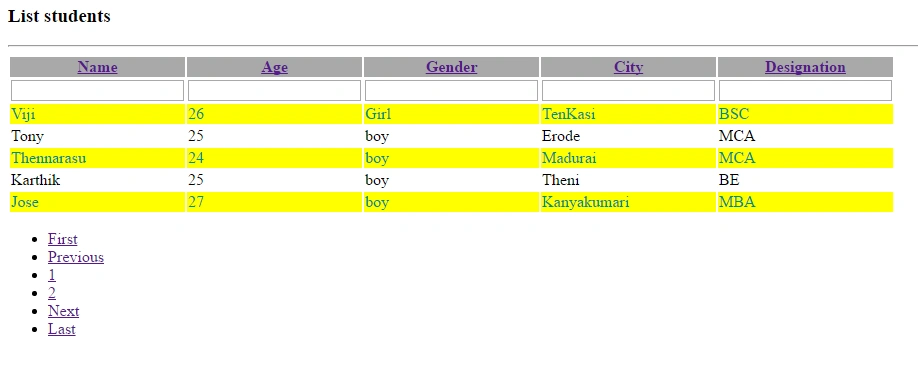
After run ningthe code, the output will look, as shown below.
Full data showing Table
After entering the value, Filter Box shows the result, as shown below.
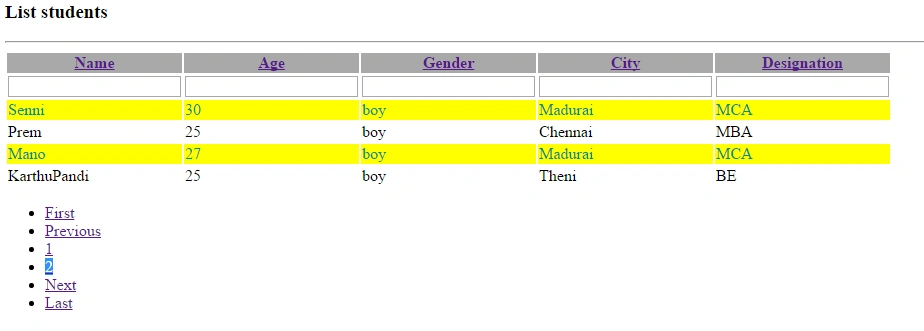
Finally Pagination Data will look as follows..
 Summary
Finally, you have learned how to create a table via sorting, filtering and paging.
After entering the value, Filter Box shows the result, as shown below.
Finally Pagination Data will look as follows..
SummaryFinally, you have learned how to create a table via sorting, filtering and paging.
Anu VPosted Nov 2, 2016, 8:12 AM
Nice..
Bikesh SrivastavaPosted Nov 2, 2016, 6:32 AM
Good .