

The <div> tag is used to group block the elements to format them.
Here, I have added div tag in the stored procedure, as I had used in ASP.NET html. Retrieve Footer and Header text information in page or report, using dynamic process instead of static process.
Description
In real time scenarios, instead of writing page header and footer and other text details, manually or static process
in ASPX page or Report like rdl ,rdlc, rpt.; we can retrieve those, using backend processes.
Steps
Create a table and insert some dummy records in it.
Execute the query given below to show the records.
- select * from tblEmployees
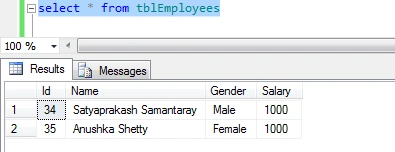
Create a stored procedure, as shown below.
- Create Procedure Sp_DivTag
- As
- Begin
- Set nocount on;
- SELECT tblEmployees.ID as EmployeeID,'<div align="justify">This is to inform that '+
- ', '+ case when tblEmployees.Gender='male' then 'Mr.' + tblEmployees.Name else 'Mrs.' + tblEmployees.Name end
- +', is a member of our Company , working in the Microsoft Platform'+
- +'</p></div>' as MemberBIO
- FROM tblEmployees
- End
by using this alias as 'MemberBIO' and putting this in ASPX and report, as mentioned above and retrieving the text details from the backend process instead of writing manually or static process.
Execute the procedure given below.
- exec Sp_DivTag
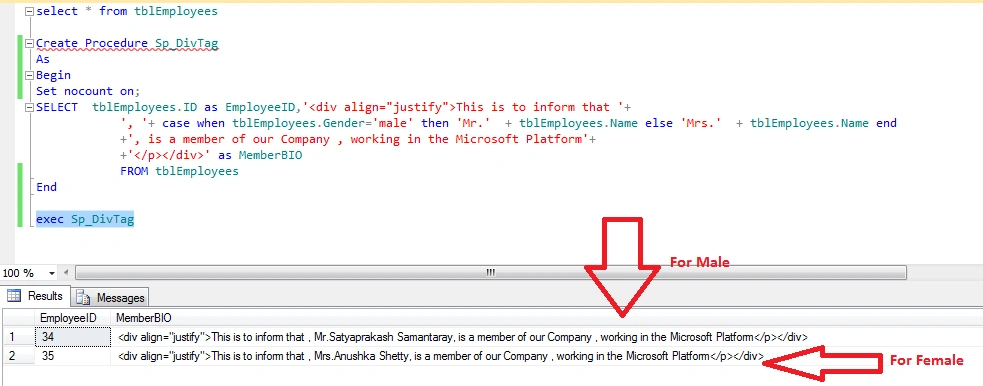
Summary
What is a div tag?
How to apply a div tag in the stored procedure.
Merits of using div tag.
Apply it in Pages and Reports.
What is a div tag?
How to apply a div tag in the stored procedure.
Merits of using div tag.
Apply it in Pages and Reports.
Saravanakumar SekaranPosted May 10, 2017, 3:20 AM
Really very very interesting !!!!!!!!