

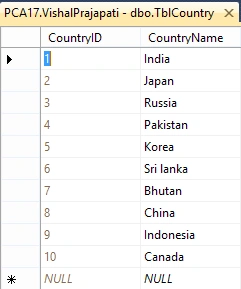
This article explains how to implement an auto-complete textbox in ASP.NET using jQuery AJAX. The following is the SQL Server Table that I will use for fetching the records to display on the auto-complete textbox.
Step 1 - Create web application.
- "Start" - "All Programs" - "Microsoft Visual Studio 2013".
- "File" - "New WebSite" - "C#" - "Empty WebSite”.
- Provide the website a name, such as "AutoCompleteUsingJQuery" and specify the location.
- Then, right-click on Solution Explorer - "Add New Item" - Add Web Form. Name it as “AutoComplete.aspx”.
- Drag and drop one TextBox and four labels onto the <form> section of the AutoComplete.aspx page.
- Add the following stylesheets as well as scripts in your .aspx page.
Here, I am using CDN library to refer to the scripts.You can also download those libraries and can give a reference in your project.- <link rel="stylesheet" href="//code.jquery.com/ui/1.11.4/themes/smoothness/jquery-ui.css" />
- <link rel="Stylesheet" href="http://ajax.aspnetcdn.com/ajax/jquery.ui/1.8.10/themes/redmond/jquery-ui.css" />
- <script src="http://ajax.googleapis.com/ajax/libs/jquery/1.11.2/jquery.min.js"></script>
- <script src="http://ajax.googleapis.com/ajax/libs/jqueryui/1.8/jquery-ui.min.js"></script>
- Now, the AutoComplete.aspx page source code will look like the following code.
- <%@ Page Language="C#" AutoEventWireup="true" CodeBehind="AutoComplete.aspx.cs" Inherits="AutoCompleteUsingJQueryForCSharpCorner.AutoComplete" %>
- <!DOCTYPE html>
- <html xmlns="http://www.w3.org/1999/xhtml">
- <head runat="server">
- <title></title>
- <link rel="stylesheet" href="//code.jquery.com/ui/1.11.4/themes/smoothness/jquery-ui.css" />
- <link rel="Stylesheet" href="http://ajax.aspnetcdn.com/ajax/jquery.ui/1.8.10/themes/redmond/jquery-ui.css" />
- <script src="http://ajax.googleapis.com/ajax/libs/jquery/1.11.2/jquery.min.js"></script>
- <script src="http://ajax.googleapis.com/ajax/libs/jqueryui/1.8/jquery-ui.min.js"></script>
- </head>
- <body>
- <form id="form1" runat="server">
- <div style="width: 300px; margin-top: 50px; height: 23px">
- <asp:Label ID="lbl" runat="server" Text="Search"></asp:Label>
- <asp:TextBox ID="txtCountry" runat="server"></asp:TextBox>
- <asp:Button ID="Label1" runat="server" Text="OK" OnClick="btn_click"></asp:Button><br /> <br />
- <asp:Label ID="Label2" runat="server" Text="You selected:"></asp:Label>
- <asp:Label ID="Label3" runat="server"></asp:Label>
- </div>
- </form>
- </body>
- </html>
Step 2- Use Entity Framework.
- Right click on your Project Name->Add New Item ->Select ADO.NET Entity Data Model
- Give it a suitable name and select appropriate table from your respective database.
In my case, the database is MS SQL Server and my table is TblCountry. The created entity model will look like the following.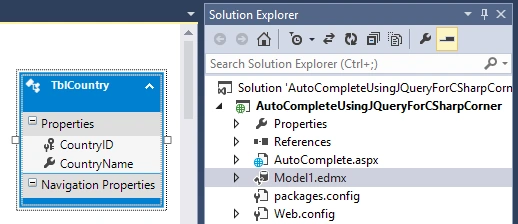
Step 3- AutoComplete.aspx.cs page will look like this.
- using System;
- using System.Collections.Generic;
- using System.Linq;
- using System.Web;
- using System.Web.Script.Services;
- using System.Web.Services;
- using System.Web.UI;
- using System.Web.UI.WebControls;
- namespace AutoCompleteUsingJQueryForCSharpCorner
- {
- public partial class AutoComplete: System.Web.UI.Page {
- protected void Page_Load(object sender, EventArgs e) {}
- [WebMethod]
- [ScriptMethod(ResponseFormat = ResponseFormat.Json)]
- public static List < string > GetCountryName(string pre) {
- List < string > allCompanyName = new List < string > ();
- using(VishalPrajapatiEntities dc = new VishalPrajapatiEntities()) {
- allCompanyName = (from a in dc.TblCountries where a.CountryName.StartsWith(pre) select a.CountryName).ToList();
- }
- return allCompanyName;
- }
- protected void btn_click(object sender, EventArgs e) {
- Label3.Text = txtCountry.Text;
- }
- }
- }
Step 4- Create jQuery AJAX function to call Controller JSON Action Method and invoke autocomplete function on it.
- <script type="text/javascript">
- $(function() {
- $('#<%=txtCountry.ClientID%>').autocomplete({
- source: function(request, response) {
- $.ajax({
- type: "POST",
- url: "AutoComplete.aspx/GetCountryName",
- data: "{ 'pre':'" + request.term + "'}",
- dataType: "json",
- contentType: "application/json; charset=utf-8",
- success: function(data) {
- response($.map(data.d, function(item) {
- return {
- value: item
- }
- }))
- },
- error: function(XMLHttpRequest, textStatus, errorThrown) {
- alert("Error");
- }
- });
- }
- });
- });
- </script>
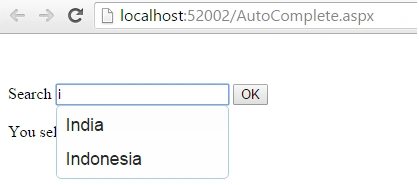
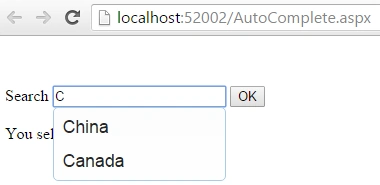
Now, run the application and type any word. It will auto populate the records which start exactly with the first character you typed, as shown in the following images.
Note,
- For detailed code, please download the sample zip file.
- Perform changes in Web.config file as per your server location.
- You need to use the jQuery library.
I hope this article will be useful for all readers.
Sinraj VPosted Sep 19, 2016, 5:11 AM
Nice one..
Humayun Kabir MamunPosted Sep 18, 2016, 12:52 AM
Nice...