

Overview:
The following post will help you in binding the SharePoint people field names to DropDownList using C# code.
List Details:
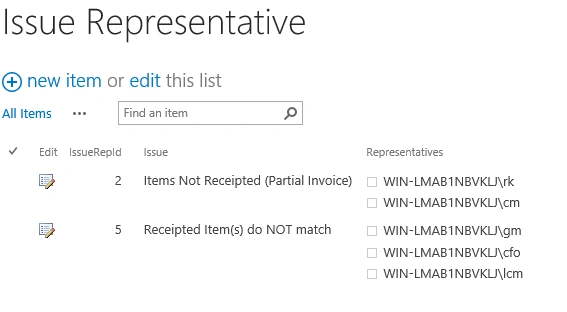
Code:
- using System;
- using System.Web.UI;
- using System.Web.UI.WebControls;
- using System.Web.UI.WebControls.WebParts;
- using Microsoft.SharePoint;
- using System.Collections.Specialized;
- using System.Data;
- using System.Collections;
- using System.Text;
- namespace RK_Solution.VisualWebPart1
- {
- public partial class VisualWebPart1UserControl: UserControl
- {
- protected void Page_Load(object sender, EventArgs e)
- {
- SPSite site = SPContext.Current.Site
- using(SPWeb web = site.OpenWeb())
- {
- SPList issueRepList = web.Lists["Issue Representative"];
- SPListItemCollection issueRepItems = issueRepList.Items;
- DataTable dtUsers = new DataTable();
- dtUsers.Columns.Add("User", typeof(string));
- foreach(SPListItem item in issueRepItems)
- {
- if (item["IssueRepId"].ToString() == "5")
- {
- SPFieldUserValueCollection userCol = new SPFieldUserValueCollection
- (SPContext.Current.Web, item["Representatives"].ToString());
- foreach(SPFieldUserValue usrItm in userCol)
- {
- string temp = usrItm.User.Name.ToString();
- dtUsers.Rows.Add(temp);
- }
- ddlIssueRep2.DataSource = dtUsers;
- ddlIssueRep2.DataTextField = "User";
- ddlIssueRep2.DataValueField = "User";
- ddlIssueRep2.DataBind();
- }
- }
- }
- }
- }
- }
Output:

Join the conversation! Your thoughts help the community grow.