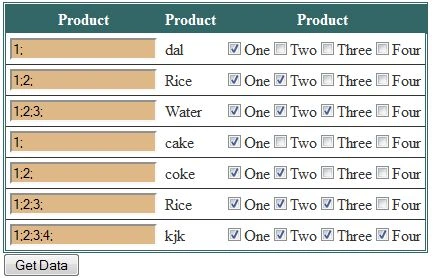
Does the Checkboxlist within gridview cell counts all selected items?
Let us see.
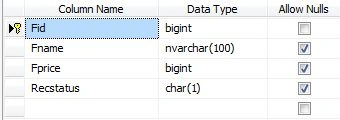
Create Table Here I Provide Script
CREATE TABLE [dbo].[Food](
[Fid] [bigint] primary key IDENTITY(1,1) NOT NULL,
[Fname] [nvarchar](100) NULL,
[Fprice] [bigint] NULL,
[Recstatus] [char](1) NULL,
)
INSERT INTO Food(Fname,Fprice,Recstatus)VALUES('Dal',2000,'A')
INSERT INTO Food(Fname,Fprice,Recstatus)VALUES('Rice',52000,'A')
<%@ Page Language="C#" AutoEventWireup="true" CodeFile="FindingCheckboxlistSelectedItems.aspx.cs"
Inherits="FindingCheckboxlistSelectedItems" %>
<!DOCTYPE html PUBLIC "-//W3C//DTD XHTML 1.0 Transitional//EN" "http://www.w3.org/TR/xhtml1/DTD/xhtml1-transitional.dtd">
<html xmlns="http://www.w3.org/1999/xhtml">
<head id="Head1" runat="server">
<title></title>
</head>
<body>
<form id="form1" runat="server">
<div>
<asp:GridView ID="GridView1" runat="server" AutoGenerateColumns="False" CellPadding="4"
GridLines="Horizontal" BackColor="White" BorderColor="#336666" BorderStyle="Double"
BorderWidth="3px">
<Columns>
<asp:TemplateField HeaderText="Product">
<ItemTemplate>
<asp:TextBox ID="TextBox1" BackColor="BurlyWood" runat="server"></asp:TextBox>
</ItemTemplate>
</asp:TemplateField>
<asp:TemplateField HeaderText="Product">
<ItemTemplate>
<asp:CheckBoxList ID="CheckBoxList1" RepeatLayout="Flow" RepeatDirection="Horizontal"
runat="server">
<asp:ListItem Text="One" Value="1">
</asp:ListItem>
<asp:ListItem Text="Two" Value="2">
</asp:ListItem>
<asp:ListItem Text="Three" Value="3">
</asp:ListItem>
<asp:ListItem Text="Four" Value="4">
</asp:ListItem>
</asp:CheckBoxList>
<br />
</ItemTemplate>
</asp:TemplateField>
</Columns>
<FooterStyle BackColor="White" ForeColor="#333333" />
<HeaderStyle BackColor="#336666" Font-Bold="True" ForeColor="White" />
<PagerStyle BackColor="#336666" ForeColor="White" HorizontalAlign="Center" />
<RowStyle BackColor="White" ForeColor="#333333" />
<SelectedRowStyle BackColor="#339966" Font-Bold="True" ForeColor="White" />
<SortedAscendingCellStyle BackColor="#F7F7F7" />
<SortedAscendingHeaderStyle BackColor="#487575" />
<SortedDescendingCellStyle BackColor="#E5E5E5" />
<SortedDescendingHeaderStyle BackColor="#275353" />
</asp:GridView>
</div>
<asp:Button ID="Button1" runat="server" Text="Get Data" OnClick="Button1_Click" />
</form>
</body>
</html>
To Bind Gridview Using This Method
public void bindgrid()
{
SqlCommand cmd = new SqlCommand("select * from food ", con);
cmd.CommandType = CommandType.Text;
SqlDataAdapter da = new SqlDataAdapter();
da.SelectCommand = cmd;
DataTable dt = new DataTable();
da.Fill(dt);
if (dt.Rows.Count > 0)
{
GridView1.DataSource = dt;
GridView1.DataBind();
}
else
{
DataRow dr = dt.NewRow();
dt.Rows.Add(dr);
GridView1.DataSource = dt;
GridView1.DataBind();
}
}
protected void Page_Load(object sender, EventArgs e)
{
if (!IsPostBack)
{
bindgrid();
}
}
protected void Button1_Click(object sender, EventArgs e)
{
foreach (GridViewRow GVR in GridView1.Rows)
{
CheckBoxList chk = (CheckBoxList)GVR.Cells[1].FindControl("CheckBoxList1");
string store = "";
foreach (ListItem li in chk.Items)
{
if (li.Selected)
{
store += li.Value + ";";
}
}
TextBox TextBox1 = (TextBox)GVR.Cells[0].FindControl("TextBox1");
TextBox1.Text = store;
}
}


Join the conversation! Your thoughts help the community grow.