

Steps to consume RSS data using Jquery AJAX
Here, we have used open source XML which has been exposed and can be used in our code to consume the XML data and later, converted to JSON format which can be played around with based on our requirement.
For converting to JSON format, we have used default api 'https://api.rss2json.com/v1/api.json?rss_url=URL To Convert'.
- // Code Sample
- $(document).ready(function() {
- var url = 'http://www.recruiter.com/feed/career.xml'; //Data in XML format
- $.ajax({
- type: 'GET',
- url: "https://api.rss2json.com/v1/api.json?rss_url=" + url, //For converting default format to JSON format
- dataType: 'jsonp', //for making cross domain call
- success: function(data) {
- alert('Success');
- $("#rss-default").append(data.feed);
- console.log(data.feed.description);
- }
- });
- });
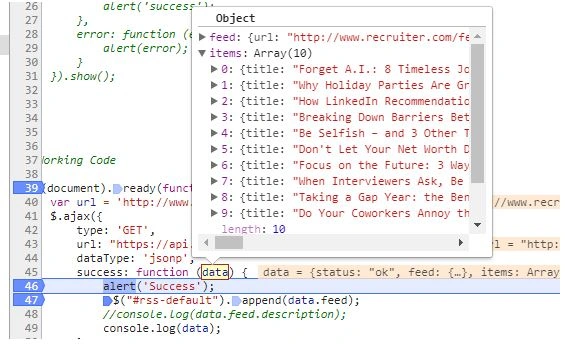
As we can see in the image, we are getting the XML data and later on converting it in JSON format which can be used based on our requirement.
Srini RapPosted May 8, 2023, 2:09 PM
Hi Suman, This is very helpful.
Chris CoxPosted Jan 24, 2019, 6:22 PM
This saved me big time. After Google and Yahoo tools went down I was scrambling to get a client's aggregated rss feed web part working again. Worked like a charm, just had to change the call to use $.getJSON(url...