

Introduction
In this blog, we will learn how can we create a document library using MS Flow.
There is no action available in flow to create a document library. So, to create a document library we need to use rest API, and to use rest API in MS flow we will send an HTTP request to SharePoint action.
Steps to create a document library
- To get started with this example create a new SharePoint List - for this example we will use the Title field but you could end up using any column you wish.
- So, when a new item is created in the list and you type the title, the flow will create a document library with the name entered in the title of the list.
Step 1
Create automated cloud flow and select trigger when the item is created.
Step 2
Select Site Address and List Name.

Step 3
Now add new action Send an HTTP request to SharePoint.
Step 4
In a Site Address field, select the site in which you want to create a document library.
Step 5
In the Method field, select option POST.
Step 6
In Uri field, enter below Uri,
- _api/web/lists
Step 7
In header, add below key value pair,
| accept | application/json;odata=verbose |
| content-type | application/json;odata=verbose |
Step 8
In the Body field, add the below JSON. You can copy the JSON code from below directly into the Body of your action,
- {
- '__metadata':{ 'type':'SP.List' },
- 'AllowContentTypes': true,
- 'BaseTemplate':101,
- 'ContentTypesEnabled':true,
- 'Description':"",
- 'Title': '@{triggerOutputs()?['body/Title']}'
- }
Step 9
After filling up all fields values, send an HTTP request to SharePoint action which will be displayed as below,
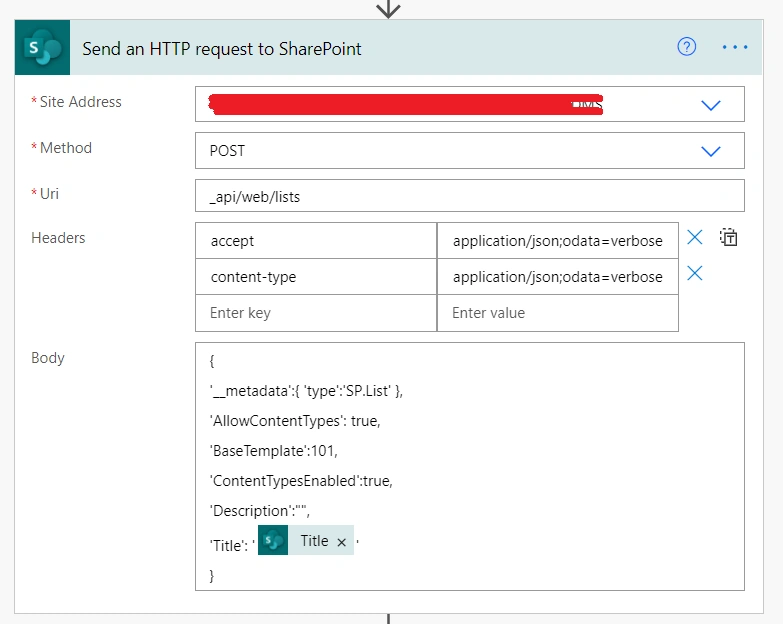
Once you have configured the action and saved your flow you can click the Test button. If this is the first time the flow has run it will ask you to perform the action on the target list so go ahead and create a list item.
Your flow should be successful and you will have a new Document Library.
Hope this blog will be helpful!
Shawn FieldingPosted Nov 30, 2021, 6:36 PM
This worked perfectly! Thank you! I also figured out how to add a content type by doing a second call with add contentTypeId. However, now I want to figure out how to add a view. Having a difficult time finding that one.
CHRIS PALLITTOPosted Nov 22, 2021, 10:28 PM
Thanks Sanjay. This worked great as expected. Is it possible to create a SP page and add this document library to the new page based on a new item added to a list trigger?
Russ HPosted Sep 30, 2021, 2:13 AM
Hi Sanjay, thank you for the article. Is it possible to add existing site columns to the new Document Library using Power Automate?
Liam GranthamPosted Sep 1, 2021, 9:58 PM
Hello Sanjay, this was very helpful. Thank you! I am new to Power Automate and learning everything I can. Is it possible to to populate the library that you just made using the "create a folder" action?