

Introduction
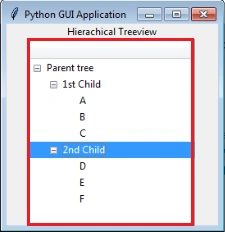
In this blog, I am going to create a hierarchical treeview in Python GUI application. It will display the treeview on the application screen.
Software requirement
Python 3.5 and IDLE (Python 3.5)
Programming code
- #Create hiracchical treeview Application
- from tkinter import *
- from tkinter import ttk
- app=Tk()
- #App Title
- app.title("Python GUI Application ")
- #Lable
- ttk.Label(app, text="Hierachical Treeview").pack()
- #Treeview
- treeview=ttk.Treeview(app)
- treeview.pack()
- #Treeview items
- treeview.insert('','0','item1',text='Parent tree')
- treeview.insert('','1','item2',text='1st Child')
- treeview.insert('','end','item3',text='2nd Child')
- treeview.insert('item2','end','A',text='A')
- treeview.insert('item2','end','B',text='B')
- treeview.insert('item2','end','C',text='C')
- treeview.insert('item3','end','D',text='D')
- treeview.insert('item3','end','E',text='E')
- treeview.insert('item3','end','F',text='F')
- treeview.move('item2','item1','end')
- treeview.move('item3','item1','end')
- #Calling Main()
- app.mainloop()
About the code
First, I am importing the tkinter modules.
Next, assign a class and variables and give the application title.
Next, create hierarchical treeview and add tree items in the code.
Finally, I have started the windows event loop by calling the mainloop method.
Then, let’s execute the code.
Output
Join the conversation! Your thoughts help the community grow.