

In this blog you will see how to use CreateTask Activity in the sequential workflow .To create sequential workflow in SharePoint 2010 using Visual Studio 2010 please refer my previous blog http://www.c-sharpcorner.com/Blogs/10045/how-to-create-sequential-workflow-in-sharepoint-2010-using-v.aspx. CreateTask activity is used to create a task in the Tasks list.
Steps Involved:
1. Go to toolbox, drag and drop the CreateTask activity from SharePoint Workflow section onto the workflow design surface (Workflow1.cs[Design]).
2. Go to createTask1 properties, enter the CorreleationToken as TaskToken and in the OwnerActivityName select workflow1.
3. Next we need to set the TaskId property, click on the ...button in the TaskId property.
4. Click on Bind to a new member tab, select Create Field option and then click on Ok.
5. Similarly set the TaskProperties property.
using System; using System.ComponentModel; using System.ComponentModel.Design; using System.Collections; using System.Drawing; using System.Linq; using System.Workflow.ComponentModel.Compiler; using System.Workflow.ComponentModel.Serialization; using System.Workflow.ComponentModel; using System.Workflow.ComponentModel.Design; using System.Workflow.Runtime; using System.Workflow.Activities; using System.Workflow.Activities.Rules; using Microsoft.SharePoint; using Microsoft.SharePoint.Workflow; using Microsoft.SharePoint.WorkflowActions; namespace SequentialWorkflow.Workflow1 { public sealed partial class Workflow1 : SequentialWorkflowActivity { public Workflow1() { InitializeComponent(); } public Guid workflowId = default(System.Guid); public SPWorkflowActivationProperties workflowProperties = new SPWorkflowActivationProperties(); public Guid createTask1_TaskId1 = default(System.Guid); public SPWorkflowTaskProperties createTask1_TaskProperties1 = new Microsoft.SharePoint.Workflow.SPWorkflowTaskProperties(); private void onWorkflowActivated1_Invoked(object sender, ExternalDataEventArgs e) { } private void createTask1_MethodInvoking(object sender, EventArgs e) { //// Need to set the TaskId property to a new value. //// When you created the TaskId property it will have empty GUID {00000000-0000-0000-0000-000000000000} createTask1_TaskId1 = Guid.NewGuid(); createTask1_TaskProperties1.Title = "Test"; createTask1_TaskProperties1.Description = "Task created using CreateTask activity"; createTask1_TaskProperties1.StartDate = DateTime.Now; createTask1_TaskProperties1.DueDate = DateTime.Now.AddDays(5); createTask1_TaskProperties1.AssignedTo = "Rnd Owners"; } } }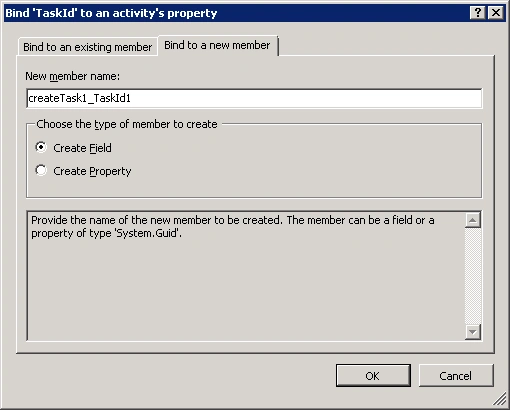
TaskProperties: 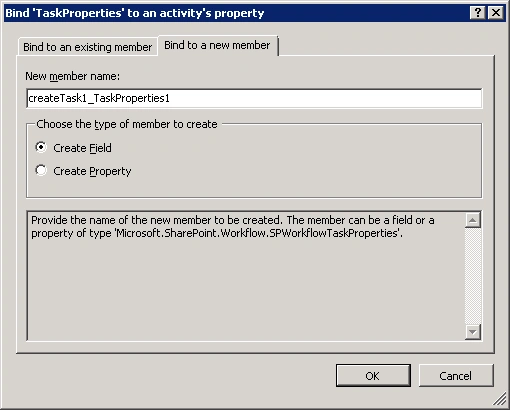
createTask1 properties:
Workflow1.cs:
Right click on the solution and then click on Deploy. Go to the custom list "Testing" where the workflow is associated by default. Create a new item. Then go to Tasks list and check whether a new task is created as shown in the following figure
chakravarthyPosted Jan 2, 2013, 4:01 AM
hello am getting WF status is "Error Occurs"
chakravarthyPosted Jan 2, 2013, 4:00 AM
hello am getting WF status is "Error Occurs"
chakravarthyPosted Jan 2, 2013, 4:00 AM
hello am getting WF status is "Error Occurs"
chakravarthyPosted Jan 2, 2013, 4:00 AM
hello am getting WF status is "Error Occurs"
chakravarthyPosted Jan 2, 2013, 4:00 AM
hello am getting WF status is "Error Occurs"
chakravarthyPosted Jan 2, 2013, 4:00 AM
hello am getting WF status is "Error Occurs"
chakravarthyPosted Jan 2, 2013, 4:00 AM
hello am getting WF status is "Error Occurs"
chakravarthyPosted Jan 2, 2013, 4:00 AM
hello am getting WF status is "Error Occurs"
Jean PaulPosted Sep 19, 2012, 9:20 AM
Good One! Thank You Vijay.