

Creating Silverlight client application.
Task 1: In the same solution add Silverlight client application, name it
as
‘SILV3_WCF_REST_Client'. (Note: Create separate website for the Silverlight
application else the WCF and ASP.NET website will be created in the same
project.).
Task 2: In the Silverlight project add the ‘Employee' class. This is used
to consume the REST –POX response from the WCF service.
public class Employee
{
public
int EmpNo { get;
set; }
public
string EmpName { get;
set; }
public
string DeptName { get;
set; }
public
int Salary { get;
set; }
}
Task 3: Open MainPage.xaml and write the following Xaml:
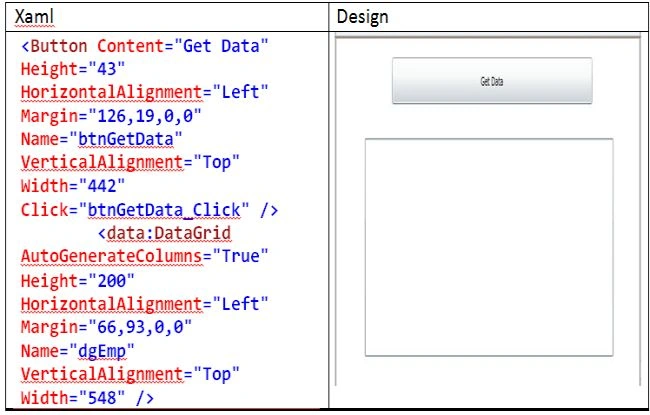
(Note: <data:DataGrid> tag for DataGrid may be different in your case, so
instead of copying the above xaml better Drag-Drop the controls.).
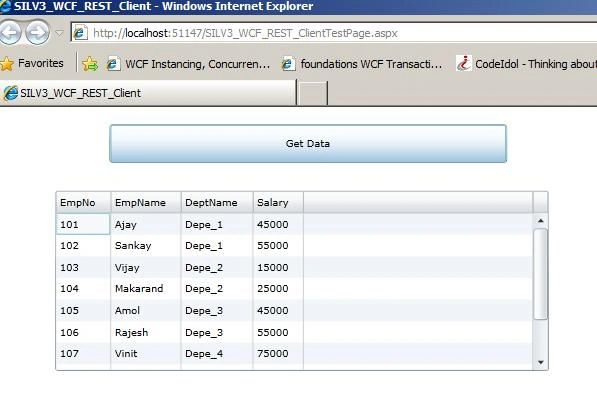
Task 4: Open MainPage.Xaml.cs and write the following code on ‘Get Data'
button click:
private void btnGetData_Click(object sender, RoutedEventArgs e)
{
WebClient wc = new WebClient(); try
{
wc.DownloadStringCompleted += new DownloadStringCompletedEventHandler(wc_DownloadStringCompleted);
wc.DownloadStringAsync(new Uri("http://localhost:8001/WCF_REST_HP_VD/Service.svc/Employee"));
Join the conversation! Your thoughts help the community grow.