

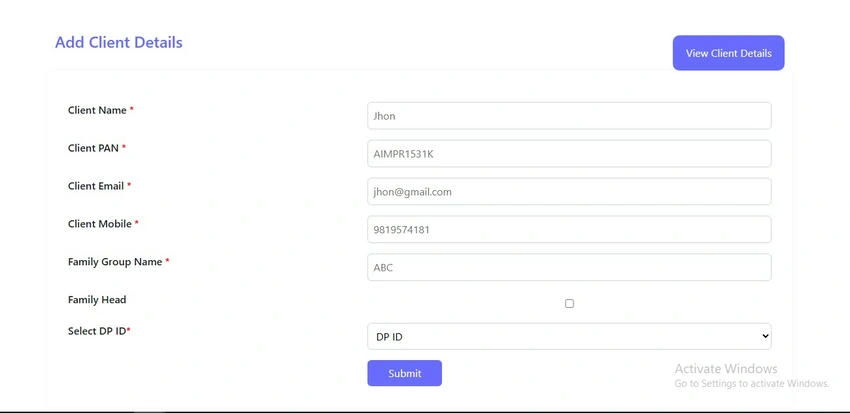
This blog post showcases a web-based CRUD (Create, Read, Update, Delete) operation interface built using ASP.NET Web Forms and styled with Bootstrap 5. It integrates Oracle Database on the backend and provides a responsive UI for managing client details such as PAN, Email, Demat ID, and more.
Overview
This documentation covers a complete ASP.NET web application for managing client details with Oracle database integration. The system provides CRUD (Create, Read, Update, Delete) operations for client information including personal details, PAN numbers, email addresses, and DP (Depository Participant) IDs.
Key Components
- CRUDOperation.aspx: Main page for viewing, searching, and deleting client records
- AddClient-List.aspx: Form for adding/editing client details
- Oracle Database: Backend data storage
- OracleHelper.cs: Data access helper class (not shown but referenced)
Features
- Search functionality with multiple filters (name, PAN, email, UCC, Demat ID)
- Date range filtering using a calendar picker
- Bulk delete capability with checkbox selection
- Responsive design that works on mobile and desktop
- Real-time filtering of displayed data
Code
CURDOperation Frontend page
<%@ Page Language="C#" AutoEventWireup="true" CodeBehind="CRUDOperation.aspx.cs" Inherits="TaskPractices.OracleDB.Oracle_CRUD_Operation.CRUDOperation" %>
<!DOCTYPE html>
<html xmlns="http://www.w3.org/1999/xhtml">
<head runat="server">
<title>CRUD Operation</title>
<link href="https://cdn.jsdelivr.net/npm/[email protected]/dist/css/bootstrap.min.css" rel="stylesheet" />
<script src="https://cdn.jsdelivr.net/npm/[email protected]/dist/js/bootstrap.bundle.min.js"></script>
<style>
body {
background-color: #f8f9fa;
}
.editalignment {
text-align: center !important;
}
.colorred {
color: red;
}
.grey-bg {
padding: 20px 0;
}
.head-with-filer {
display: flex;
flex-wrap: wrap;
justify-content: space-between;
align-items: center;
margin-bottom: 20px;
}
.dashboard-heading h3 {
margin-bottom: 0;
font-weight: bold;
color: #696CFF;
}
.filter-section {
display: flex;
flex-wrap: wrap;
gap: 10px;
align-items: center;
}
.calender-section {
display: flex;
align-items: center;
gap: 8px;
background-color: #696CFF;
padding-right: 20px;
padding-left: 20px;
padding-top: 15px;
padding-bottom: 15px;
color: #fff;
border-radius: 10px;
}
a {
text-decoration: none !important;
color: #fff !important;
}
.searchbtn {
width: 75px;
height: 30px;
padding-left: 14px;
}
.admin-input {
margin-bottom: 10px;
padding: 10px;
border-radius: 5px;
border: 1px solid #ccc;
}
.cms-table {
margin-top: 20px;
}
.serachbox {
padding: 8px;
border-radius: 5px;
border: 1px solid #ccc;
width: 250px;
}
.tooltiptext {
visibility: hidden;
width: 80px;
background-color: black;
color: #fff;
text-align: center;
border-radius: 5px;
padding: 5px 0;
position: absolute;
z-index: 1;
bottom: 125%;
left: 50%;
margin-left: -40px;
opacity: 0;
transition: opacity 0.3s;
}
.tooltip:hover .tooltiptext {
visibility: visible;
opacity: 1;
}
.delete-div {
position: relative;
}
.modalload {
display: flex;
justify-content: center;
align-items: center;
position: fixed;
z-index: 9999;
background-color: rgba(0, 0, 0, 0.5);
top: 0;
left: 0;
width: 100%;
height: 100%;
}
.centerload img {
width: 60px;
height: 60px;
}
@media (max-width: 768px) {
.head-with-filer,
.filter-section,
.calender-section {
flex-direction: column;
align-items: flex-start;
}
.serachbox {
width: 100%;
}
.delete-div {
margin-top: 10px;
}
}
</style>
</head>
<body>
<form id="form1" runat="server">
<section class="grey-bg">
<div class="container">
<div class="row">
<div class="col-lg-12 col-md-12 col-sm-12 col-xs-12">
<div class="head-with-filer">
<div class="dashboard-heading">
<h3>Client Details</h3>
</div>
<div class="filter-section">
<div class="calender-section">
<div class="calender-inner">
<span><a href="AddClient-List.aspx">Import Client Details</a></span>
</div>
</div>
<div class="calender-section">
<div class="calender-inner" name="daterange">
<img src="../../assets/calender.png" alt="calender" class="img-responsive" id="calendarIcon" />
<span id="datevalspan" runat="server" class="date-range-display"></span>
<img src="../../assets/down-white.png" alt="down-white" class="img-responsive" />
<asp:HiddenField ID="hdnDateRange" runat="server" />
<asp:Button ID="btnBind" runat="server" Text="Bind Date" OnClick="btnBind_Click" Style="display: none;" />
</div>
</div>
<%-- <div class="delete-div tooltip deleteicon">
<asp:ImageButton ID="Deletebtn" runat="server" ImageUrl="../../assets/delete.png " OnClientClick="return CheckBoxValidationAssign2();" OnClick="Deletebtn_Click" class="img-responsive" />
<span class="tooltiptext">Delete</span>
</div>--%>
<div class="delete-div tooltip deleteicon">
<asp:ImageButton ID="Deletebtn" runat="server"
ImageUrl='<%# ResolveUrl("~/assets/delete.png") %>'
OnClientClick="return CheckBoxValidationAssign2();"
OnClick="Deletebtn_Click"
CssClass="img-responsive" />
<span class="tooltiptext">Delete</span>
</div>
</div>
</div>
<div class="cms-table table-responsive" style="padding-top: 20px;">
<div class="col-lg-12 col-md-12 col-sm-12 col-xs-12">
<asp:TextBox runat="server" CssClass="admin-input ValidateAlfa" ID="txtName" ClientIDMode="Static" placeholder="Name"></asp:TextBox>
<asp:TextBox runat="server" CssClass="admin-input" ID="txtPAN" ClientIDMode="Static" placeholder="PAN"></asp:TextBox>
<asp:TextBox runat="server" CssClass="admin-input" ID="txtemail" ClientIDMode="Static" placeholder="Email"></asp:TextBox>
<asp:TextBox runat="server" CssClass="admin-input" ID="txtUCC" ClientIDMode="Static" placeholder="UCC"></asp:TextBox>
<asp:TextBox runat="server" CssClass="admin-input" ID="txtdematid" ClientIDMode="Static" placeholder="Demat ID"></asp:TextBox>
<div class="calender-section searchbtn" style="margin-bottom: 5px;">
<div class="calender-inner">
<span onclick="validateuser();"><a style="cursor: pointer;" id="btnsearch">Search</a></span>
</div>
</div>
</div>
<div style="position: relative; display: inline-block; float: right; margin-bottom: 10px; margin-right: 16px;" class="Exceldiv">
<asp:TextBox ID="txtFilter" runat="server" onkeyup="filterGrid()" placeholder="Search" CssClass="serachbox" />
<img id="clearBtn" runat="server" src="../../assets/close.gif" alt="Clear" style="cursor: pointer; position: absolute; right: 10px; top: 50%; transform: translateY(-50%); display: none;" onclick="clearInput()" />
</div>
<div id="leadstablediv" style="overflow-y: auto; max-height: 300px; width: 100%; padding-right: 15px; padding-left: 15px;">
<asp:GridView ID="GridView1" runat="server" Width="100%" AutoGenerateColumns="false"
GridLines="None"
CssClass="table table-striped table-bordered cms-table">
<Columns>
<asp:TemplateField>
<HeaderTemplate>
<input id="HeadChk" type="checkbox" onclick="CheckAll(this);">
</HeaderTemplate>
<ItemTemplate>
<input id="chkSelect" name="chkSelect" onclick="checkall1(this)" type="checkbox" value='<%#DataBinder.Eval(Container.DataItem,"SrNo")%>'>
</ItemTemplate>
</asp:TemplateField>
<asp:TemplateField HeaderText="User Name" HeaderStyle-CssClass="gridheader-alignment">
<ItemTemplate>
<asp:Label ID="lblUserName" runat="server" Text='<%#Bind("USERNAME") %>'></asp:Label>
</ItemTemplate>
</asp:TemplateField>
<asp:TemplateField HeaderText="PAN" HeaderStyle-CssClass="gridheader-alignment">
<ItemTemplate>
<asp:Label ID="lblPAN" runat="server" Text='<%#Bind("pan") %>'></asp:Label>
</ItemTemplate>
</asp:TemplateField>
<asp:TemplateField HeaderText="Email" HeaderStyle-CssClass="gridheader-alignment">
<ItemTemplate>
<asp:Label ID="lblEmail" runat="server" Text='<%#Bind("email") %>'></asp:Label>
</ItemTemplate>
</asp:TemplateField>
<asp:TemplateField HeaderText="UCC" HeaderStyle-CssClass="gridheader-alignment">
<ItemTemplate>
<asp:Label ID="lblMobileNumber" runat="server" Text='<%#Bind("USERID") %>'></asp:Label>
</ItemTemplate>
</asp:TemplateField>
<asp:TemplateField HeaderText="DEMAT ID" HeaderStyle-CssClass="gridheader-alignment">
<ItemTemplate>
<asp:Label ID="lblDEMATID" runat="server" Text='<%#Bind("CDSL_DEMAT_ID") %>'></asp:Label>
</ItemTemplate>
</asp:TemplateField>
<asp:TemplateField HeaderText="Created Date" HeaderStyle-CssClass="gridheader-alignment">
<ItemTemplate>
<asp:Label ID="lblCreatedDate" runat="server"
Text='<%# FormatFunctions.C_Format.M_FormatDate(Eval("CREATEDDATE").ToString(), "dd MMM yyyy") %>' />
</ItemTemplate>
</asp:TemplateField>
<asp:TemplateField HeaderText="Action" HeaderStyle-CssClass="gridheader-alignment editalignment ">
<ItemTemplate>
<a class="text-center editanchor "
name='<%# Eval("srno") %>'
value='<%# Eval("srno") %>' title="Edit">
<img src='<%# ResolveUrl("~/assets/edit.png") %>' alt="Edit" class="img-responsive" />
</a>
</ItemTemplate>
</asp:TemplateField>
</Columns>
<FooterStyle BackColor="#507CD1" Font-Bold="True" ForeColor="White" />
<HeaderStyle CssClass="ReportHeader" />
<RowStyle BackColor="#EFF3FB" HorizontalAlign="Left" />
<AlternatingRowStyle BackColor="White" HorizontalAlign="Left" />
</asp:GridView>
<div id="nodatadivopen" runat="server" align="center">
<asp:Label ID="lblnodatadivopen" runat="server" Style="color: red; font-size: 17px;">No Data Available !!</asp:Label>
</div>
</div>
<span class="colorred" style="font-size: 10px;">Note : Please search the user detail using search option</span>
</div>
</div>
</div>
</div>
</section>
<div class="modalload" runat="server" id="loader" visible="false">
<div class="centerload">
<img src="../../assets/Loader.gif" alt="Loader" />
</div>
</div>
</form>
<!-- jQuery -->
<script src="https://code.jquery.com/jquery-3.6.0.min.js"></script>
<!-- Moment.js (required for daterangepicker) -->
<script src="https://cdn.jsdelivr.net/momentjs/latest/moment.min.js"></script>
<!-- Daterangepicker.js -->
<script src="https://cdn.jsdelivr.net/npm/daterangepicker/daterangepicker.min.js"></script>
<!-- Daterangepicker.css -->
<link rel="stylesheet" href="https://cdn.jsdelivr.net/npm/daterangepicker/daterangepicker.css">
<script>
function filterGrid() {
debugger;
var input = document.getElementById("<%= txtFilter.ClientID %>");
var clearBtn = document.getElementById("<%= clearBtn.ClientID %>"); // Get correct ID
if (!input) {
console.error("Input element not found");
return;
}
if (clearBtn) {
if (input.value.trim().length > 0) {
clearBtn.style.display = "inline-block"; // Show close button
} else {
clearBtn.style.display = "none"; // Hide close button
}
} else {
console.warn("Clear button element not found"); // Debugging message
}
var filter = input.value.toUpperCase();
var table = document.getElementById("<%= GridView1.ClientID %>");
if (!table) {
console.error("Table element not found");
return;
}
var tr = table.getElementsByTagName("tr");
for (var i = 1; i < tr.length; i++) {
tr[i].style.display = "none"; // Hide all rows
var td = tr[i].getElementsByTagName("td");
for (var j = 0; j < td.length; j++) {
if (td[j]) {
var txtValue = td[j].textContent || td[j].innerText;
if (txtValue.toUpperCase().indexOf(filter) > -1) {
tr[i].style.display = ""; // Show row if match found
break;
}
}
}
}
}
function clearInput() {
debugger;
var input = document.getElementById("<%= txtFilter.ClientID %>");
var clearBtn = document.getElementById("<%= clearBtn.ClientID %>"); // Get correct ID
if (input) {
input.value = ""; // Clear input field
filterGrid(); // Refresh table filtering
}
if (clearBtn) {
clearBtn.style.display = "none"; // Hide clear button
}
}
window.onload = function () {
var input = document.getElementById("<%= txtFilter.ClientID %>");
var clearBtn = document.getElementById("<%= clearBtn.ClientID %>");
if (input) {
input.onkeyup = filterGrid;
}
if (clearBtn) {
clearBtn.style.display = "none"; // Hide clear button initially
}
filterGrid(); // Initial check
};
var table;
var delarr = [];
var arr = [];
var arrsdom = [];
$(function () {
$('div[name="daterange"]').daterangepicker({
opens: 'right',
dateFormat: 'dd/M/yy',
maxDate: new Date(),
showDropdowns: true,
locale: {
format: 'DD MMM YYYY',
"separator": " To ",
"customRangeLabel": "Custom",
},
linkedCalendars: false,
buttonClasses: 'colorclass',
autoApply: true,
}, function (start, end, label) {
var name = $("#txtName").val();
var pan = $("#txtPAN").val();
var email = $("#txtemail").val();
var ucc = $("#txtUCC").val();
var dpid = $("#txtdematid").val();
var familyname = $("#txtFamily").val();
var test = start.format('DD MMM YYYY') + " - " + end.format('DD MMM YYYY');
$("#<%=hdnDateRange.ClientID%>").val(test);
$("#<%=datevalspan.ClientID%>").text(test);
var btnBind = document.getElementById('<%= btnBind.ClientID %>');
btnBind.click();
});
});
function dateconvertion(date) {
debugger;
var rdate = "";
var d = date.split('-')
for (var i = 0; i < d.length; i++) {
const date = new Date(d[i]);
const year = date.getFullYear();//2024
const month = String(date.getMonth() + 1).padStart(2, '0'); // 09 Months are 0-based
const day = String(date.getDate()).padStart(2, '0');//03
rdate += `${year}-${month}-${day}`;//rdate = 2024-09-03 ,yera=2024 , month=09
if (i == 0) {
rdate += '~';
}
}
return rdate;
}
function getdata() {
var name = $("#txtName").val();
var pan = $("#txtPAN").val();
var email = $("#txtemail").val();
var ucc = $("#txtUCC").val();
var dpid = $("#txtdematid").val();
var familyname = $("#txtFamily").val();
var date1 = $("#<%=datevalspan.ClientID%>").text();
$("#<%=hdnDateRange.ClientID%>").val(date1);
var dates = $("#<%=hdnDateRange.ClientID%>").val();
var convertedDate = dateconvertion(dates);
console.log(convertedDate); // Log to check what it returns
if (typeof convertedDate === 'string') {
var date = convertedDate.split('~');
} else {
console.error("Converted date is not a string:", convertedDate);
}
var btnBind = document.getElementById('<%= btnBind.ClientID %>');
btnBind.click();
console.log(`Start Date: ${start}, End Date: ${end}`, "Request : name :" + name + "|| pan : " + pan + "|| email: " + email + "|| ucc : " + ucc + "|| dpid: " + dpid + "|| familyname" + familyname);
}
function validateuser() {
debugger;
var filter2 = /^\w+([\.-]?\w+)*@\w+([\.-]?\w+)*(\.\w{2,3})+$/
var regex = /^[0-9\s]*$/;
var name = $("#txtName").val();
var pan = $("#txtPAN").val();
var email = $("#txtemail").val();
var ucc = $("#txtUCC").val();
var dpid = $("#txtdematid").val();
var familyname = $("#txtFamily").val();
if (pan != "") {
if (pan.length < 10) {
alert("Please enter atleast 10 digit PAN Number.");
document.getElementById('txtPAN').focus();
return false;
}
}
if (email != "") {
if (!filter2.test(email)) {
alert("Invalid Email Address !Please re-enter");
document.getElementById('txtemail').focus();
return false;
}
}
if (dpid != "") {
if (dpid.length < 16) {
alert("Please enter atleast 16 digit Demat ID.");
document.getElementById('txtdematid').focus();
return false;
}
}
getdata();
} $('#calendarIcon').click(function () {
$('div[name="daterange"]').daterangepicker('show'); // Show the calendar when the calendar icon is clicked
});
$('#btnsearch').click(function (e) {
e.preventDefault();
validateuser();
});
(function ($) {
$.fn.inputFilter = function (inputFilter) {
return this.on("input keydown keyup mousedown mouseup select contextmenu drop", function () {
if (inputFilter(this.value)) {
this.oldValue = this.value;
this.oldSelectionStart = this.selectionStart;
this.oldSelectionEnd = this.selectionEnd;
} else if (this.hasOwnProperty("oldValue")) {
this.value = this.oldValue;
this.setSelectionRange(this.oldSelectionStart, this.oldSelectionEnd);
}
});
};
}(jQuery));
$(".ValidateAlfa").inputFilter(function (value) {
return /^[a-zA-Z]*$/.test(value);
});
$("#txtPAN").inputFilter(function (value) {
return /^[a-zA-Z]{0,5}?[0-9]{0,4}?[a-zA-Z]{0,1}?$/g.test(value);
});
//header checkbox called
function CheckAll(CheckBox) {
document.getElementById(CheckBox);
if (CheckBox.checked == true)
check = true;
else
check = false;
//child checkbox checked
for (var i = 0; i <= document.getElementsByName("chkSelect").length - 1; i++)
document.getElementsByName("chkSelect").item(i).checked = check;
return true;
}
function checkall1(data1) {
// header false
if (data1.checked == false) {
document.getElementById("HeadChk").checked = false;
}
for (var i = 0; i <= document.getElementsByName("chkSelect").length - 1; i++) {
if (document.getElementsByName("chkSelect").item(i).checked == false) {
check = false;
break;
}
else
check = true;
}
//all child true then header true
if (check == true) {
document.getElementById("HeadChk").checked = true;
return false;
}
else
return true;
}
//delete
function CheckBoxValidationAssign2() {
debugger;
var check = false;
for (var i = 0; i <= document.getElementsByName("chkSelect").length - 1; i++) {
if (document.getElementsByName("chkSelect").item(i).checked == true) {
check = true;
break;
}
else
check = false;
}
if (check == false) {
alert("No Items Selected");
return false;
}
return confirm('Are you sure want to delete ');
}
//Edit Button Function
$(".editanchor").click(function () {
debugger;
var val = $(this).attr("name");
// Open the link in a new tab
window.open("/OracleDB/OracleCRUDOperation/AddClient-List.aspx?data=" + val, "_blank");
});
</script>
</body>
</html>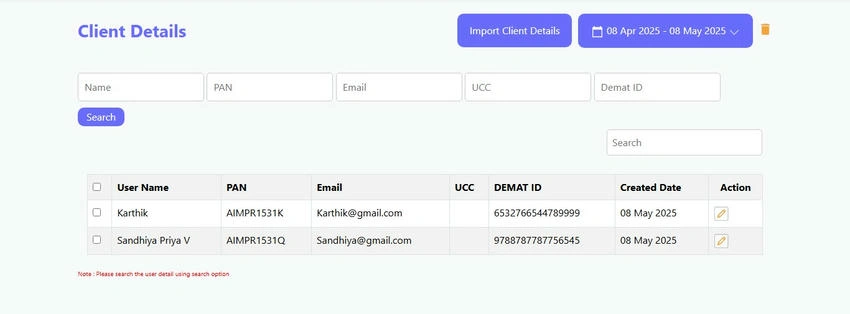
Join the conversation! Your thoughts help the community grow.