

I will demonstrate a simple CRUD operation on List with help of JQuery, SPServices and Script Editor built in web part.
So let’s get started.
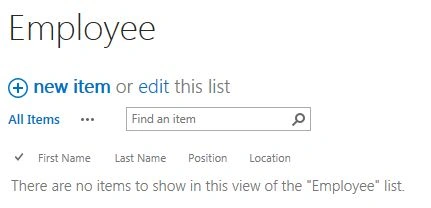
- Create custom list name Employee.
- Rename Title to First Name and create three another single line of text column Last Name, Position, Location.
- Download JQuery library from here.
Download SPServices library from here.
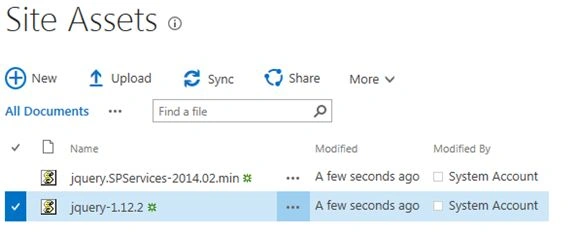
Open your Site Assets Library or create any other Document Library and add JQuery and SPServices Library.
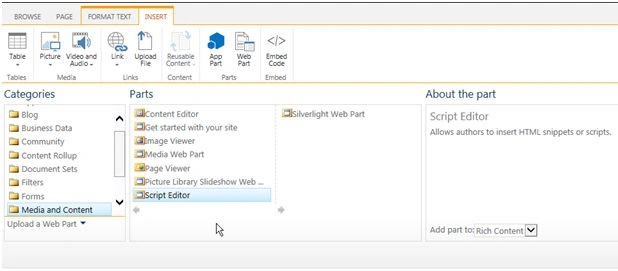
- Add Script Editor Web Part to your site page,
Gear Box -> Edit page -> INSERT -> Web Part -> Media and Content -> Script Editor -> Add.
- Add JQuery and SPServices References to Script Editor,
- <src =” http:// yoursite /SiteAssets/jquery.SPServices-2014.02.min.js”></src>
- <src =” http://yoursite/SiteAssets/jquery-1.12.2.js”></src>
- Add below Code in Script Editor.
- <src=” http:// yoursite /SiteAssets/jquery.SPServices-2014.02.min.js”></src>
- <src=” http://yoursite/SiteAssets/jquery-1.12.2.js”></src>
- <script>
- var v1, v2, v3, v4, itemid;
- $(document).ready(function()
- {
- read();
- createItem();
- updateItem();
- DeleteListItem();
- });
- function read()
- {
- $().SPServices(
- {
- operation: "GetListItems",
- async: false,
- webURL: "http://srt-it-test-615/sites/testing/",
- listName: "Employee",
- CAMLViewFields: "<ViewFields>" + "<FieldRef Name=\'Title\' />" + "<FieldRef Name=\'Last_x0020_Name\' />" + "<FieldRef Name=\'Position\' />" + "<FieldRef Name=\'Location\' />" + "</ViewFields>",
- completefunc: function(xData, Status)
- {
- $(xData.responseXML).SPFilterNode("z:row").each(function()
- {
- varFirstName = $(this).attr("ows_Title");
- varLastName = $(this).attr("ows_Last_x0020_Name");
- var Position = $(this).attr("ows_Position");
- var Location = $(this).attr("ows_Location");
- var id = $(this).attr("ows_ID");
- vartbldata = "<tr><td><input type='radio' class='addcls' name='rd1' value='" + id + "' onclick='javascript:getcheked();' /></td><td >" + FirstName + "</td><td>" + LastName + "</td><td>" + Position + "</td><td>" + Location + "</td></tr>"
- $("#tbl1").append(tbldata);
- });
- }
- });
- }
- functioncreateItem()
- {
- $("#btn-add").click(function()
- {
- varFirstName = $("#FirstName").val();
- varLastName = $("#LastName").val();
- var Position = $("#Position").val();
- var Location = $("#Location").val();
- $().SPServices(
- {
- operation: "UpdateListItems",
- async: false,
- webURL: "http://srt-it-test-615/sites/testing/",
- batchCmd: "New",
- listName: "Employee",
- valuepairs: [
- ["Title", FirstName],
- ["Last_x0020_Name", LastName],
- ["Position", Position],
- ["Location", Location]
- ],
- completefunc: function(xData, Status)
- {
- alert("Saved Successfully");
- }
- });
- });
- }
- functionupdateItem()
- {
- $("#btnUpdate").click(function()
- {
- $().SPServices(
- {
- operation: "UpdateListItems",
- webURL: "http://srt-it-test-615/sites/testing/",
- async: false,
- batchCmd: "Update",
- ID: itemid,
- listName: "Employee",
- valuepairs: [
- ["Title", v1],
- ["Last_x0020_Name", v2],
- ["Position", v3],
- ["Location", v4]
- ],
- completefunc: function(xData, status)
- {
- alert("Updated Successfully");
- }
- });
- });
- }
- functionDeleteListItem()
- {
- $("#btndelete").click(function()
- {
- console.log(itemid);
- $().SPServices(
- {
- operation: "UpdateListItems",
- async: false,
- webURL: "http://srt-it-test-615/sites/testing/",
- batchCmd: "Delete",
- listName: "Employee",
- ID: itemid,
- completefunc: function(xData, Status)
- {
- alert("Item Deleted");
- }
- });
- });
- }
- functiongetcheked()
- {
- $(".addcls").each(function()
- {
- if ($(this).is(":checked"))
- {
- varchkdata = $(this).val();
- $("#hdndata").val(chkdata);
- itemid = $("#hdndata").val();
- var $row = $(this).closest("tr"), // Finds the closest row <tr>
- $tds2 = $row.find("td:nth-child(2)");
- $tds2.prop("contentEditable", "true");
- $tds2.keyup(function()
- {
- v1 = $(this).text();
- v2 = $($tds3).text();
- v3 = $($tds4).text();
- v4 = $($tds5).text();
- });
- $tds3 = $row.find("td:nth-child(3)")
- $tds3.prop("contentEditable", "true");
- $tds3.keyup(function()
- {
- v2 = $(this).text();
- v1 = $($tds2).text();
- v3 = $($tds4).text();
- v4 = $($tds5).text();
- });
- $tds4 = $row.find("td:nth-child(4)");
- $tds4.prop("contentEditable", "true");
- $tds4.keyup(function()
- {
- v3 = $(this).text();
- v2 = $($tds3).text();
- v1 = $($tds2).text();
- v4 = $($tds5).text();
- });
- $tds5 = $row.find("td:nth-child(5)");
- $tds5.prop("contentEditable", "true");
- $tds5.keyup(function()
- {
- v4 = $(this).text();
- v3 = $($tds4).text();
- v2 = $($tds3).text();
- v1 = $($tds2).text();
- });
- }
- })
- }
- </script>
- <div id="createData">
- <table>
- <tr>
- <td>
- <table>
- <tr>
- <td>First Name</td>
- <td> <input type="text" id="FirstName" /> </td>
- </tr>
- <tr>
- <td>Last Name</td>
- <td> <input type="text" id="LastName" /> </td>
- </tr>
- <tr>
- <td>Position</td>
- <td> <input type="text" id="Position" /> </td>
- </tr>
- <tr>
- <td>Location</td>
- <td> <input type="text" id="Location" /> </td>
- </tr>
- <tr>
- <td> <button value="Add" id="btn-add">Add</button> </td>
- </tr>
- </table>
- </td>
- </tr>
- </table>
- </div>
- <div id="readData">
- <div id="tbldatamain">
- <table id=tbl1>
- <tr>
- <th></th>
- <th>First Name</th>
- <th>FLast Name</th>
- <th>Position</th>
- <th>Location</th>
- </tr>
- </table>
- </div> <input type="hidden" id="hdndata" value="" />
- <div>
- <table>
- <tr>
- <td><button id="btnUpdate">Update</button></td>
- <td><button id="btndelete">Delete</button></td>
- </tr>
- </div>
- </div>
- Check In and Publish the draft.
- Your page will look like this.
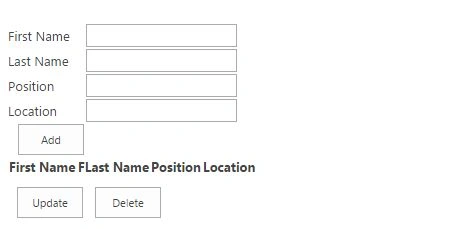
- To create Item Fill First Name, Last Name, Position and Location and Click Add.
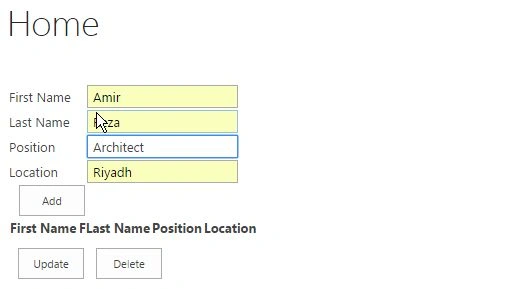
- To Update Click on Radio button. Modify Item and click Update Button.
- To Delete Record, Click on Radio button and click Delete Button.
Tob AmanuPosted Jun 21, 2023, 7:21 PM
Hello, nothing is happening after taking the code and modifying the code based on my list name, site name. Can you please assist? Thank you <src ="https://tobcorpe.sharepoint.com/sites/tobcorpeclassic/SiteAssets/spcrud/jquery.SPServices-2014.02.min"></src><src =”https://tobcorpe.sharepoint.com/sites/tobcorpeclassic/SiteAssets/spcrud/jquery-1.12.2.js"></src> <script> var v1, v2, v3, v4, itemid; $(document).ready(function() { read(); createItem(); updateItem(); DeleteListItem(); }); function read() { $().SPServices( { operation: "GetListItems", async: false, webURL: "https://tobcorpe.sharepoint.com/sites/tobcorpeclassic/", listName: "CustomerInfo", CAMLViewFields: "<ViewFields>" + "<FieldRef Name=\'Title\' />" + "<FieldRef Name=\'Last_x0020_Name\' />" + "<FieldRef Name=\'Position\' />" + "<FieldRef Name=\'Location\' />" + "</ViewFields>", completefunc: function(xData, Status) { $(xData.responseXML).SPFilterNode("z:row").each(function() { varFirstName = $(this).attr("ows_Title"); varLastName = $(this).attr("ows_Last_x0020_Name"); var Position = $(this).attr("ows_Position"); var Location = $(this).attr("ows_Location"); var id = $(this).attr("ows_ID"); vartbldata = "<tr><td><input type='radio' class='addcls' name='rd1' value='" + id + "' onclick='javascript:getcheked();' /></td><td >" + FirstName + "</td><td>" + LastName + "</td><td>" + Position + "</td><td>" + Location + "</td></tr>" $("#tbl1").append(tbldata); }); } }); } functioncreateItem() { $("#btn-add").click(function() { varFirstName = $("#FirstName").val(); varLastName = $("#LastName").val(); var Position = $("#Position").val(); var Location = $("#Location").val(); $().SPServices( { operation: "UpdateListItems", async: false, webURL: "https://tobcorpe.sharepoint.com/sites/tobcorpeclassic/", batchCmd: "New", listName: "CustomerInfo", valuepairs: [ ["Title", FirstName], ["Last_x0020_Name", LastName], ["Position", Position], ["Location", Location] ], completefunc: function(xData, Status) { alert("Saved Successfully"); } }); }); } functionupdateItem() { $("#btnUpdate").click(function() { $().SPServices( { operation: "UpdateListItems", webURL: "https://tobcorpe.sharepoint.com/sites/tobcorpeclassic/", async: false, batchCmd: "Update", ID: itemid, listName: "CustomerInfo", valuepairs: [ ["Title", v1], ["Last_x0020_Name", v2], ["Position", v3], ["Location", v4] ], completefunc: function(xData, status) { alert("Updated Successfully"); } }); }); } functionDeleteListItem() { $("#btndelete").click(function() { console.log(itemid); $().SPServices( { operation: "UpdateListItems", async: false, webURL: "https://tobcorpe.sharepoint.com/sites/tobcorpeclassic/", batchCmd: "Delete", listName: "CustomerInfo", ID: itemid, completefunc: function(xData, Status) { alert("Item Deleted"); } }); }); } functiongetcheked() { $(".addcls").each(function() { if ($(this).is(":checked")) { varchkdata = $(this).val(); $("#hdndata").val(chkdata); itemid = $("#hdndata").val(); var $row = $(this).closest("tr"), // Finds the closest row <tr> $tds2 = $row.find("td:nth-child(2)"); $tds2.prop("contentEditable", "true"); $tds2.keyup(function() { v1 = $(this).text(); v2 = $($tds3).text(); v3 = $($tds4).text(); v4 = $($tds5).text(); }); $tds3 = $row.find("td:nth-child(3)") $tds3.prop("contentEditable", "true"); $tds3.keyup(function() { v2 = $(this).text(); v1 = $($tds2).text(); v3 = $($tds4).text(); v4 = $($tds5).text(); }); $tds4 = $row.find("td:nth-child(4)"); $tds4.prop("contentEditable", "true"); $tds4.keyup(function() { v3 = $(this).text(); v2 = $($tds3).text(); v1 = $($tds2).text(); v4 = $($tds5).text(); }); $tds5 = $row.find("td:nth-child(5)"); $tds5.prop("contentEditable", "true"); $tds5.keyup(function() { v4 = $(this).text(); v3 = $($tds4).text(); v2 = $($tds3).text(); v1 = $($tds2).text(); }); } }) } </script> <div id="createData"> <table> <tr> <td> <table> <tr> <td>First Name</td> <td> <input type="text" id="FirstName" /> </td> </tr> <tr> <td>Last Name</td> <td> <input type="text" id="LastName" /> </td> </tr> <tr> <td>Position</td> <td> <input type="text" id="Position" /> </td> </tr> <tr> <td>Location</td> <td> <input type="text" id="Location" /> </td> </tr> <tr> <td> <button value="Add" id="btn-add">Add</button> </td> </tr> </table> </td> </tr> </table> </div> <div id="readData"> <div id="tbldatamain"> <table id=tbl1> <tr> <th></th> <th>First Name</th> <th>FLast Name</th> <th>Position</th> <th>Location</th> </tr> </table> </div> <input type="hidden" id="hdndata" value="" /> <div> <table> <tr> <td><button id="btnUpdate">Update</button></td> <td><button id="btndelete">Delete</button></td> </tr> </div> </div>
Guest UserPosted Mar 22, 2017, 10:02 AM
Request you to explain why have used all those 4 variables v1,v2,v3,v4 and nth child concept multiple times as it's not understandable.
Guest UserPosted Mar 22, 2017, 2:51 AM
Can you help me with Cancel button functionality? I also need Save button functioning in dual ways:- 1. Save for the first time. 2. Update for the second time once we select a hyperlink to add list items from another look up list say "Masters" list.
upendra singhPosted Mar 28, 2016, 11:46 AM
Awesome!!!!!
Humayun Kabir MamunPosted Mar 27, 2016, 7:50 AM
Nice...
Kashif SohailPosted Mar 26, 2016, 11:37 PM
V Nice
Sibeesh VenuPosted Mar 25, 2016, 5:42 AM
Nice Share
Vinodh NarayananPosted Mar 25, 2016, 12:33 AM
Good one
Debasis SahaPosted Mar 25, 2016, 12:18 AM
good
Saillesh PawarPosted Mar 25, 2016, 12:07 AM
Nice share sir