

Custom Alert Message using Ajax
Sometimes we are required to create a clone of a Windows alert message, but that alert message is not allowing to change the header text.
Here using Ajax model popup extender, I will show you how to create a custom message box.
Add the user control file and ajaxtoolkit reference to your project.
Add the below code in ascx file.
<style type="text/css">
.MessageBoxPopUp
{
    background-color:White;
    border:solid 2px #99B4D1;
}
.MessageBoxButton
{
    background-color: #A0A0A0;
border: solid 2px #B4B4B4;
color: Black;
font-weight:bold;
font-family:Verdana;
font-size:9pt;
cursor:pointer;
height: 20px;
width:70px;
display:none;
}
.MessageBoxHeader
{
 height:17px;
 font-size:10pt;
 color:White;
 font-weight:bold;
 font-family:Verdana;
 text-align:Left;
 vertical-align:middle;
 padding:3px 3px 3px 3px;
 background-color:#3399FF;
 border-bottom:2px solid #B4B4B4;
}
.MessageBoxData
{
 height:20px;
 font-size:8pt;
 font-family:Verdana;
 color:#3A4349;
 text-align:Left;
 vertical-align:top;
}
</style>
<script type="text/javascript">
    function closeModelPopup(btn) {
        // var mpe = document.getElementById("<%= mpeMessageBox.ClientID %>");
        $find('mpeFirmMessageBox').hide();
    }
</script>
<asp:Button ID="btnTemp" runat="server" Style="display: none;" />
<cc1:ModalPopupExtender ID="mpeMessageBox" runat="server" DynamicServicePath="" Enabled="True"
    TargetControlID="btnTemp" PopupControlID="pnlMessageBox" BackgroundCssClass="modal"
    PopupDragHandleControlID="pnlMessageBox" CancelControlID="btnCancel" BehaviorID="mpeFirmMessageBox">
</cc1:ModalPopupExtender>
<asp:Panel ID="pnlMessageBox" runat="server" Style="display: none; width: 300px;
    height: 140px;" class="MessageBoxPopUp">
    <table border="0" cellpadding="0" cellspacing="0" width="100%">
        <tr class="MessageBoxHeader" style="height: 17px;">
            <td colspan="2">
                <asp:Label ID="lblHeader" runat="server"></asp:Label>
            </td>
            <td align="right" style="padding: 2px 2px 0px 0px;">
                <%--<asp:UpdatePanel ID="upnCloseMessageBox" runat="server">
                    <ContentTemplate>--%>
                        <asp:ImageButton ID="imgBtnClose" runat="server" ImageUrl="~/Image/close_icon.png"
                             OnClientClick="closeModelPopup(this)" />
                    <%--</ContentTemplate>
                </asp:UpdatePanel>--%>
            </td>
        </tr>
        <tr>
            <td colspan="2" style="height: 5px;">
            </td>
        </tr>
        <tr style="height: 88px;">
            <td style="vertical-align: top; padding-left: 5px;">
                <asp:Image ID="imgInfo" runat="server" ImageUrl="~/Image/information-balloon.png" Width="40px" />
            </td>
            <td class="MessageBoxData" colspan="2" style=" padding: 10px 5px 5px 5px;">
                <asp:Label ID="lblMessage" runat="server"></asp:Label>
            </td>
        </tr>
        <tr style="vertical-align: bottom; height: 20px; padding: 0px 5px 5px 0px;">
            <td style="width: 40px;">
            </td>
            <td align="right" style="width: 180px">
                <asp:Button ID="btnOk" runat="server" CssClass="MessageBoxButton" />
            </td>
            <td align="right">
                <asp:Button ID="btnCancel" runat="server" CssClass="MessageBoxButton" />
            </td>
        </tr>
    </table>
</asp:Panel>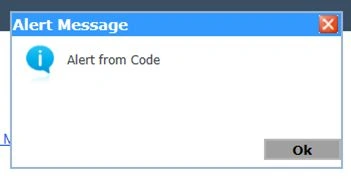
Rafael MotaPosted Sep 17, 2016, 10:15 AM
Hi. Where Can I find the icons used? Also, text and cancel button are not displayed, I don't know why. Thanks
Bun FongPosted Jan 30, 2015, 3:16 AM
thanks, for your shared.