Introduction
The developer develops Web app and deploys them for execution on the Browser, so that the client can browse it. An application developed by using JavaScript, AngularJS, BootStrap, NodeJs is very easy to deploy. Here, I will explain the step osf deployment of AngularJs App, using NodeJs.
Prerequisites
- Node.Js should be installed into your machine.
Source -
https://nodejs.org/en/download/
Set up AngularJS Project.
The steps are given below-
- Create one folder named "MyProject".
- Create sub folder inside MyProject named "App" -- This folder will contain the project files and resources.
Take one "package.json
" file inside "MyProject" Folder and put the content, as given below-
- {
- "name": "MyProject",
- "version": "0.0.1",
- "description": "My Project",
- "dependencies": {
- "express": "*"
- },
- "engine": "node >=0.6.x",
- "scripts": {
- "start": "node server.js"
- },
- "main": "server.js",
- "repository": {
- "type": "git",
- "url": ""
- },
- "author": "MyProject",
- "license": "MyProject",
- "bugs": {
- "url": ""
- },
- "homepage": ""
- }
Take one "Server.js" file inside, as given below-
- var express = require('express');
- var app = express();
-
- app.use(express.static("App"));
-
- app.get('/', function (req, res) {
- res.redirect('/');
- });
-
- app.listen(8080, 'localhost');
- console.log("MyProject Server is Listening on port 8080");
Here, you can define your own port and put IP of your machine in place of "localhost".
Navigate to folder "MyProject", using command prompt like cd f:\MyProject.
Now, type command npm install
It will be, as given below-
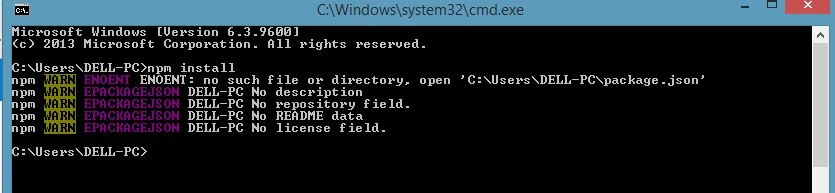
It will install npm and create a folder with the name "node_modules". Also, it will install the dependencies, which you will put inside package.json file.
Now, type command npm start and it will start npm, as shown below-

Now, open your Browser and type - localhost:8080.
It will open your Web app.
Project Structure
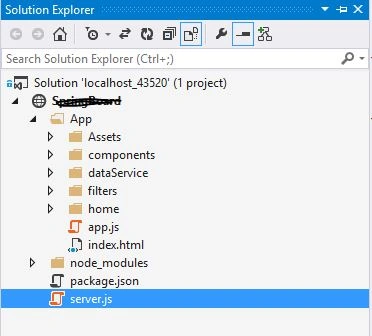
The project structure is given below-
app.js file is an entry point of this Web app, so it should define the state, using URL router, as shown below-
- (function () {
- "use strict"
- var app = angular.module("myApp", ["ui.router"]);
-
- app.config(["$stateProvider", "$urlRouterProvider",
- function ($stateProvider, $urlRouterProvider) {
- $urlRouterProvider.otherwise("/");
- $stateProvider
- .state("home", {
- url: "/",
- templateUrl: "home/home.html",
- controller: "homeController",
- controllerAs: "homeController",
- authenticationReqired: false
- });
- }
- ]);
- }());
Here, I define the default state "home" and its URL is "/" . In the same URL, I defined inside server.js file, as shown below-
- app.get('/', function (req, res) {
- res.redirect('/');
- });
Thus, it will redirect to home state containing "/" URL on the Browser.
Conclusion
NPM (Node Package Manager) is very good for the deployment of Web apps. It is very easy to deploy.

Praveen KumarPosted Nov 19, 2018, 11:10 AM
What would happen if console is off .then how server will be start. will it show 403
katheeja beeviPosted Nov 19, 2018, 8:32 AM
May I please know how to connect angular to oracle through node
Shubham VermaPosted Dec 18, 2017, 3:46 AM
When i am running npm start, Server is started but after that when i am opening browser with localhost:8080 its showing This page isn’t working. But on the browser console its showing Error: GET http://localhost:8080/ net::ERR_TOO_MANY_REDIRECTS