

There are different ways of inserting values into a database table using INSERT INTO statement, as per the requirement of the Database Administrator (DBA). So, let us discuss them one by one.
SQL INSERT INTO Statement
- The INSERT INTO statement is used to add new data to a database.
- The INSERT INTO statement adds a new record to a table.
- INSERT INTO can contain values for some or all of its columns.
- INSERT INTO can be combined with a SELECT to insert a record.
Here, we will first create a database and table into it and then, perform the INSERT INTO statement.
Note
Make sure you have admin privileges before creating any database. Once a database is created, you can check it in the list of databases with the following SQL command: SHOW DATABASES;
Make sure you have admin privileges before creating any database. Once a database is created, you can check it in the list of databases with the following SQL command: SHOW DATABASES;
Syntax
- CREATE DATABASE databasename;
Example
- CREATE DATABASE Organization;
The following example creates a table called "Persons" that contains five columns: PersonID, LastName, FirstName, Address, and City.
Syntax
- CREATE TABLE table_name (
- column1 datatype,
- column2 datatype,
- column3 datatype,
- ....
- );
Example
- CREATE TABLE Persons
- (
- PersonID int,
- LastName varchar(255),
- FirstName varchar(255),
- Address varchar(255),
- City varchar(255)
- );
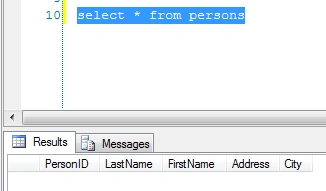
The following SQL statement selects all the columns from the "Persons" table.
- select * from persons
Below is a selection from the "Persons" table in the Organization sample database.
Method 1
It is possible to write the INSERT INTO statement in different ways.
The first way specifies both the column names and the values to be inserted.
Syntax
- INSERT INTO table-name (column-names) VALUES (values) ;
Example
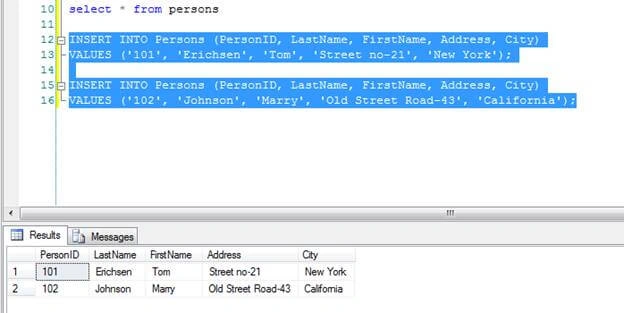
The following SQL statement inserts a new record in the "Persons" table.
- INSERT INTO Persons (PersonID, LastName, FirstName, Address, City)
- VALUES ('101', 'Erichsen', 'Tom', 'Street no-21', 'New York');
- INSERT INTO Persons (PersonID, LastName, FirstName, Address, City)
- VALUES ('102', 'Johnson', 'Marry', 'Old Street Road-43', 'California');
The selection from the "Persons" table will now look like this.
Method 2
Insert Data Only in Specified Columns.
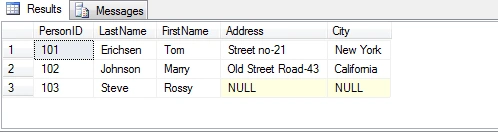
The following SQL statement will insert a new record, but only in the "PersonID", "LastName", and "FirstName" columns.
- INSERT INTO Persons (PersonID, LastName,FirstName)
- VALUES ('103', 'Steve','Rossy')
The selection from the "Persons" table will now look like this.
Method 3
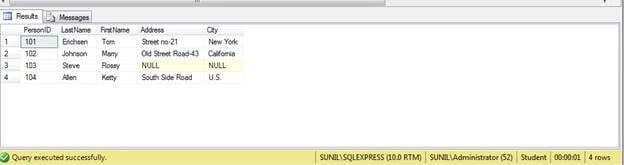
If you are adding the values for all the columns of the table, you do not need to specify the column names in the SQL query. However, make sure the order of the values is in the same order as the columns in the table. The INSERT INTO syntax would be as below.
- INSERT INTO Persons VALUES ('104', 'Allen', 'Ketty', 'South Side Road', 'U.S.');
jose loraPosted Aug 26, 2021, 2:06 PM
Excelent post
Praveen KumarPosted Jun 17, 2019, 6:52 AM
Nice Post Priyanka.