

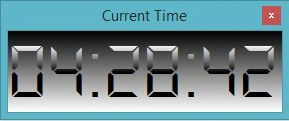
This is digital Clock in WPF without installing digital font.
MainWindow.xaml
- <Window x:Class="Digital_Clock.MainWindow"
- xmlns="http://schemas.microsoft.com/winfx/2006/xaml/presentation"
- xmlns:x="http://schemas.microsoft.com/winfx/2006/xaml"
- Title="Current Time" Height="120" Width="290" ResizeMode="NoResize" WindowStyle="ToolWindow"Icon="1370614099_42192.ico">
- <Grid>
- <TextBlock Style="{StaticResource FontAwesome}" FontSize="80" Name="tbk_clock">
- <TextBlock.Foreground>
- <LinearGradientBrush EndPoint="0.5,1" StartPoint="0.5,0">
- <GradientStop Color="Black" Offset="0.52"/>
- <GradientStop Color="White"/>
- </LinearGradientBrush>
- </TextBlock.Foreground>
- <TextBlock.Background>
- <LinearGradientBrush EndPoint="0.5,1" StartPoint="0.5,0">
- <GradientStop Color="Black" Offset="0"/>
- <GradientStop Color="White" Offset="1"/>
- </LinearGradientBrush>
- </TextBlock.Background>
- </TextBlock>
- </Grid>
- </Window>
Florin CristutPosted Jan 26, 2019, 3:42 AM
Broken archive :(
Saineshwar BageriPosted Jan 13, 2015, 11:24 PM
Nice one