

Introduction
- Here, I will explain how to display the data on click of row in GridView, using jQuery and Web Service in ASP.NET.
- Follow the steps, mentioned below, to achieve our requirement.
Step 1
Create table, using query, mentioned below.
- CREATE TABLE [tblgrid](
- [UserId] [int] IDENTITY(1,1) NOT NULL,
- [userName] [varchar](50) NULL,
- [City] [varchar](50) NULL,
- [Designation] [varchar](50) NULL,
- [sal] [bigint] NULL
- )
Step 2
Add below code to .aspx file.
- <html xmlns="http://www.w3.org/1999/xhtml">
- <head runat="server">
- <title></title>
- <script src="http://dotnettricks-abdul.in/Contents/jquery-1.4.1.js" type="text/javascript"></script>
- <script type="text/javascript">
- function visiblefalse() {
- $("#dv").attr("style", "display:none");
- $("#GridView1″).attr("
- style ", "
- backgroundColor: white ");
- }
- function GetDetails(id) {
- WebService.GetAllData(id, success, failure);
- }
- function success(result) {
- $(result).each(function(i) {
- var username = result[i].userName;
- var City = result[i].City;
- var des = result[i].des;
- var sal = result[i].sal;
- $("div[id$=dv]").attr("style", "block");
- $("#UName").html(username);
- $("#City").html(City);
- $("#Des").html(des);
- $("#Sal").html(sal)
- });
- }
- function failure() {
- alert("error");
- }
- </script>
- </head>
- <body>
- <form id="form1″ runat=" server ">
- <div>
- <asp:GridView ID="GridView1″ runat="server" AutoGenerateColumns="False" DataKeyNames="UserId,userName" EnableModelValidation="True" OnRowCommand="GridView1_RowCommand" HeaderStyle-BorderWidth="1″
- HeaderStyle-Font-Bold=" true " OnRowDataBound="GridView1_RowDataBound ">
- <Columns>
- <asp:TemplateField HeaderText="UserName ">
- <ItemTemplate>
- <asp:Label ID="lblitemUser " runat="server " Text=’<%# Eval("userName ") %>’></asp:Label>
- </ItemTemplate>
- </asp:TemplateField>
- <asp:TemplateField HeaderText="City ">
- <ItemTemplate>
- <asp:Label ID="lblitemCity " runat="server " Text=’<%# Eval("City ") %>’></asp:Label>
- </ItemTemplate>
- </asp:TemplateField>
- <asp:TemplateField HeaderText="Designation ">
- <ItemTemplate>
- <asp:Label ID="lblDesig " runat="server " Text=’<%# bind("Designation ")%>’></asp:Label>
- </ItemTemplate>
- </asp:TemplateField>
- <asp:TemplateField HeaderText="Salary ">
- <ItemTemplate>
- <asp:Label ID="lblsal " runat="server " Text=’<%# Eval("sal ") %>’></asp:Label>
- </ItemTemplate>
- </asp:TemplateField>
- </Columns>
- </asp:GridView>
- </div>
- <div>
- <asp:Label ID="lblresult " runat="server "></asp:Label>
- </div>
- <div id="dv " runat="server " style="display: none; ">
- <table>
- <tr>
- <td>
- User Name:
- </td>
- <td id="UName ">
- </td>
- </tr>
- <tr>
- <td>
- City:
- </td>
- <td id="City ">
- </td>
- </tr>
- <tr>
- <td>
- Designation:
- </td>
- <td id="Des ">
- </td>
- </tr>
- <tr>
- <td>
- Salary:
- </td>
- <td id="Sal ">
- </td>
- </tr>
- </table>
- <asp:ScriptManager ID="ScriptManager1″ runat="server">
- <Services>
- <asp:ServiceReference Path="~/WebService.asmx" />
- </Services>
- </asp:ScriptManager>
- </div>
- </form>
- </body>
- </html>
Step 3
Add below code to .cs page.
Add below code to .cs page.
- SqlConnection con = new SqlConnection("Data Source=.\\SQLExpress;Initial Catalog=abc;Integrated Security=True");
- SqlDataAdapter da = new SqlDataAdapter();
- DataSet ds = new DataSet();
- protected void Page_Load(object sender, EventArgs e)
- {
- if (!IsPostBack)
- {
- bind();
- }
- }
- protected void bind()
- {
- SqlCommand cmd = new SqlCommand("select * from tblgrid", con);
- da.SelectCommand = cmd;
- da.Fill(ds, "tblgrid");
- if (ds.Tables[0].Rows.Count > 0)
- {
- GridView1.DataSource = ds.Tables[0];
- GridView1.DataBind();
- }
- }
- protected void GridView1_RowDataBound(object sender, GridViewRowEventArgs e)
- {
- if (e.Row.RowType == DataControlRowType.DataRow)
- {
- e.Row.Attributes.Add("onclick", "JavaScript: GetDetails('" + Convert.ToInt32(GridView1.DataKeys[e.Row.RowIndex].Value.ToString()) + "')");
- e.Row.Attributes.Add("onmouseover", "JavaScript:this.style.cursor=’pointer’; this.style.backgroundColor=’Red’");
- e.Row.Attributes.Add("onmouseout", "this.style.backgroundColor=’white’");
- }
- }
Create webService project.
- [WebMethod]
- public GetRec[] GetAllData(int ID)
- {
- SqlCommand cmd = new SqlCommand("select userName,City,Designation,sal from tblgrid where UserId="+ID);
- DataTable dt = new DataTable();
- cmd.Connection = con;
- da.SelectCommand = cmd;
- //da.Fill(ds, "tblgrid");
- da.Fill(dt);
- List<GetRec> objList = new List<GetRec>();
- foreach(DataRow dr in dt.Select())
- {
- objList.Add(new GetRec
- {
- userName=dr["userName"].ToString(),
- City=dr["City"].ToString(),
- des = dr["Designation"].ToString(),
- sal = Convert.ToInt32(dr["sal"])
- }
- );
- }
- return objList.ToArray();
- }
- public struct GetRec {
- public string userName { get; set; }
- public string City { get; set; }
- public string des { get; set; }
- public int sal { get; set; }
- }
Step 5
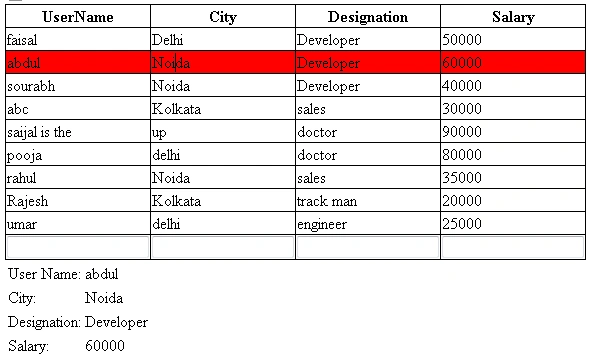
We got the output, mentioned below.
Ananth GPosted Dec 29, 2016, 10:57 PM
Thank you....................................
NehaPosted Dec 29, 2016, 8:43 AM
Nice one..................................