

By default, Oracle checks content as well as casing, while comparing the two strings in "where" or "like" or "case" statements.
For example, the statement given below will return 0.
- SELECT CASE WHEN 'abc'='ABC' THEN 1 ELSE 0 END AS MATCHED FROM DUAL;
To set these parameters, we can run the statements, given below, in SQL*Plus or SQL Developer:
- ALTER SESSION SET NLS_COMP=LINGUISTIC;
- ALTER SESSION SET NLS_SORT=BINARY_CI;
Setting NLS_SORT to BINARY_CI means SQL operations will use binary value for sorting and ignore the character case.
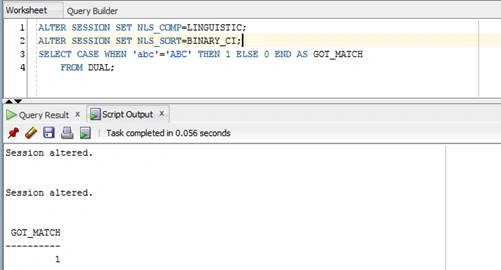
After setting the parameters, given above, the string comparison will ignore the character case. Since we can’t set these parameters at the database level, we can create the database trigger, given below, to set these parameters on a user login:
- CREATE OR REPLACE TRIGGER SYSTEM. CHANGE_NLS_COMPARE_STRING
- AFTER LOGON ON DATABASE
- WHEN (
- USER='SYSTEM'
- )
- begin
- execute immediate ' ALTER SESSION SET NLS_COMP=LINGUISTIC';
- execute immediate ' ALTER SESSION SET NLS_SORT=BINARY_CI';
- end ;
I am ending the things here. I hope this blog will be helpful for all.
Join the conversation! Your thoughts help the community grow.