

Introduction to Events in C#
In C#, an event is a mechanism that allows a class to notify other classes when a significant event occurs. Events are primarily used to build event-driven applications, in which one part of the system reacts automatically to actions in another.
An event does not contain logic by itself. Instead, it acts as a signal. When the event is raised, all methods subscribed to it are executed. Events are built on top of delegates, but they add an extra layer of safety and control.
In real-world software, events are used everywhere — button clicks, form submissions, order placements, payment confirmations, file uploads, and many more.
Real-Life Analogy of Events
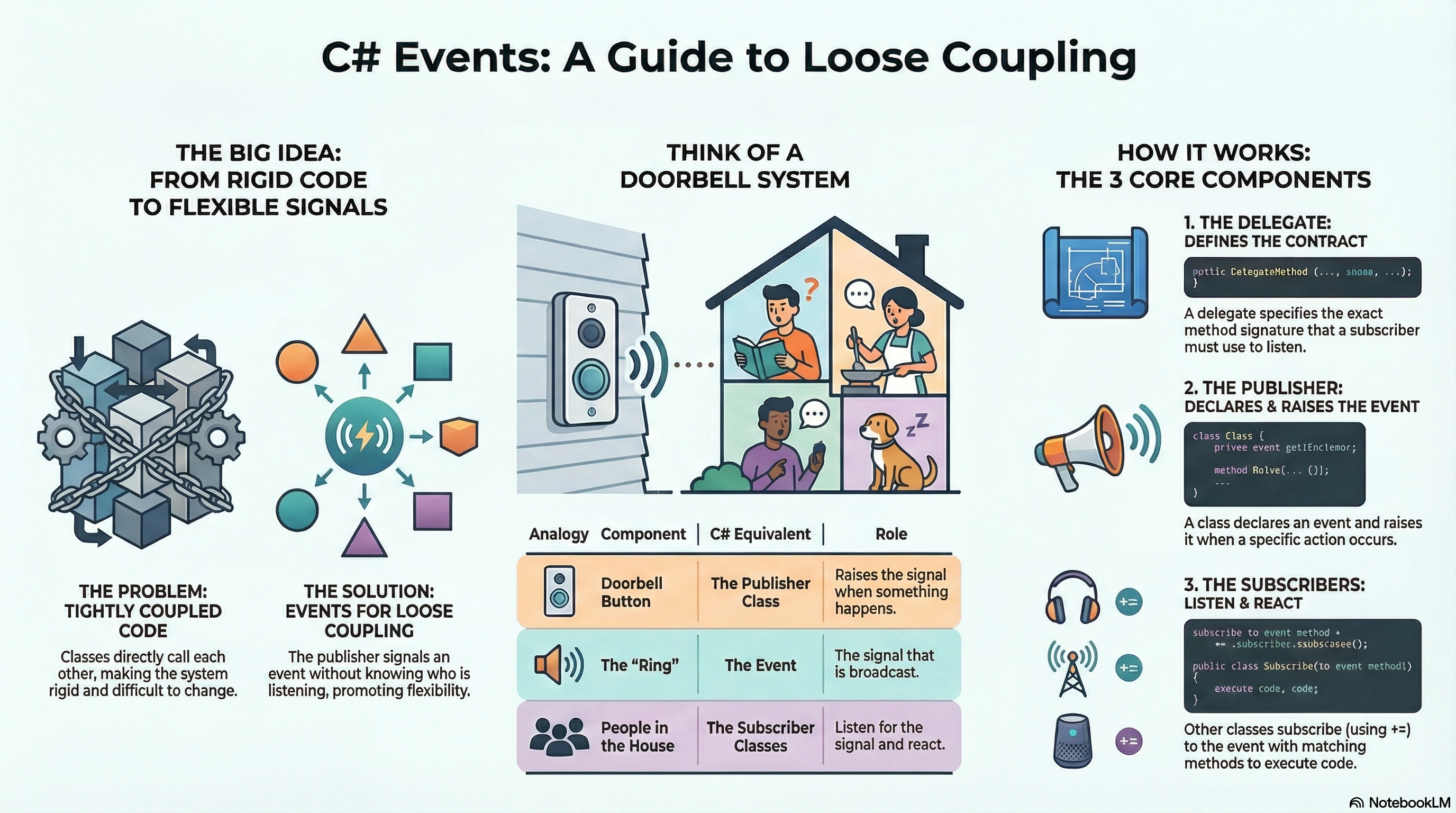
Think of a doorbell system.
The doorbell button does not know who is inside the house.
When someone presses the button, it simply raises a signal.
Whoever has subscribed to that signal (family members, security system) gets notified and reacts.
In this analogy:
The doorbell button is the event publisher.
The bell ring is the event.
The people reacting are the subscribers.
The doorbell does not care who responds — it just announces that something happened.
This is exactly how events work in C#.
Why Events Are Needed in C#
Without events, classes become tightly coupled. One class would need to directly call methods of another class, which makes the system rigid and hard to maintain.
Events solve this problem by enabling loose coupling. The publisher does not know who the subscribers are. It only knows that something happened. This design makes applications flexible, extensible, and easier to modify without breaking existing code.
Relationship Between Delegates and Events
Events are based on delegates. A delegate defines what type of method can subscribe, and the event uses that delegate to manage subscriptions.
However, events add protection:
Only the declaring class can raise the event
External classes can only subscribe or unsubscribe
External classes cannot invoke the event directly
This prevents misuse and enforces better design.
Basic Structure of Events in C#
An event implementation involves three main parts:
A delegate that defines the method signature
An event declared using the
eventkeywordSubscriber methods that respond when the event is raised
Simple Event Program (Step-by-Step)
Step 1: Declare a Delegate
public delegate void NotificationHandler(string message);This delegate defines the format of methods that can respond to the event.
Step 2: Declare an Event
public class OrderService
{
    public event NotificationHandler OrderPlaced;

    public void PlaceOrder(string orderId)
    {
        Console.WriteLine("Order placed: " + orderId);

        if (OrderPlaced != null)
        {
            OrderPlaced($"Order {orderId} has been placed");
        }
    }
}
Here, OrderPlaced is an event that gets raised when an order is placed.
Step 3: Subscribe to the Event
public class NotificationService
{
    public void SendEmail(string message)
    {
        Console.WriteLine("Email notification: " + message);
    }

    public void SendSms(string message)
    {
        Console.WriteLine("SMS notification: " + message);
    }
}
Step 4: Wiring Everything Together
class Program
{
    static void Main()
    {
        OrderService orderService = new OrderService();
        NotificationService notificationService = new NotificationService();

        orderService.OrderPlaced += notificationService.SendEmail;
        orderService.OrderPlaced += notificationService.SendSms;

        orderService.PlaceOrder("ORD101");
    }
}
Explanation
When PlaceOrder is called, the event is raised, and all subscribed methods are executed automatically.
Real-Life Example: Online Payment System
In an online payment system:
Payment is processed
Receipt is generated
User is notified
Transaction is logged
All these actions should happen automatically after payment success. Events make this clean and scalable.
Program Example
public delegate void PaymentSuccessHandler(double amount);

public class PaymentGateway
{
    public event PaymentSuccessHandler PaymentSuccess;

    public void ProcessPayment(double amount)
    {
        Console.WriteLine("Payment processed: " + amount);

        PaymentSuccess?.Invoke(amount);
    }
}

public class ReceiptService
{
    public void GenerateReceipt(double amount)
    {
        Console.WriteLine("Receipt generated for amount: " + amount);
    }
}

public class LoggerService
{
    public void LogPayment(double amount)
    {
        Console.WriteLine("Payment logged: " + amount);
    }
}

class Program
{
    static void Main()
    {
        PaymentGateway gateway = new PaymentGateway();

        gateway.PaymentSuccess += new ReceiptService().GenerateReceipt;
        gateway.PaymentSuccess += new LoggerService().LogPayment;

        gateway.ProcessPayment(5000);
    }
}
Built-in EventHandler Delegate
C# provides a standard delegate named EventHandler to simplify event creation.
Example Using EventHandler
public class FileUploader
{
    public event EventHandler UploadCompleted;

    public void UploadFile()
    {
        Console.WriteLine("File uploaded successfully");

        UploadCompleted?.Invoke(this, EventArgs.Empty);
    }
}

class Program
{
    static void Main()
    {
        FileUploader uploader = new FileUploader();
        uploader.UploadCompleted += (sender, e) =>
        {
            Console.WriteLine("Upload completed event received");
        };

        uploader.UploadFile();
    }
}
Using EventHandler is recommended for standard events because it follows .NET conventions.
Event Subscription and Unsubscription
Subscribers can attach to an event using += and detach using -=.
Unsubscribing is important to avoid memory leaks, especially in long-running applications.
orderService.OrderPlaced -= notificationService.SendEmail;
Events vs Delegates
Delegates allow direct method invocation and assignment. Events restrict access and provide controlled notification. Delegates are more flexible but less safe, while events are safer and more suitable for public notifications.
In short:
Delegates are method references
Events are notifications
Where Events Are Used in Real Applications
Events are heavily used in:
UI applications (button clicks, form events)
ASP.NET Core middleware and filters
Background services
Messaging systems
Logging and monitoring tools
Understanding events is essential for building scalable and maintainable systems.
Events in C# provide a powerful way to implement event-driven architecture with loose coupling and clean separation of responsibilities. They allow systems to react to actions without direct dependencies between components.
By mastering events, developers gain a deeper understanding of how modern C# applications work internally and how frameworks like ASP.NET handle user actions and system notifications.
Join the conversation! Your thoughts help the community grow.